How to Get a Copy of Tax Return Step-by-Step Guide 2026
Need your past tax information? Getting a copy of your tax return or tax transcript can be done quickly online through the IRS Get Transcript tool, by mail, or by submitting Form 4506-T.
You can get a copy of your tax return or tax transcript directly from the IRS through their online portal, by mail, or by submitting Form 4506. The fastest way is logging into the IRS Get Transcript tool to download your records instantly for free.
Whether you are applying for a mortgage, completing financial aid forms, or sorting out a past tax year in 2026, lenders and government agencies rarely accept a self-printed copy of a filed return. You usually need official documentation directly from federal archives to verify your financial history.
Key Takeaways
- Use the online IRS Get Transcript tool for instant access to past tax records.
- Transcripts are free, while actual photocopies of tax returns carry a fee.
- Request up to three prior years online or via the IRS mobile app.
- Use Form 4506-T to request older tax returns or official physical copies.
- State tax returns must be requested directly through your state tax agency.
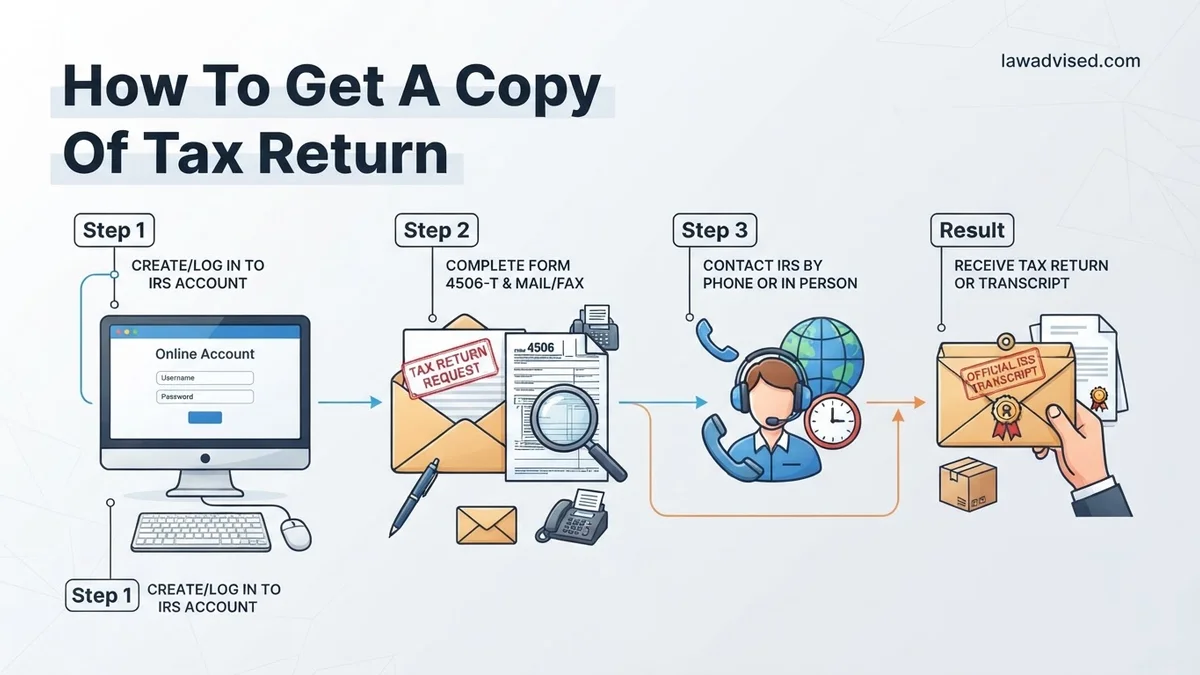
What Causes the Need for a Tax Return Copy and Which Type You Actually Require
Most people need a copy of a previous tax filing because an external institution requested it. Common scenarios include buying a house, applying for a business loan, resolving an audit, or amending a return from a prior year.
Understanding the Three Main IRS Record Options
The IRS offers different documents depending on your specific needs. Requesting the wrong one wastes valuable time.
- Tax Return Transcript: This shows most line items from your original tax return, including Form 1040 and schedules, as it was filed. Lenders usually accept this for mortgages and loans. It is available for the current 2025 tax filing season and up to prior years.
- Tax Account Transcript: This details basic data like marital status, type of return filed, adjusted gross income, and taxable income. It also shows any changes made after you filed.
- Form 4506 Copy of Tax Return: If you need an exact, physical copy of your actual tax return complete with attachments, you must request a true copy using Form 4506. Note that the IRS charges a fee for this and only retains returns for past years.
Master Tax Return Retrieval in 7 Simple Steps
Whether you are applying for a mortgage, completing financial aid forms, or simply updating your personal records, needing a copy of a previous tax return is a common scenario. This guide walks you through the exact pathways available to access your federal tax documentation quickly and securely, ensuring you avoid common bureaucratic delays and security pitfalls.
Step 1: Determine Whether You Need a Tax Return or a Tax Transcript
What you need: The specific requirements of the organization requesting your tax information (lender, college, or agency).
Instructions: Before you start clicking around the IRS website, you must understand the difference between a full tax return and a tax transcript. A tax return is the actual 1040 form and all attached schedules that you or your preparer originally submitted. A tax transcript summarizes your tax return information line-by-line and is usually what third parties actually want because it is processed much faster. Most mortgage lenders and financial aid officers accept tax transcripts, which are free and available for the current tax year plus the past three prior years.
Pro Tip: Always ask the requesting organization if a tax transcript will suffice before paying for a copy of a full tax return.
Step 2: Gather Your Personal Verification Information
What you need: Your Social Security Number (SSN) or Individual Taxpayer Identification Number (ITIN), your date of birth, filing status, and access to your financial accounts or loan numbers.
Instructions: To prove your identity to the IRS or financial institutions, you will need to input exact personal data matching your last filed tax return. This includes your exact mailing address as it appeared on your previous return—even if you have since moved. If you are using online verification portals, you will also need a valid email address and a mobile phone number capable of receiving text verification codes linked to your name.
Pro Tip: Keep a physical copy of your most recent tax return in a secure folder so you can easily reference your exact filing status and adjusted gross income (AGI).
Step 3: Access the IRS Get Transcript Online Tool
What you need: A computer or smartphone with internet access, your ID verification documents, and a smartphone for multi-factor authentication.
Instructions: Navigate to the official IRS website and locate the “Get Transcript” tool. If you already have an account with ID.me or an existing IRS username, log in directly. If you are a first-time user, you will need to create an account through ID.me, which requires uploading a photo of a government-issued ID (driver’s license or passport) and taking a live selfie for facial recognition. Once authenticated, select the reason you need the transcript (such as “Mortgage”) and choose the specific tax year and transcript type you require.
Pro Tip: If your identity verification fails online, do not panic; it is often due to minor discrepancies in credit history or phone number ownership records, and you can pivot to mail delivery.
Step 4: Download and Securely Save Your Digital Documents
What you need: A PDF reader application and secure cloud storage or an encrypted local hard drive folder.
Instructions: Once the IRS online portal generates your requested tax transcript, it will appear as a downloadable PDF file directly in your browser. Carefully open the document to verify that the tax year and figures match your expectations. Immediately download the file to your device. Because tax transcripts contain highly sensitive Personally Identifiable Information (PII) including your full SSN, rename the file clearly and store it in an encrypted folder. Never save these documents to a public computer or share them via unsecured public Wi-Fi networks.
Pro Tip: Set a password on the PDF file itself if you plan to email it to a trusted professional, and text or call them the password separately.
Step 5: Request Transcripts by Mail if Online Access Fails
What you need: Your mailing address from your last tax return and a pen to write down your confirmation details.
Instructions: If you cannot pass the online ID verification process or do not have a smartphone, you can still get transcripts delivered to your home for free via the United States Postal Service. Go to the IRS website and select the “Get Transcript by Mail” option, or call the automated IRS phone transcript service. Input your SSN and your exact street address. The IRS will process the request and mail the official transcript directly to your address of record. This method does not require online registration or identity verification selfies.
Pro Tip: Be patient with postal delivery times, as mailed transcripts typically take 5 to 10 calendar days to arrive in your mailbox.
Step 6: Order a Complete Copy of Your Tax Return Using Form 4506
What you need: IRS Form 4506 (“Request for Copy of Tax Return”), a printer, and a payment method for the IRS processing fee.
Instructions: If you specifically need an exact, physical photocopy of your previously filed tax return (including W-2s and schedules) rather than a transcript, you must fill out IRS Form 4506. Download the form from the IRS website, fill out your identifying details, specify the exact tax years you need, and sign the document. Note that there is a fee of $43 for each tax year requested. Mail the completed form along with your check or money order to the appropriate address listed in the form instructions based on your state of residence.
Pro Tip: Form 4506 requests can take up to 75 calendar days to process and fulfill, so submit your application well in advance of any critical deadlines.
Step 7: Contact Your Tax Preparer or Software Provider
What you need: Contact information for your previous CPA, accountant, or login credentials for DIY tax software (like TurboTax or H&R Block).
Instructions: If you used a professional tax preparer or commercial tax software in previous years, getting a copy of your return is often much faster than going through the IRS. Professional tax preparation firms are legally required to keep client records on file for a specific number of years. Log into your digital account for your tax software provider to access prior-year filings, or call your accountant’s office and request a securely encrypted digital or paper copy of your past returns.
Pro Tip: Some tax software companies charge a reactivation fee if you have not used their premium services in recent years, so weigh this cost against the IRS Form 4506 fee.
✅ Final Checklist
- Verified whether the requesting party needs a tax return or a tax transcript.
- Successfully accessed documents online or initiated a mail/preparer request.
- Saved digital files in a password-protected, encrypted local directory.
- Confirmed that the tax year, name, and SSN on the document are entirely accurate.
- Shredded any temporary paper notes containing your sensitive identification numbers.
Important Notes:
- Never send unencrypted tax documents over standard email or text messages, as they are vulnerable to identity theft.
- Seek professional legal or financial help if you suspect your personal information has been compromised during the retrieval process.
- Estimated time range: 5 minutes (online instant download) to 75 days (mailed Form 4506); Cost range: $0 (transcripts and software archives) to $43 per year (official IRS Form 4506 copies).
How to Get a Copy of Your Tax Return Online via the IRS Portal
Pulling your records online is the quickest method available in 2026. You do not need to wait weeks for postal delivery.
Using the IRS Get Transcript Online Tool
The digital portal provides immediate access to your data if you pass the identity verification steps.
- Navigate to the official IRS website and locate the Get Transcript tool.
- Select Get Transcript Online and sign in using your existing account credentials or a verified digital identity provider.
- Choose the reason you need the transcript, such as a mortgage or federal tax administration.
- Select the specific tax year you require, such as 2025 or earlier.
- Download and save the PDF file securely to your device.
Requirements for Online Access
Before you attempt to log in, make sure you have the necessary verification items ready to prevent lockouts.
- A valid email address and a smartphone that can receive text messages.
- Your Social Security Number or Individual Taxpayer Identification Number.
- Specific financial account data, such as a credit card number, student loan number, or auto loan account, to verify your identity.
How to Fix Delays by Requesting Tax Records via Mail or Phone
When online portals fail due to identity verification hurdles or technical glitches in 2026, alternative channels provide reliable access to your tax documentation. According to the Internal Revenue Service, taxpayers can easily bypass digital roadblocks by utilizing automated phone systems or traditional postal requests.
Option 1: Requesting by Phone
The IRS maintains a dedicated toll-free telephone line for individuals who prefer speaking to an automated system or representative. Keep your Social Security Number, date of birth, and filing status ready before placing the call.
- Call the IRS transcript line at 1-800-908-9946.
- Follow the automated voice prompts to verify your identity using your primary tax identification number and street address from your latest return.
- Select the specific tax product you need, such as a tax return transcript or tax account transcript.
- Expect delivery to your address of record within 5 to 10 calendar days.
Option 2: Requesting by Mail
If automated phone systems prove unsuccessful, traditional mail offers a dependable fallback method. Financial institutions and mortgage lenders in 2026 widely accept official transcripts obtained through postal requests.
- Download Form 4506-T (Request for Transcript of Tax Return) directly from the official IRS website.
- Complete lines 1 through 4 carefully, ensuring your current mailing address matches your most recent filing.
- Check the appropriate box for the specific transcript type you require, typically line 6a for a standard return transcript.
- Mail the completed form to the specific regional IRS address listed in the form instructions based on your home state.
What If It Still Doesn’t Work and You Need an Exact Photocopy of Your Return
Standard transcripts satisfy the vast majority of mortgage lenders, student aid offices, and small business loan providers. However, legal disputes, complex audits, or specific state agencies occasionally demand an exact, line-by-line photocopy of your originally filed tax return, including attached schedules.
Obtaining a precise photocopy requires a different form and incurs a mandatory processing fee per tax year requested.
- Locate and download Form 4506 (Request for Copy of Tax Return) for the 2026 tax season.
- Fill out your identifying information and specify the exact tax years you need duplicated.
- Include the required user fee payment, which is currently set at $43 for each tax year requested, payable via check or money order to the United States Treasury.
- Mail the completed form and payment to the appropriate IRS regional address specified in the document instructions.
- Anticipate a significantly longer processing window, as official photocopies generally take up to 75 calendar days to arrive by mail.
Conclusion
Securing a copy of your tax return is a straightforward process when you choose the method that matches your immediate timeline and documentation requirements. Whether you utilize instant online portals, automated phone lines, or formal postal requests, taking prompt action prevents unnecessary delays in your financial or legal planning. According to verified research and tax administration experts, preparing your identity verification details beforehand remains the single most effective way to accelerate delivery. Take your next step today by logging into your secure online account to retrieve your documents instantly.
❓ Frequently Asked Questions
What is the fastest way to get a copy of my tax return?
The fastest method is using the ‘Get Transcript Online’ tool on the official IRS website. You can view, print, or download your tax transcript immediately after verifying your identity.
How do I get a copy of a tax return from previous years beyond three years?
If you need records older than three years, you must complete and mail Form 4506-T to request a tax transcript, or Form 4506 for an exact copy of a previously filed return for a fee.
How much does it cost to get a full copy of a tax return?
Ordering an exact photocopy of a previously filed tax return using Form 4506 costs $43 for each tax year requested. Tax transcripts, however, remain entirely free.
Can my tax preparer provide me with a copy of my tax return?
Yes, paid tax preparers are required by law to provide you with a copy of your tax return when they complete it, though they may charge a reasonable fee to retrieve archived copies from past years.
How do I obtain copies of my state tax returns?
State tax returns cannot be obtained through the IRS. You must contact your specific state’s department of revenue or state tax agency to request copies or transcripts of state filings.
What identification do I need to access IRS transcripts online?
To use the IRS online portal, you need a valid email address, your Social Security number, filing status, birth date, and access to a mobile phone with your name on the account for identity verification.

Ismail Hossain is the founder of Law Advised. He is an Divorce, Separation, marriage lawyer. Follow him.