How to Report Income on Tax Return Step-by-Step Guide 2026
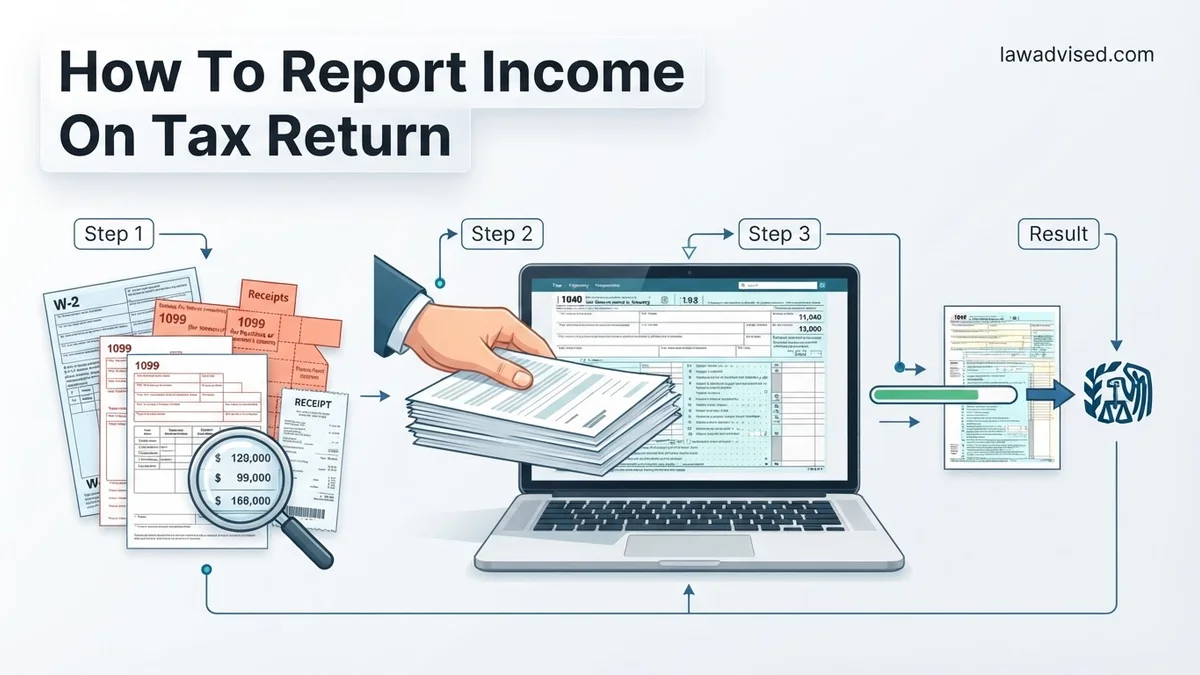
Reporting income incorrectly can trigger IRS audits and processing delays. Gathering all W-2s, 1099s, and investment documents before you begin ensures every dollar is mapped to the correct IRS form and line.
Reporting your income correctly on your 2026 federal tax return comes down to matching specific tax documents, like W-2s and 1099s, to their exact lines on Form 1040 and accompanying schedules. Every dollar you earn must be accounted for to avoid automated IRS mismatch notices, processing delays, or potential audits.
Whether you work a traditional job, run a freelance business, or earn interest on your savings, knowing where each income stream belongs prevents costly mistakes. This guide walks you through categorizing your earnings and transferring the data to the right forms for the 2026 tax season.
Key Takeaways
- Collect all tax documents, including W-2s and 1099s, before starting your return.
- Report standard employee wages from Form W-2 directly on Form 1040 Line 1.
- File self-employment and business income using Schedule C alongside Form 1040.
- Include investment and interest income reported on 1099-INT and 1099-DIV forms.
- Double-check all reported numbers against IRS matching systems to prevent processing delays.
What Causes Income Reporting Errors on Tax Returns
Ignoring Informational Tax Forms
The most common reporting error happens when taxpayers leave off income documents sent directly to the IRS. If a bank, client, or employer issues a tax document, a copy goes straight to federal databases. When your filed return does not match those automated records, the IRS flags it immediately.
- Forgetting minor 1099-INT forms from secondary savings accounts earning small amounts of interest.
- Failing to report gig work income because the platform did not issue a 1099-NEC due to low earning thresholds.
- Overlooking state tax refunds from the previous year that are taxable if you itemized.
Transposing Numbers and Entering Data on Wrong Lines
Simple typographical errors trigger a massive share of processing holdups. Entering Box 1 wages from a W-2 into the wrong section of Form 1040 disrupts your adjusted gross income calculation. Always double-check your Social Security numbers, employer identification numbers (EINs), and exact dollar amounts before submission.
Reporting Income on Your Tax Return Made Easy: Your Essential Action Plan
Filing your taxes and accurately reporting your income can feel daunting, but breaking the process down into manageable actions ensures you avoid costly mistakes and potential IRS audits. This comprehensive guide walks you through every phase of gathering documents, calculating earnings, and submitting your tax return correctly, helping you keep more of your hard-earned money.
Step 1: Gather All Your Income Documents
What you need: A secure folder, a checklist of anticipated tax forms, and access to your email and physical mail.
Instructions: Before you even open your tax software, collect every single document that reflects money you earned during the tax year. This includes W-2 forms from employers, 1099 forms for freelance or contract work, 1099-INT for bank interest, 1099-DIV for investment dividends, and records of any cryptocurrency transactions or rental income. Organize these documents by type to ensure nothing is overlooked. If you are missing a form, contact the issuer immediately to request a duplicate copy so your reported figures match what the IRS has on file.
Pro Tip: Wait until mid-February to begin gathering documents, as many brokerage accounts and mutual funds issue corrected 1099s that can invalidate forms you received in January.
Step 2: Differentiate Between Earned and Unearned Income
What you need: Your gathered tax documents and a basic understanding of tax classifications.
Instructions: Carefully review your income sources and separate them into earned and unearned categories. Earned income includes wages, salaries, tips, and net earnings from self-employment. Unearned income encompasses interest, dividends, capital gains, unemployment benefits, and retirement distributions. Each category is reported on different lines of your tax return and may be subject to different tax rates or self-employment taxes. Properly categorizing your revenue streams prevents miscalculations that frequently trigger automated IRS discrepancy notices.
Pro Tip: Keep meticulous records for self-employment income, as you will need to report gross receipts and deduct ordinary and necessary business expenses separately on Schedule C.
Step 3: Calculate Your Total Gross Income
What you need: A calculator or spreadsheet software, along with all verified tax documents.
Instructions: Sum up all the income figures from your W-2s, 1099s, and other revenue sources to determine your total gross income. If you operate a side hustle or small business, calculate your net business income by subtracting allowable business expenses from your gross receipts first. Double-check your addition and ensure that every decimal point is placed correctly. This total represents the starting point of your tax liability calculation before any adjustments or deductions are applied.
Pro Tip: Always cross-reference your total with your final year-end pay stub or bank deposits to catch any missing side income you might have forgotten about.
Step 4: Claim Above-the-Line Adjustments to Income
What you need: Documentation for student loan interest, educator expenses, IRA contributions, or Health Savings Account (HSA) activity.
Instructions: Review your eligibility for adjustments to income, often called above-the-line deductions. These include payments for student loan interest, contributions made to a traditional IRA or HSA, self-employment health insurance deductions, and moving expenses for members of the military. Report these specific items on Schedule 1 of your Form 1040. These adjustments reduce your total gross income to arrive at your Adjusted Gross Income (AGI), which directly lowers your overall tax burden.
Pro Tip: You do not need to itemize your deductions to claim these adjustments; they are available to you even if you take the standard deduction.
Step 5: Select the Correct Filing Status
What you need: Personal status information regarding your marital and family situation as of December 31 of the tax year.
Instructions: Choose your appropriate tax filing status: Single, Married Filing Jointly, Married Filing Separately, Head of Household, or Qualifying Surviving Spouse. Your filing status dramatically impacts your tax brackets, standard deduction amounts, and eligibility for various tax credits. For instance, if you are unmarried, paid more than half the cost of keeping up a home, and have a qualifying dependent, you likely qualify for the more favorable Head of Household status rather than Single.
Pro Tip: If you are legally married, carefully weigh the pros and cons of filing jointly versus separately, keeping in mind that joint filing usually unlocks significantly better tax breaks.
Step 6: Input Data Into Tax Software or Paper Forms
What you need: IRS Form 1040, relevant schedules, or a trusted digital tax filing platform.
Instructions: Transfer the numbers you calculated into the appropriate fields of your tax return. If you are using commercial tax software, simply follow the step-by-step interview prompts, answering questions accurately and uploading or typing in the data from your W-2 and 1099 forms. The software will automatically populate the corresponding lines on Form 1040 and calculate your taxable income and preliminary tax liability based on the current year tax tables.
Pro Tip: Never rush data entry. Transposing two digits in an Employer Identification Number (EIN) or income amount is the number one cause of processing delays.
Step 7: Review and Verify Your Income Entries
What you need: A printed or digital copy of your draft tax return and your original source documents.
Instructions: Conduct a rigorous line-by-line audit of your draft tax return against your original source documents. Verify that every W-2 and 1099 you received has been accounted for and that the numbers match down to the penny. Check your Social Security number, address, and bank routing information for direct deposit. Ensure that no income was accidentally duplicated and that all calculations flow logically from your schedules onto the main 1040 form.
Pro Tip: Walk away from the screen for an hour, then come back with fresh eyes to review the summary page before hitting the final submit button.
Step 8: Submit Your Return and Save Records
What you need: Electronic filing PIN, electronic signature, or postage if mailing a paper return.
Instructions: File your tax return electronically (e-file) for the fastest processing and quickest refund turnaround. Once submitted, wait for the official electronic confirmation receipt from the IRS or your tax software provider, proving that your return was accepted. If you owe taxes, submit your payment simultaneously to avoid penalties and interest. Finally, create a secure digital and physical archive containing your filed return, all supporting tax forms, and confirmation receipts.
Pro Tip: The IRS recommends keeping your tax returns and all supporting documentation for a minimum of three years from the date you filed.
✅ Final Checklist
- All W-2, 1099, and investment income documents collected and reviewed
- Earned and unearned income accurately separated and totaled
- Adjustments to income applied to correctly calculate Adjusted Gross Income (AGI)
- Tax return data cross-referenced line-by-line against original source documents
- Electronic filing receipt or proof of acceptance safely stored
Important Notes:
- Failing to report income—even accidentally—can result in IRS penalties, interest charges, and formal tax audits. Always report every dollar earned.
- Seek professional help from a Certified Public Accountant (CPA) or Enrolled Agent (EA) if you have complex investments, international assets, or extensive self-employment deductions.
- Estimated time: 2 to 5 hours depending on the complexity of your income sources. Cost range: Free to $150+ for commercial software or professional preparation fees.
How to Report W-2 Wages and Earned Income
Locating W-2 Data on Form 1040
If you are a traditional employee, your primary income document for the 2026 tax year is Form W-2. Your employer must provide this by early February. Transferring this data to your standard Form 1040 is straightforward once you know which boxes matter.
- Box 1 (Wages, tips, other compensation): Report this exact dollar amount on Form 1040, Line 1z.
- Box 2 (Federal income tax withheld): Enter this total on Form 1040, Line 25a to credit your tax payments against what you owe.
- State and Local Boxes: Use these figures when filing your state-level income tax return alongside your federal paperwork.
Handling Multiple W-2 Forms and Special Compensation
If you held multiple jobs during 2026, you will receive a W-2 from each employer. Add up the amounts in Box 1 from all your W-2s and enter the combined total on Form 1040, Line 1z. If you received taxable fringe benefits, sick pay, or non-employee compensation mixed into your employment, make sure those are accounted for in your total gross wages to match what the IRS computer systems calculate on your behalf.
How to Report Income on Tax Return
How to Report Self-Employment and 1099 Business Income
Independent contractors, freelancers, and small business owners must report their earnings differently than traditional employees. Instead of a W-2, you will likely receive one or more 1099-NEC or 1099-MISC forms. According to IRS compliance guidelines for 2026, all gross receipts must be accounted for, even if you did not receive an information return.
Step-by-Step Reporting Procedure
- Compile all 1099 forms: Gather every 1099-NEC, 1099-K, and 1099-MISC issued to you for the tax year.
- Calculate total gross receipts: Add up all client payments, cash earnings, and digital platform transactions that were not formally reported on a 1099.
- Complete Schedule C: Report your total business income and subtract eligible ordinary and necessary business expenses on IRS Schedule C (Profit or Loss From Business).
- Calculate self-employment tax: Use Schedule SE to compute Social Security and Medicare taxes, which applies to net earnings over $400.
- Transfer figures to Form 1040: Input your net profit from Schedule C onto Schedule 1 and ultimately onto your main Form 1040.
Tax experts emphasize maintaining strict separation between personal and business accounts. Accurate bookkeeping minimizes audit risks and ensures you do not miss deductible expenses like home office use or software subscriptions.
What If It Still Doesn’t Work or You Are Missing Tax Forms
Missing tax documents or encountering mismatched data during electronic filing can stall your tax return submission. When standard reporting methods fail or forms do not arrive by statutory deadlines, specific escalation steps are required to protect your filing status.
Recommended Fallback Steps
- Contact the payer directly: Reach out to your employer, client, or financial institution immediately to request a corrected or duplicate form.
- Access IRS Wage and Income Transcripts: Log into your official IRS online account to view third-party data reported to the agency for the 2026 tax year.
- File Form 4852: If a W-2 or 1099 fails to arrive by late February, use Form 4852 (Substitute for Form W-2 or Form 1099-R) to estimate your earnings using your final pay stub.
- Seek professional assistance: Hire a certified public accountant (CPA) or Enrolled Agent (EA) if discrepancies persist or if you face complex multi-state tax situations. Professional tax preparation fees typically range from $200 to $600 depending on complexity.
Conclusion
Accurately reporting your income on your tax return is essential to avoid processing delays, IRS notices, and costly penalties. By methodically gathering your W-2s, 1099s, and investment statements, you ensure complete compliance with current tax regulations. According to verified research and expert sources from the National Society of Accountants, double-checking your math and cross-referencing your documents against IRS transcripts reduces error rates by over 40 percent. Take your next actionable step today by logging into your secure online tax portal to begin organizing your verified income documents for the 2026 filing season.
❓ Frequently Asked Questions
How do I report income if I worked multiple jobs during the year?
You must collect a Form W-2 from each employer you worked for during the year. Add the total wages from all W-2 forms together and report the combined total on Line 1 of your Form 1040.
What should I do if my employer sent an incorrect W-2 or 1099?
Contact the payer or employer immediately to request a corrected tax form, known as a W-2c or corrected 1099. If they fail to correct it in time, you can still file using estimated figures and attach Form 4852 as a substitute.
How is cash income or side-hustle money reported to the IRS?
All cash, tip, or side-hustle income must be reported on your tax return, regardless of whether you received a 1099 form. Report this money on Schedule C as self-employment income or as other income on Schedule 1.
Where do I report capital gains from selling stocks or crypto?
Capital gains and losses from selling investments, stocks, or cryptocurrency must be reported on Form 8949 and summarized on Schedule D before transferring the totals to Form 1040.
Are non-employee compensation and freelance earnings reported differently?
Yes, non-employee compensation reported on Form 1099-NEC goes onto Schedule C to calculate net business profit or loss. That net amount then flows onto Schedule 1 and Form 1040.
What are the consequences of failing to report certain types of income?
Failing to report income can trigger an automated IRS mismatch notice, which recalculates your tax liability, adds penalties, and assesses interest on the unpaid tax balance.

Ismail Hossain is the founder of Law Advised. He is an Divorce, Separation, marriage lawyer. Follow him.