What Happens After Filing Taxes 2026 Step-by-Step Guide
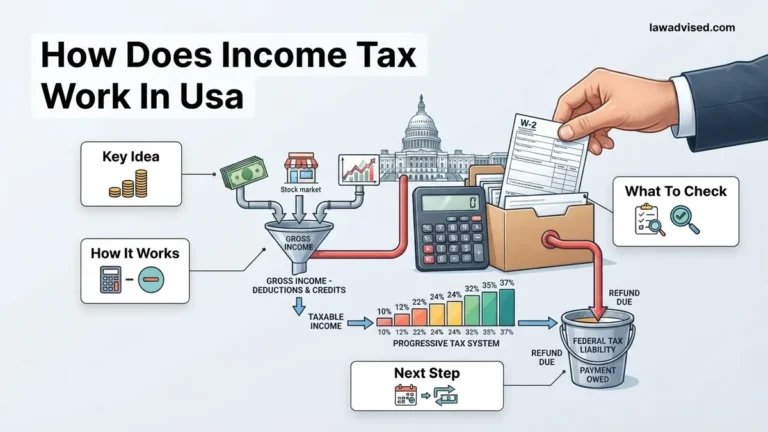
After submitting your tax return, the IRS typically processes refunds within 21 days for electronic filings. Tracking your refund status and managing any tax payments owed are the critical next steps. Knowing these timelines helps you avoid unexpected penalties and plan your finances accordingly.
Hitting the submit button on your 2026 tax return brings an immediate wave of relief, but the journey with the IRS is only just beginning. Whether you are eagerly anticipating a cash influx or bracing yourself to pay a remaining balance, knowing the exact post-filing timeline takes the anxiety out of the waiting game.
Most taxpayers simply want to know two things right now: when their money will hit their bank account or when their payment is officially processed. Let us walk through the exact steps, timelines, and tracking methods you need to navigate the 2026 tax season successfully.
Key Takeaways
- Most e-filed tax refunds are issued by the IRS within 21 days.
- Use the official IRS Where’s My Refund tool to track status updates.
- Tax payments owed must be submitted by the filing deadline to avoid penalties.
- Filing an amended return is necessary if you discover a math error.
- Keep copies of your filed return and supporting documents for at least three years.

What Causes IRS Processing Delays After Filing Your Taxes
Electronic Filing Versus Paper Returns
The method you used to submit your 2026 tax return dramatically changes your wait time. Electronic filing with direct deposit remains the absolute fastest route through the IRS system. When you e-file, the IRS automated systems scan your return instantly, flagging basic math errors before they stall the process.
- E-file with direct deposit: Most refunds arrive within 21 days, often much faster.
- Paper returns mailed to the IRS: Processing can take anywhere from four to six weeks, or longer during peak volume periods.
Common Triggers for Manual Review
Sometimes your return slips out of the automated fast-track and requires human intervention. If an IRS agent has to review your paperwork manually, expect a significant delay in your refund or payment confirmation. Keep an eye out for these red flags:
- Math errors on your 1040 form that do not match the computer calculations.
- Mismatched W-2 or 1099 information where your reported income does not align with what employers submitted.
- Claiming specific credits like the Earned Income Tax Credit (EITC), which legally requires the IRS to hold refunds until mid-February.
- Filing a paper return instead of using approved 2026 tax software.
How to Track Your Refund and Manage Payments Step-by-Step
Using the Where’s My Refund Tool
You do not have to guess where your money is trapped in the system. The official IRS tracking portal updates every single day, usually overnight. To check your status, you will need your Social Security number, your exact filing status, and the precise whole-dollar refund amount shown on your return.
- Return Received: The IRS has your digital paperwork and is queuing it for processing.
- Refund Approved: Your return passed checks, and a specific deposit or mail date is assigned.
- Refund Sent: The funds are on their way to your financial institution.
Managing Your Tax Bill Deadlines
If you owe money for the 2026 tax year, the rules require fast action to avoid extra fees. The federal tax filing and payment deadline falls on April 15, 2026. Even if you request an extension to file your paperwork, that extension only applies to the paperwork, not your tax bill. Interest and failure-to-pay penalties begin accruing immediately after the April deadline if your balance remains unpaid.
- Log into your IRS online account immediately to view your exact balance and make a direct debit payment.
- If you cannot pay in full, apply for a short-term payment plan (up to 180 days) or an installment agreement directly through the IRS portal.
What If Your Return is Rejected or You Made a Mistake
Filing your 2026 tax return does not always go smoothly. According to IRS compliance data, millions of electronically filed returns get rejected each filing season. A rejection usually means a minor data mismatch, such as an incorrect Identity Protection PIN or a misspelled dependent name. If you owe money or expect a refund, fixing this promptly is essential.
Handling an IRS E-File Rejection
An electronic rejection is not an audit. It simply means the IRS processing system cannot accept your file in its current format. Tax software will provide a specific rejection code to pinpoint the exact error.
- Log into your tax software platform or review your rejected filing notice from your certified public accountant.
- Locate the specific numeric error code provided by the IRS system.
- Correct the inaccurate data field, such as a mismatched Adjusted Gross Income from your 2025 return.
- Resubmit the corrected tax return electronically through the software at no additional charge.
Correcting Errors After Acceptance
If the IRS accepts your return but you later realize you forgot to report freelance income or claimed an incorrect deduction, do not panic. The IRS strongly advises against filing an amended return immediately. Wait until your original 2026 tax return has been fully processed and you receive your initial refund or balance due notice.
- Wait for the IRS to process your original 2026 return and issue any pending refund.
- Obtain and complete IRS Form 1040-X, Amended U.S. Individual Income Tax Return.
- Attach any supporting tax forms or W-2s that reflect the new information.
- Mail the completed physical paperwork to the designated IRS processing address listed in the Form 1040-X instructions, or use an authorized e-file platform if supported.
What If It Still Doesn’t Work?
If your refund remains delayed past the standard 21-day window, or if you receive an unexpected tax notice regarding your 2026 filing that you cannot resolve independently, additional intervention is required. Complex tax discrepancies require structured troubleshooting steps to avoid penalties or prolonged delays.
- Verify your status directly through the official IRS Where’s My Refund portal or the IRS2Go mobile application to check for specific hold codes.
- Contact the IRS taxpayer assistance line directly at 1-800-829-1040, keeping in mind that wait times during peak 2026 filing season weeks can average 15 to 30 minutes.
- Engage a qualified credentialed professional, such as a Certified Public Accountant, Enrolled Agent, or tax attorney, if you receive an official audit notice or face identity theft concerns.
- Expect professional representation fees to range from $200 to $500 per hour, or a flat fee between $1,500 and $5,000 for comprehensive IRS audit resolution services.
Conclusion
Navigating the post-filing phase of your 2026 tax return requires careful tracking, patience, and prompt action if errors or rejections occur. By monitoring your refund status through official channels and addressing discrepancies immediately via Form 1040-X or IRS support lines, you protect your financial standing. According to verified research and expert sources from the Internal Revenue Service, utilizing secure online tracking tools is the most efficient method to ensure your tax lifecycle concludes successfully. One actionable next step is to log into your IRS online account today to verify that your 2026 return has been processed and accepted without pending flags.
❓ Frequently Asked Questions
Why is my tax refund taking longer than 21 days to process?
Delays can happen due to errors on your return, missing information, claims for certain credits like the EITC, or if your return was flagged for identity verification. The IRS may need additional time to manually review these documents.
What should I do if I cannot afford to pay my tax bill?
If you cannot pay what you owe, file your return on time anyway to avoid failure-to-file penalties. You can then request a short-term payment extension or set up an installment agreement with the IRS.
How do I know if the IRS accepted my tax return?
If you filed electronically using tax software, you will typically receive an acknowledgement email within 24 to 48 hours stating that the IRS has accepted your return. If you mailed a paper return, you will not receive a digital confirmation.
What does it mean if the IRS sends me a notice in the mail?
An IRS notice usually explains a discrepancy between your tax return and their records, informs you of an adjustment, or requests additional documentation. Read the notice carefully and respond by the specified deadline if action is required.
Will I get interest on a delayed tax refund?
In most cases, the IRS does not pay interest on refunds if they issue them within 45 days of the official filing deadline. If there is an excessive delay past that window, the IRS may include interest with your refund.
Do state tax refunds follow the same timeline as federal refunds?
No, state tax returns are processed by your state’s department of revenue independently from the IRS. State processing times vary widely depending on the state and whether you filed online or by mail.

Ismail Hossain is the founder of Law Advised. He is an Divorce, Separation, marriage lawyer. Follow him.