How to Change Tax Withholding Step-by-Step Guide for 2026
To change your tax withholding, you need to fill out a new IRS Form W-4 and submit it directly to your employer’s HR or payroll department. Adjusting this form allows you to control how much federal income tax is taken from your paycheck, helping you avoid a surprise tax bill or secure a larger refund.
To change your federal tax withholding, you need to fill out a new IRS Form W-4 and submit it directly to your employer’s payroll or human resources department. You can do this at any time during the year, whether you started a new job or experienced a major life event.
Adjusting your withholding ensures you do not have too much tax taken out of your paycheck, which leaves you living on less cash than necessary throughout the year. Conversely, it prevents you from having too little tax withheld, which creates a massive surprise tax bill and potential penalties when you file your 2026 tax return.
Key Takeaways
- Submit a new IRS Form W-4 to your employer to change your tax withholding.
- Use the IRS Tax Withholding Estimator tool to calculate exact W-4 numbers.
- Step 1 requires personal details, while Steps 2 through 4 handle income adjustments.
- Sign and date Step 5 to make the form legally valid for payroll processing.
- Changes typically take effect within one to two pay cycles depending on your employer.
What Causes Incorrect Tax Withholding on Your Paycheck
Your paycheck withholding relies heavily on the information you provided when you first started your job. Life changes frequently, but your payroll department will keep using your old Form W-4 until you actively submit a replacement.
Common Life Events That Impact Taxes
- Getting married or divorced, which instantly changes your tax filing status and standard deduction limits.
- Welcoming a child or adopting, making you eligible for valuable child tax credits.
- Taking on a second job or launching a side hustle that increases your total household income.
- Significant changes in non-wage income, such as investment dividends, capital gains, or rental property earnings.
The Danger of Outdated W-4 Settings
If you checked the box for a single filer with multiple jobs years ago and your spouse recently quit working, your employer is likely withholding way too much money. On the flip side, if both spouses work and neither updated their W-4 to account for dual incomes, you will likely face a steep underpayment penalty in 2026. Reviewing your settings annually protects your cash flow.
Master Tax Withholding in 8 Simple Steps
Adjusting the amount of federal and state income tax withheld from your paycheck is one of the most effective ways to take control of your personal finances. Whether you want to eliminate a surprise tax bill at the end of the year or you are tired of giving the government an interest-free loan through a massive refund, updating your W-4 form is the solution. This comprehensive walkthrough provides a clear, actionable roadmap to navigate tax withholding changes accurately, ensuring your take-home pay aligns perfectly with your annual tax liability.
Step 1: Retrieve Your Current Pay Stub
What you need: Your most recent electronic or physical pay stub from your current employer, and access to your employer’s payroll portal (such as ADP, Workday, or Gusto).
Instructions: Before making any adjustments, you need a baseline. Locate your latest pay stub and examine the year-to-date (YTD) federal and state income tax deductions. Look closely at the tax withholding elections section, which will display your filing status (Single, Married Filing Jointly, etc.) and any previous dependent or extra withholding settings. Understanding your current setup helps you measure how drastically you need to shift your parameters to reach your financial goals.
Pro Tip: Do not rely on memory for your current settings. Payroll systems often retain old selections that employees forget about, particularly after major life events.
Step 2: Gather Last Year’s Tax Return
What you need: A copy of your most recently filed federal tax return (Form 1040) and associated W-2 forms from all jobs you or your spouse held.
Instructions: Open your previous year’s tax return to use as a forecasting baseline. Specifically, look at Line 24 (Total Tax) and Line 34 (Refund) or Line 37 (Amount You Owe). If your financial situation—including salary, investments, and deductions—has not changed dramatically since last year, your total tax liability should be reasonably close to what you will owe this year. This historical data acts as your primary compass for determining whether your current withholding is too high or too low.
Pro Tip: If you experienced major life changes like a marriage, divorce, or the birth of a child last year, keep in mind that your baseline tax liability will shift accordingly.
Step 3: Account for All Household Income Sources
What you need: Estimates of annual gross income for yourself and, if applicable, your spouse or any secondary jobs you hold.
Instructions: Tax brackets are progressive, and if a household has multiple earners, the lower-paying jobs can easily be under-withheld if calculated in isolation. List out every expected income stream for the upcoming year, including side hustles, freelance work, and investment dividends. If you are married and filing jointly, combining your projected earnings is critical to preventing the dreaded “two-earner trap” where neither job withholds enough taxes to cover the combined household bracket.
Pro Tip: Use conservative income estimates. If you expect a performance bonus or a mid-year raise, factor a portion of it into your calculations to avoid under-withholding.
Step 4: Access the IRS Tax Withholding Estimator
What you need: A computer or smartphone with internet access, your current pay stubs, and your previous tax return.
Instructions: Navigate to the official IRS website and launch the Tax Withholding Estimator tool. Input your personal information, income data from Step 3, and your withholding selections from Step 1 when prompted. The tool will calculate whether you are currently on track for a refund or a tax bill. Most importantly, the estimator will generate a customized recommendation telling you precisely what to enter on every line of the new Form W-4 to achieve a $0 balance at tax time.
Pro Tip: Never use third-party tax estimator tools that are not hosted on a .gov domain, as you will be sharing sensitive financial and personal data.
Step 5: Obtain and Complete Form W-4
What you need: A blank IRS Form W-4 (Employee’s Withholding Certificate), which you can download online or request directly from your human resources department.
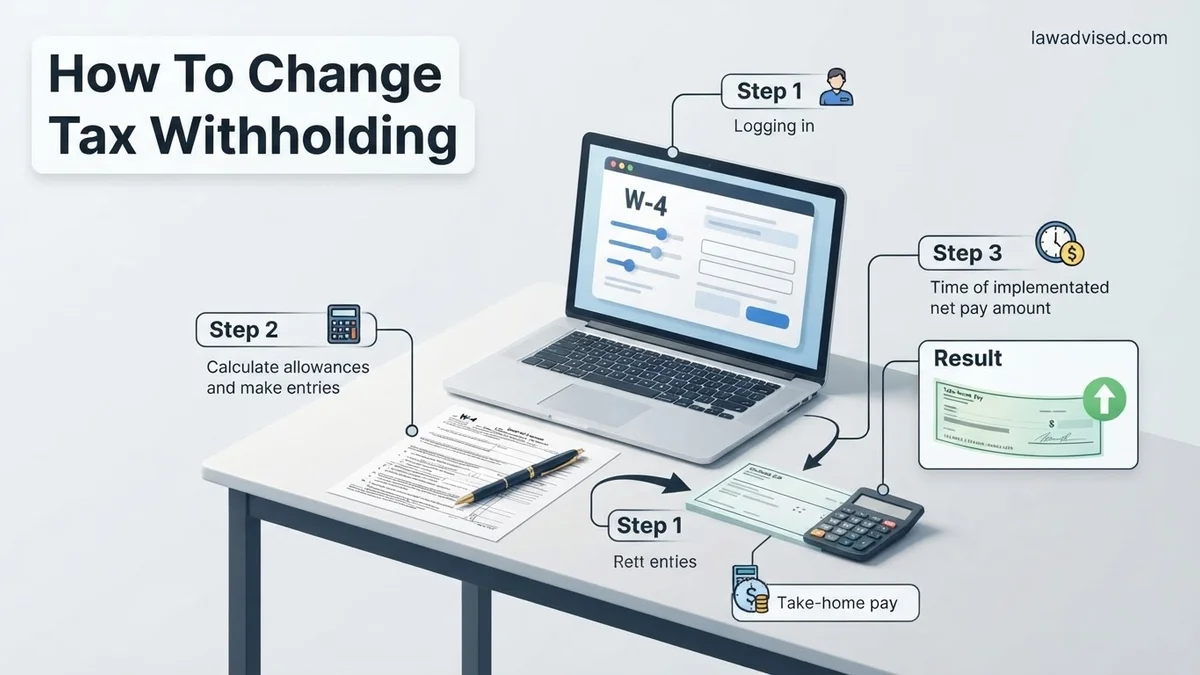
Instructions: Fill out the form following the precise line-by-line instructions provided by the IRS Estimator in the previous step. Step 1 requires your personal details and filing status. Step 2 handles multiple jobs or working spouses. Step 3 accounts for child and dependent tax credits. Step 4 allows you to input other income, deductions, and any extra dollar amount you want withheld per paycheck. Sign and date the certification section at the bottom of the form.
Pro Tip: Pay special attention to Step 2(b) of the paper form if you have multiple earners; checking that box ensures accuracy without needing to use the online estimator.
Step 6: Submit the Updated Form to Your Employer
What you need: Your completed and signed Form W-4 and access to your company’s HR or payroll submission channel.
Instructions: Deliver your updated W-4 to your employer. Most modern companies utilize an internal self-service portal where you can type your new selections directly into the system, eliminating the need for paper processing. If your company still uses paper, hand-deliver it to your payroll or human resources administrator and request a confirmation receipt. Ensure the submission is finalized at least two weeks before your upcoming pay period.
Pro Tip: Keep a digital or physical copy of the submitted W-4 for your personal records so you can verify it matches your next pay stub.
Step 7: Verify Changes on Your Next Pay Stub
What you need: The first pay stub generated after your W-4 submission date.
Instructions: Review your very next paycheck to confirm that payroll successfully processed your withholding adjustments. Look at the federal and state tax withholding lines to ensure the deduction amounts have changed appropriately. Verify that your listed filing status and any additional withholding amounts match what you inputted on your new W-4 form. Errors in payroll processing happen, and catching them early prevents months of incorrect tax deductions.
Pro Tip: If your pay stub does not reflect the changes, contact your HR or payroll department immediately to trace the status of your submission.
Step 8: Monitor and Re-evaluate Mid-Year
What you need: Calendar reminders and periodic check-ins using the IRS Estimator tool.
Instructions: Tax withholding is not a “set it and forget it” task. Re-visit your calculations and run the IRS Tax Withholding Estimator midway through the year—specifically around July or whenever you experience a major life event like buying a house, getting a raise, or having a child. Making incremental adjustments throughout the year prevents sudden year-end crunches and ensures your cash flow remains optimized month after month.
Pro Tip: Aim for a close-to-zero refund balance; getting a massive refund means you gave the government an interest-free loan all year long.
✅ Final Checklist
- Verified current tax withholding baseline using your latest pay stub
- Calculated total household income across all jobs and side streams
- Generated a customized recommendation using the official IRS Tax Withholding Estimator
- Completed and signed a new IRS Form W-4 with accurate dependent and deduction details
- Successfully submitted the W-4 to your employer’s HR or payroll portal
- Checked your next pay stub to confirm the withholding adjustments took effect
Important Notes:
- Double-check all calculations if you have complex investments, self-employment income, or large itemized deductions to avoid underpayment penalties.
- Seek help from a certified public accountant (CPA) or financial advisor if you experience complex life events such as a business acquisition or an inheritance.
- Estimated time to complete: 30 to 45 minutes. Cost: Free (when using official IRS resources).
How to Use the IRS Withholding Estimator to Determine Your Numbers
Guessing what numbers to put on your Form W-4 usually leads to a mismatched tax refund or bill. The IRS Tax Withholding Estimator takes the guesswork out of the equation by generating exact figures tailored to your financial situation.
Gathering Your Documents Before You Begin
- Your most recent pay stubs for every job you and your spouse currently hold.
- Information about other income sources, including side gigs, freelance work, or retirement distributions.
- Your most recent 2025 federal tax return to reference deductions and credits.
Running the Estimator Tool
Navigate to the official IRS website and open the Tax Withholding Estimator tool. Input your projected 2026 earnings, expected deductions, and tax credits when prompted. The tool will calculate whether you are currently on track for a refund or a balance due, and it will output the exact text and numbers you need to enter into each step of the new Form W-4.
Step-by-Step Instructions on How to Fill Out Form W-4
Completing the IRS Form W-4 requires careful attention to detail to ensure your 2026 tax withholding matches your actual liability. The modern design of the W-4 eliminates traditional allowances, focusing instead on accurate income and deduction estimates. Financial planners recommend having your most recent tax return and current pay stubs on hand before you begin.
Core Steps to Complete the Form
- Complete Step 1 (Personal Information): Enter your name, address, Social Security number, and check your correct filing status, such as single, married filing jointly, or head of household.
- Complete Step 2 (Multiple Jobs or Spouse Works): Use this section only if you hold more than one job at a time or file jointly with a working spouse. The IRS offers an online Tax Withholding Estimator to calculate these precise adjustments accurately.
- Complete Step 3 (Claim Dependents): Multiply the number of qualifying children under 17 by $2,000, and other dependents by $500, then enter the total sum on this line.
- Complete Step 4 (Other Adjustments): Account for other expected income not from jobs, itemized deductions, or request an explicit extra withholding amount per pay period.
- Complete Step 5 (Sign and Date): Sign and date the document to validate the form before submitting it to your company payroll department.
What to Do If Your Withholding Changes Do Not Appear on Your Paycheck
Payroll processing schedules can occasionally delay newly submitted Form W-4 updates from taking effect immediately. According to standard payroll administration guidelines, processing typically requires one to two full pay cycles. If several weeks pass and your net pay remains unchanged, systematic troubleshooting is necessary to identify the breakdown.
Troubleshooting Delayed Updates
- Verify Employer Processing: Contact your human resources or payroll department to confirm they successfully received and entered your updated Form W-4 into the payroll system.
- Check Pay Stub Details: Review your itemized pay stub to see if federal income tax deductions shifted, even if the net total adjustment feels negligible due to other deductions.
- Resubmit Digital or Physical Forms: If the portal failed to save your submission, securely resubmit the W-4 through your employer’s designated HR software portal.
What If It Still Doesn’t Work?
If persistent payroll errors prevent your 2026 tax withholding changes from taking effect, structured escalation prevents end-of-year tax underpayment penalties. Tax professionals emphasize proactive intervention when internal human resources channels stall.
- Request a formal, written confirmation from your payroll department detailing the exact effective pay date for your new W-4 withholding rate.
- Calculate your year-to-date withholding using your pay stubs and compare it against projected 2026 tax liability to determine if a quarterly estimated tax payment via IRS Form 1040-ES is necessary.
- Consult a certified public accountant (CPA) or Enrolled Agent to manually adjust your tax strategy and avoid unexpected tax season bills. Professional tax advisory services typically range from $200 to $500 depending on complexity.
- File a formal inquiry or complaint with the U.S. Department of Labor’s Wage and Hour Division if an employer willfully refuses to process valid tax withholding forms.
Conclusion
Adjusting your tax withholding prevents unpleasant surprises at tax time and ensures your hard-earned money remains in your pocket throughout the year. By submitting a revised Form W-4 and confirming payroll implementation, you maintain complete control over your annual cash flow. According to verified research and expert sources from the Internal Revenue Service, reviewing your withholding annually is the single most effective way to optimize personal financial health. Take the immediate next step today by logging into your employer’s payroll portal to check your current withholding settings.
❓ Frequently Asked Questions
How do I know if my current tax withholding is correct?
Review your recent paystubs to see how much federal tax is being deducted relative to your income. Using the online IRS Tax Withholding Estimator provides a precise evaluation based on your year-to-date earnings.
What happens if I claim too many allowances on my W-4?
Claiming too few deductions or extra withholding means too little tax is withheld, potentially resulting in a large tax bill and penalties when you file your annual return.
Do I need to file a new W-4 every year?
No, your withholding rolls over from year to year automatically. You only need to submit a new W-4 if your personal or financial situation changes or if you want to adjust your tax outcome.
How do multiple jobs affect my tax withholding?
If you hold more than one job at a time, you must account for the combined income in Step 2 of the W-4 to prevent under-withholding, as each employer only taxes the income paid by them.
Can claiming dependents on my W-4 increase my take-home pay?
Yes, claiming qualifying children and other dependents in Step 3 reduces the total amount of tax withheld from your paycheck, thereby increasing your net take-home pay.
What should I do if I want to have extra money withheld for taxes?
You can specify an exact dollar amount in Step 4(c) of Form W-4 that your employer will automatically deduct from each paycheck for additional tax withholding.

Ismail Hossain is the founder of Law Advised. He is an Divorce, Separation, marriage lawyer. Follow him.