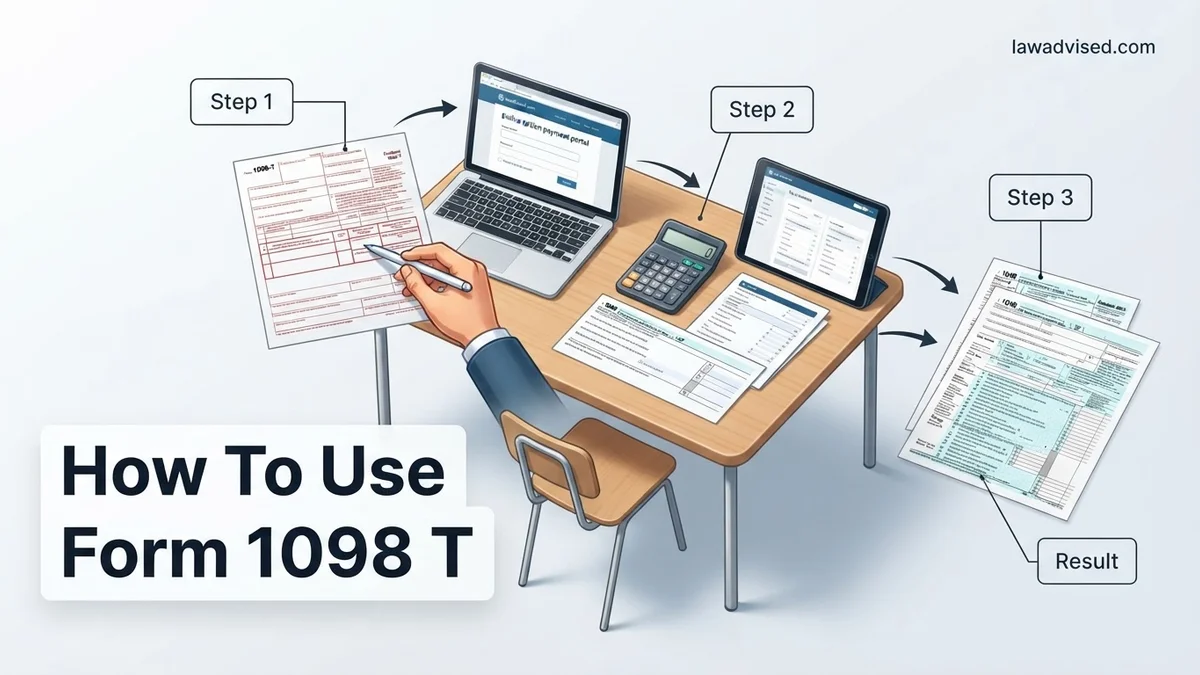
How To Use Form 1098 T How to Use Form 1098-T 2026
Form 1098-T provides the crucial tuition and scholarship data needed to claim valuable education tax credits on your federal tax return. You must match the figures reported by your school with your actual out-of-pocket expenses to determine your exact eligibility. This guide walks you through entering these numbers into your tax software or Form 8863 correctly.
To use IRS Form 1098-T for your 2026 tax return, you need to pull specific numbers from the form and plug them into your tax software or IRS Form 8863 to claim education tax credits like the American Opportunity Tax Credit or the Lifetime Learning Credit. The entire process relies on matching what your school reported against the actual out-of-pocket tuition and supply costs you paid during the calendar year.
Getting this right means you can lower your tax bill or qualify for a refundable credit, but mixing up the figures can trigger an IRS notice. Skipping the confusion around reported amounts versus your actual expenses is the fastest way to file an accurate return and secure your education savings.
Key Takeaways
- Use Box 1 to report total payments received by the eligible educational institution.
- Subtract Box 5 scholarships and grants from your total expenses to calculate net costs.
- Gather receipts for out-of-pocket book and supply costs not reported on the 1098-T.
- Choose between the American Opportunity Tax Credit and the Lifetime Learning Credit.
- Enter your 1098-T data directly into tax prep software using the education section.
What Causes Confusion With Form 1098-T Data
The primary reason taxpayers struggle with Form 1098-T is that schools report what they billed or received, which rarely matches your actual out-of-pocket spending dollar for dollar. Educational institutions issue this form to help you calculate tax credits, but the numbers require adjustment before you enter them into your tax software for the 2026 tax season.
Box 1 Versus What You Actually Paid
Box 1 shows the total payments received by the eligible educational institution for qualified tuition and related expenses during the calendar year. However, your records might show you paid a spring tuition bill in December of the prior year, or you might have used a student loan disbursement that posted on a different timeline. You must cross-reference Box 1 with your own bank statements and student account ledgers to ensure every eligible dollar is accounted for.
Qualified Expenses Versus Out-of-Pocket Costs
Colleges only report specific institutional charges in Box 1, leaving you to calculate other mandatory education costs independently. Keep these key distinctions in mind:
- Qualified Tuition: Enrollment fees and course-related expenses billed directly by the school appear on the 1098-T.
- Books and Supplies: Textbooks, software, and equipment required for your courses count as qualified expenses, but the school never reports these on the 1098-T.
- Personal Expenses: Room, board, insurance, and transportation costs are never eligible for education tax credits, regardless of whether the school charged you for them.
Form 1098-T Made Easy: Your Essential Action Plan
Navigating tax season can feel overwhelming, especially when education credits enter the picture. Form 1098-T, the Tuition Statement, is your key to claiming valuable tax savings like the American Opportunity Tax Credit (AOTC) or the Lifetime Learning Credit. However, staring at the boxes and numbers can leave anyone feeling confused. This comprehensive, actionable walkthrough demystifies the entire process, ensuring you gather the right data, input it accurately into your tax software, and maximize your potential education tax benefits without triggering an IRS audit.
Step 1: Locate and Access Your Official Form 1098-T
What you need: Your student portal login credentials (username and password) for your college or university, or access to your physical mailbox if you opted out of electronic delivery.
Instructions: Educational institutions are legally required to issue Form 1098-T by January 31st each year for the previous tax year. Log into your university’s online student financial account and navigate to the billing, financial aid, or tax documents section. Download the official PDF copy. If you prefer a physical copy and consented to paperless delivery, you may need to update your preferences or contact the bursar’s office. Ensure the Social Security Number (SSN) or Individual Taxpayer Identification Number (ITIN) listed on the form matches your actual documentation exactly to prevent IRS processing delays.
Pro Tip: Always download the official PDF directly from the school portal rather than relying solely on third-party servicer emails, which can sometimes be delayed or flagged by spam filters.
Step 2: Decode the Numbers in Boxes 1 and 2
What you need: Your downloaded Form 1098-T and a basic calculator or spreadsheet tool.
Instructions: Examine Box 1, which details the total payments received by the institution for qualified tuition and related expenses during the calendar year. Alternatively, some institutions may use Box 2 to report amounts billed, though recent IRS regulations heavily favor Box 1 reporting. It is critical to understand that the number in Box 1 represents payments made, not necessarily the charges billed for that semester. Compare this figure against your own bank statements, credit card receipts, or student account ledger to verify that the amount aligns with what you actually paid out of pocket or via student loans between January 1 and December 31.
Pro Tip: Do not panic if Box 1 is blank and Box 2 has a number; your school may still be operating under the older billing-amount reporting method, which is entirely permissible under IRS guidelines.
Step 3: Account for Scholarships and Grants in Box 5
What you need: Form 1098-T and financial aid award letters or student account summaries.
Instructions: Look closely at Box 5, which lists the total amount of scholarships or grants processed by the educational institution during the calendar year. This includes merit scholarships, federal Pell Grants, athletic scholarships, and employer-provided tuition assistance. This number is vital because tax credits can only be claimed on out-of-pocket qualified education expenses. Therefore, you must subtract the total amount in Box 5 from the total amount in Box 1 (or Box 2) to determine your adjusted qualified education expenses. Keep detailed records of this math, as the IRS cross-references these figures during automated review processes.
Pro Tip: If you received scholarships that exceeded your tuition and were used for room and board, remember that the excess scholarship portion is considered taxable income, even if it does not appear on your tax return as a credit.
Step 4: Cross-Reference with Your Personal Financial Records
What you need: Personal bank statements, credit card statements, loan disbursement records, and receipts for book purchases.
Instructions: Do not rely exclusively on Form 1098-T. Schools are not required to report everything you spent on education. Gather your receipts for required textbooks, course materials, and equipment (such as laptops required for enrollment) that you purchased outside the direct university billing system. Add these out-of-pocket costs to your adjusted expense total calculated in the previous step. Conversely, check if adjustments were made in Box 4 or Box 6 for prior year reporting, which can alter your current year calculations. Ensuring your personal ledger matches or accurately supplements the 1098-T data protects you in the event of an audit.
Pro Tip: Keep receipts for all book and supply purchases in a dedicated digital folder for at least three years, as the IRS can request proof of these additional qualified expenses.
Step 5: Choose the Right Education Tax Credit
What you need: Your adjusted education expense totals, your Adjusted Gross Income (AGI) estimate, and tax filing status information.
Instructions: You must decide whether to claim the American Opportunity Tax Credit (AOTC) or the Lifetime Learning Credit (LLC). The AOTC offers up to $2,500 per eligible student and is available for the first four years of higher education, provided the student is pursuing a degree at least half-time. The LLC offers up to $2,000 per tax return, has no limit on the number of years you can claim it, and applies to undergraduate, graduate, and professional degree courses—even for a single class. Review IRS Publication 970 or let your tax software evaluate your eligibility based on your income thresholds and enrollment status.
Pro Tip: You cannot claim both credits for the same student in the same tax year, so always run the numbers to see which credit yields the highest financial return.
Step 6: Input Data into Your Tax Software or IRS Forms
What you need: Tax preparation software (TurboTax, H&R Block, FreeTaxUSA) or paper IRS Form 8863, along with your completed calculations.
Instructions: Open your tax preparation software and navigate to the “Education” or “Deductions and Credits” section. The software will prompt you to enter the specific box numbers directly from your Form 1098-T (Institution’s EIN, student’s name, Box 1 payments, Box 5 grants, etc.). Answer the follow-up questions regarding enrollment status, whether the student has a felony drug conviction, and whether they completed the first four years of higher education. If you are filing manually, complete IRS Form 8863 (“Education Credits”) and attach it to your Form 1040.
Pro Tip: Double-check the Federal Employer Identification Number (EIN) of the educational institution (found at the top left of the 1098-T) to ensure a typo does not trigger an immediate rejection of your electronic tax return.
Step 7: Retain Documents and Monitor Your Refund Status
What you need: A secure digital filing system or physical folder, and access to the IRS “Where’s My Refund?” tool.
Instructions: Once your tax return is successfully submitted and accepted, organize your Form 1098-T, personal receipts, financial aid statements, and a copy of your filed tax return (including Form 8863) into a single secure file. IRS guidelines strongly recommend retaining tax records for a minimum of three years from the date you filed your return, or two years from the date the tax was paid, whichever is later. Monitor your tax refund status online, keeping in mind that returns claiming the AOTC or LLC may experience a slight processing hold under the PATH Act until mid-February.
Pro Tip: Back up your digital tax documents to an encrypted cloud drive or an external hard drive to protect against computer hardware failure.
✅ Final Checklist
- Verified that the Student SSN/ITIN on Form 1098-T matches your social security card exactly.
- Subtracted total grants and scholarships (Box 5) from total payments (Box 1).
- Included receipts for out-of-pocket book and required material expenses not reported on the form.
- Selected the optimal tax credit (AOTC vs. LLC) for your specific financial and educational situation.
- Securely stored all 1098-T documents and calculation worksheets for at least three years.
Important Notes:
- Never ignore discrepancies between your personal payment records and the 1098-T; contact your university’s bursar or financial aid office immediately to request a corrected Form 1098-T (marked as “Corrected”).
- Seek professional assistance from a Certified Public Accountant (CPA) or Enrolled Agent (EA) if you have complex dependency scenarios, dual enrollment, or scholarships that span multiple calendar years.
- Gathering documents takes approximately 30 to 60 minutes, and the total cost range is free (if using IRS Free File or self-filing forms) to $100+ (if utilizing premium tax preparation software or hiring a professional).
How to Fix and Report Form 1098-T on Your Tax Return Step-by-Step
Filing your 2026 taxes with Form 1098-T requires a systematic approach to ensure you maximize your credits without inviting an audit. Whether you use commercial tax software or fill out IRS Form 8863 manually, the data entry follows a strict path centered on Box 1 and Box 5.
Entering Box 1 and Box 5 Into Your Software
When your tax software prompts you for education expenses, grab your Form 1098-T and enter the exact figures into the corresponding fields. Pay close attention to how scholarships interact with your payments to avoid double-counting benefits.
- Locate the amount in Box 1 (Payments received for qualified tuition and related expenses) and input it into the designated software field.
- Locate the amount in Box 5 (Scholarships or grants) and enter it. Note that tax software will subtract Box 5 from Box 1 to determine your net paid expenses.
- Review Box 6, which reports adjustments to scholarships or grants from a prior year, as this can increase or decrease your current year taxable income or credit eligibility.
Calculating and Adding Your Unreported Supplies
Because the 1098-T leaves out required books and materials, you must add these out-of-pocket costs to your totals before finalizing your education credit calculation. Gather your receipts for bookstore purchases, required digital access codes, and specialized lab equipment bought for your 2026 classes. Add these itemized supply costs directly to the net qualified education expense figure calculated by your tax software. Keeping these receipts organized for at least three years protects you if the IRS ever requests proof of your out-of-pocket education spending.
How to Calculate Qualified Out-of-Pocket Expenses Not Listed on the Form
Your Form 1098-T often leaves out crucial out-of-pocket costs that still qualify for education tax credits under IRS guidelines. According to data from the National Center for Education Statistics, students spend an average of $1,250 annually on course materials alone. To maximize your 2026 tax filing, you must calculate these extra expenses manually.
Identifying Eligible Unlisted Costs
Qualified tuition and related expenses extend beyond what the bursar’s office reports. Eligible items include required textbooks, digital access codes, specialized software, and specific equipment mandated for enrollment. Voluntary fees, insurance, and transportation costs never qualify.
Steps to Calculate Your Additional Expenses
- Gather all itemized receipts for textbooks, supplies, and course-required equipment purchased for the 2026 tax year.
- Cross-reference each item against your official 2026 course syllabus to prove the material was mandatory for class completion.
- Subtract any tax-free educational assistance received, such as employer-provided educational assistance or specific scholarships that were restricted to books.
- Add the verified out-of-pocket total to the figure reported in Box 1 of your Form 1098-T before entering the final amount into your tax software.
What If It Still Doesn’t Work and Your Numbers Do Not Match
Discrepancies between your personal financial records and Form 1098-T frequently trigger IRS processing delays or automated notices. According to recent Internal Revenue Service compliance reports, over 15% of education credit claims require manual verification due to reporting mismatches. If your figures fail to reconcile, execute these fallback steps immediately.
Troubleshooting Steps for Mismatched Data
- Log into your university student portal to pull a detailed, transaction-by-transaction account ledger for the entire 2026 calendar year.
- Contact your institution’s bursar or financial aid office to request a corrected Form 1098-T if institutional accounting errors are identified.
- File Form 8863 alongside your tax return to formally claim education credits, ensuring your calculations match your personal ledger rather than faulty box data.
- Consult a certified public accountant (CPA) or enrolled agent if the financial discrepancy exceeds $2,000 or if the IRS issues an automated balance due notice. Professional tax representation typically costs between $150 and $400 depending on complexity.
Conclusion
Mastering Form 1098-T requires careful coordination between official institutional reporting and your personal receipt tracking for tuition, fees, and required materials. Resolving discrepancies early prevents costly processing delays and ensures you capture maximum credit value. According to verified research and expert sources from the IRS and higher education finance associations, utilizing precise documentation is the single most effective strategy for audit protection. Your immediate next step is to log into your student portal, download your comprehensive 2026 ledger, and cross-reference it with your tax preparation software today.
❓ Frequently Asked Questions
How do I choose between the American Opportunity Tax Credit and the Lifetime Learning Credit?
The American Opportunity Tax Credit is available for the first four years of higher education for students pursuing a degree, offering up to $2,500 per year. The Lifetime Learning Credit has no limit on the number of years you can claim it and covers undergraduate, graduate, and professional degree courses up to $2,000 per return.
What are considered ‘qualified education expenses’ on a 1098-T?
Qualified expenses include tuition and fees required for enrollment or attendance at an eligible educational institution. Room, board, insurance, and medical expenses are never considered qualified expenses for tax credit purposes.
What should I do if the numbers on my Form 1098-T are incorrect?
If you believe the amounts reported in Box 1 or Box 5 are wrong, contact your school’s bursar or financial aid office immediately to request a corrected Form 1098-T. Do not guess the numbers on your tax return, as mismatched data can trigger an IRS audit or delay your refund.
Can parents claim the education credit if the student is a dependent?
Yes, if you claim the student as a dependent on your tax return, you are the one who must claim the education credits using their Form 1098-T. The student cannot claim the credits on their own separate return if they are listed as your dependent.
How do scholarships and grants reported in Box 5 affect my tax credits?
Tax-free scholarships and grants reduce the amount of qualified education expenses you can use to calculate your tax credits. You must subtract Box 5 from your total out-of-pocket expenses to find your net qualified expenses.
What happens if my scholarships exceed my tuition costs?
If your total scholarships and grants in Box 5 exceed your qualified tuition and fees in Box 1, the excess amount is considered taxable income and must be reported on your tax return as wage or other income.

Ismail Hossain is the founder of Law Advised. He is an Divorce, Separation, marriage lawyer. Follow him.