1099 Tax Filing Guide Step-by-Step Instructions 2026
Navigating the 1099 tax filing process requires strict adherence to IRS deadlines, correct form selection, and accurate contractor data collection. Businesses must issue Form 1099-NEC to any independent contractor paid $600 or more in the calendar year by January 31. Using electronic filing software streamlines submission to both the IRS and state agencies while preventing costly late penalties.
Filing your 1099 forms correctly as a business owner in 2026 requires collecting accurate W-9 information, separating payments by form type like the 1099-NEC, and meeting strict IRS deadlines to avoid severe penalties. Whether you work with independent contractors, freelancers, or unincorporated vendors, getting this process right keeps your business compliant and protects you from costly IRS audits.
Navigating independent contractor taxes can feel overwhelming, but a structured approach makes it manageable. This guide cuts through the confusion to give you an actionable roadmap for gathering data, completing forms, and submitting them on time this tax season.
Key Takeaways
- Collect a completed Form W-9 from every independent contractor before issuing any payments.
- File Form 1099-NEC by January 31 for both recipients and the IRS.
- Use Form 1099-NEC for nonemployee compensation and Form 1099-MISC for rents, prizes, or legal settlements.
- Utilize electronic filing software to meet state and federal reporting requirements efficiently.
- Ensure correct Taxpayer Identification Numbers (TINs) to avoid IRS B-notices and matching penalties.
What Causes 1099 Filing Errors and Compliance Penalties
Most business owners do not intentionally submit incorrect tax forms. Instead, simple administrative oversights trigger IRS mismatch notices and costly penalties. Knowing what triggers these errors helps you build a bulletproof filing process for 2026.
Incorrect Contractor Data and Missing TINs
The single biggest mistake businesses make is entering the wrong Taxpayer Identification Number (TIN) or legal business name on a 1099 form. If the name and TIN combination on your form does not match IRS records, you will receive a CP210X notice or a “B-Notice.”
- Typo in the contractor’s Social Security Number (SSN) or Employer Identification Number (EIN).
- Using a contractor’s “doing business as” (DBA) name instead of their legal tax-filing name.
- Failing to verify address changes before generating the final form.
Missing the Strict IRS Deadlines
Filing late is a guaranteed way to trigger financial penalties from the IRS. The penalty structure scales based on how late you file, ranging from $60 per form to over $310 per form for intentional disregard. In 2026, the IRS continues to crack down on electronic filing mandates, meaning businesses filing more than 10 total information returns must submit them digitally rather than on paper.
Master 1099 Tax Filing in 8 Simple Steps
Filing 1099 taxes as an independent contractor, freelancer, or small business owner can feel overwhelming with all the shifting regulations and IRS forms. Whether you are paying independent contractors or receiving 1099 income yourself, navigating this process accurately ensures you avoid costly penalties and keep your finances in top shape. This comprehensive walkthrough breaks down the entire tax filing lifecycle into clear, actionable phases, giving you the confidence to manage your 1099 obligations like a seasoned professional.
Step 1: Gather and Verify Form W-9 from Contractors
What you need: Blank IRS Form W-9 templates, digital or physical filing system, secure communication channel.
Instructions: Before you pay any independent contractor $600 or more in a calendar year, you must collect a completed and signed IRS Form W-9 from them. This form officially captures their correct legal name, business name, address, and Taxpayer Identification Number (TIN), which is typically their Social Security Number (SSN) or Employer Identification Number (EIN). Send this request out before work begins to avoid tracking down contractors during the busy tax season in January. Store these documents securely to protect sensitive personal data.
Pro Tip: Never issue a 1099 form without first having a signed W-9 on file. Verifying the TIN against IRS databases using backup matching services can prevent severe mismatch penalties later.
Step 2: Track and Categorize All Income and Expenses
What you need: Accounting software (like QuickBooks or FreshBooks), business bank statements, digital receipt scanner.
Instructions: Diligent bookkeeping is the backbone of successful 1099 tax filing. Meticulously record every dollar of income received and every business-related expense paid throughout the year. Separate your personal and business finances entirely by using dedicated bank accounts and credit cards. Categorize expenses accurately into standard IRS buckets such as advertising, travel, software subscriptions, office supplies, and home office deductions. Reconcile your accounts monthly to catch missing receipts or duplicate transactions long before tax deadlines approach.
Pro Tip: Keep all business receipts for at least three years. Digital copies stored in the cloud are completely acceptable to the IRS and save physical storage space.
Step 3: Calculate Your Net Self-Employment Earnings
What you need: Year-end profit and loss statement, calculator, Schedule C worksheet.
Instructions: Once your bookkeeping is fully reconciled, calculate your net profit by subtracting your total allowable business expenses from your total gross income. If you operate as a sole proprietorship or single-member LLC, these figures will directly populate IRS Schedule C (Profit or Loss From Business). Ensure that every deduction you claim is ordinary and necessary for your specific industry. Be rigorous in your calculations, as discrepancies between your reported income and the 1099 forms issued to you by clients will automatically trigger IRS mismatch flags.
Pro Tip: Do not forget to calculate your home office deduction using either the simplified method ($5 per square foot up to 300 square feet) or the actual expense method to lower your taxable net income.
Step 4: Determine Your Quarterly Estimated Tax Payments
What you need: IRS Form 1040-ES, estimated income worksheet, previous year tax return.
Instructions: Unlike traditional W-2 employees who have income and payroll taxes automatically withheld from every paycheck, 1099 workers are responsible for paying their own taxes. If you expect to owe $1,000 or more in taxes when you file your annual return, you must make quarterly estimated tax payments to the IRS and your state tax agency. These payments are typically due four times a year: April 15, June 15, September 15, and January 15 of the following year. Calculate these payments using your projected annual net earnings.
Pro Tip: Underpaying your quarterly estimates can result in IRS underpayment penalties. When in doubt, aim to pay at least 100% of your prior year’s total tax liability spread across four equal installments.
Step 5: Prepare and Reconcile IRS Forms 1099-NEC and 1099-MISC
What you need: Accounting software export data, IRS FIRE system access or third-party e-file provider account, blank recipient copies.
Instructions: If you are a business owner who paid independent contractors $600 or more during the tax year, you must prepare and issue Form 1099-NEC (Nonemployee Compensation) for service providers. For other types of payments like rent, prizes, or legal settlements exceeding $600, use Form 1099-MISC. Carefully cross-reference your accounting ledger with the W-9 data you collected in Step 1. Ensure that spelling, addresses, and TINs are 100% accurate to prevent processing delays and potential IRS rejection notices.
Step 6: Issue Copies to Contractors and File with the IRS
What you need: Secure e-filing platform, printable recipient copies, postal mailing supplies or encrypted email delivery.
Instructions: Timing is everything when it comes to official 1099 deadlines. You must provide Copy B of Form 1099-NEC to your independent contractors and file Copy A with the IRS by January 31 following the close of the tax year. For Form 1099-MISC, recipient copies are generally due by January 31, while IRS filing deadlines are typically February 28 for paper filing or March 31 for electronic filing. E-filing is strongly recommended because it provides immediate delivery confirmation and significantly reduces human error.
Pro Tip: Missing the January 31 deadline for 1099-NEC can result in tiered IRS penalties ranging from $60 to $310 per form, depending on how late the filing occurs.
Step 7: File Your Personal or Business Income Tax Return
What you need: Completed Schedule C, Schedule SE (Self-Employment Tax), Form 1040, all received 1099 forms.
Instructions: With your bookkeeping wrapped up and 1099 reporting completed, it is time to file your comprehensive annual income tax return. Aggregate all the 1099-NEC and 1099-MISC forms you received from your clients. Combine this data with your Schedule C (business profit/loss) and Schedule SE, which calculates your self-employment tax covering Social Security and Medicare contributions. Transfer these net figures to your primary Form 1040 and submit your return to the IRS on or before the standard April 15 deadline.
Pro Tip: If you need more time to compile your documents, file for an automatic six-month tax extension by April 15. Remember that an extension to file is not an extension to pay any taxes owed.
Step 8: Review, Pay, and Archive Your Tax Records
What you need: IRS Direct Pay account, physical or digital filing cabinet, tax software confirmation receipts.
Instructions: Once your tax return is successfully transmitted and accepted by the IRS, settle any remaining tax balances due using IRS Direct Pay, electronic funds withdrawal, or credit card. Download and print complete PDF copies of your filed federal and state returns, along with all supporting schedules, bank statements, receipts, and issued 1099 forms. Organize these documents in a dedicated, secure folder labeled by tax year. Maintaining an organized historical archive makes future audits stress-free and gives you a baseline for next year’s financial planning.
Pro Tip: Retain all tax-related documents, receipts, and filed returns for a minimum of seven years to fully satisfy IRS audit lookback windows and state requirements.
✅ Final Checklist
- All independent contractor W-9 forms are collected and securely stored
- Income and expenses are fully categorized and reconciled with bank statements
- Quarterly estimated tax payments were calculated and submitted on time
- Forms 1099-NEC/MISC were accurately prepared and sent to contractors by January 31
- Schedule C and Schedule SE data match all reported 1099 income streams
- Federal and state income tax returns are filed and payment balances are settled
Important Notes:
- Tax laws, deduction limits, and filing thresholds change frequently; always verify current IRS guidelines or consult official publication updates.
- Seek the guidance of a Certified Public Accountant (CPA) or enrolled agent if your business structure changes, if you face complex multi-state tax issues, or if you receive an IRS notice of audit.
- Estimated time investment: 5 to 15 hours of preparation, depending on business volume; estimated software or accountant cost range: $50 to $500+.
How to Fix Your 1099 Tax Filing Process Step-by-Step
Fixing a chaotic 1099 process starts long before January rolls around. By implementing a standardized workflow, you can eliminate year-end scrambling and ensure every dollar paid to contractors is properly accounted for.
Step 1: Collect Form W-9 Before Issuing Payment
Never pay a new contractor or vendor until they have filled out and signed a Form W-9. This form locks in their legal name, address, and TIN.
- Make the W-9 a mandatory part of your onboarding paperwork.
- Use electronic signing tools to securely collect and store these documents.
- Periodically review your vendor database to ensure existing W-9s are up to date.
Step 2: Determine Which Form to Issue (1099-NEC vs. 1099-MISC)
You must use the correct form type to avoid rejection. Use Form 1099-NEC (Nonemployee Compensation) for any independent contractor or freelancer you paid $600 or more during the calendar year. Use Form 1099-MISC for other types of payments, such as rent, prizes, awards, or legal settlements exceeding the $600 threshold.
How to Choose and Use Electronic 1099 Filing Software
Filing information returns electronically is no longer just a convenience; it is a regulatory requirement for most businesses. According to IRS compliance data, the mandatory electronic filing threshold drops significantly for the 2026 tax year, meaning businesses filing 10 or more information returns combined must file digitally. Choosing the right software prevents costly processing delays.
Evaluating Software Features
Modern tax compliance platforms must support TIN matching, automated recipient e-delivery, and direct state reporting. Certified providers integrate directly with accounting platforms like QuickBooks and Xero. When selecting a vendor for 2026, verify that they support the updated Form 1099-NEC and 1099-MISC layout specifications mandated by federal guidelines.
Step-by-Step E-Filing Execution
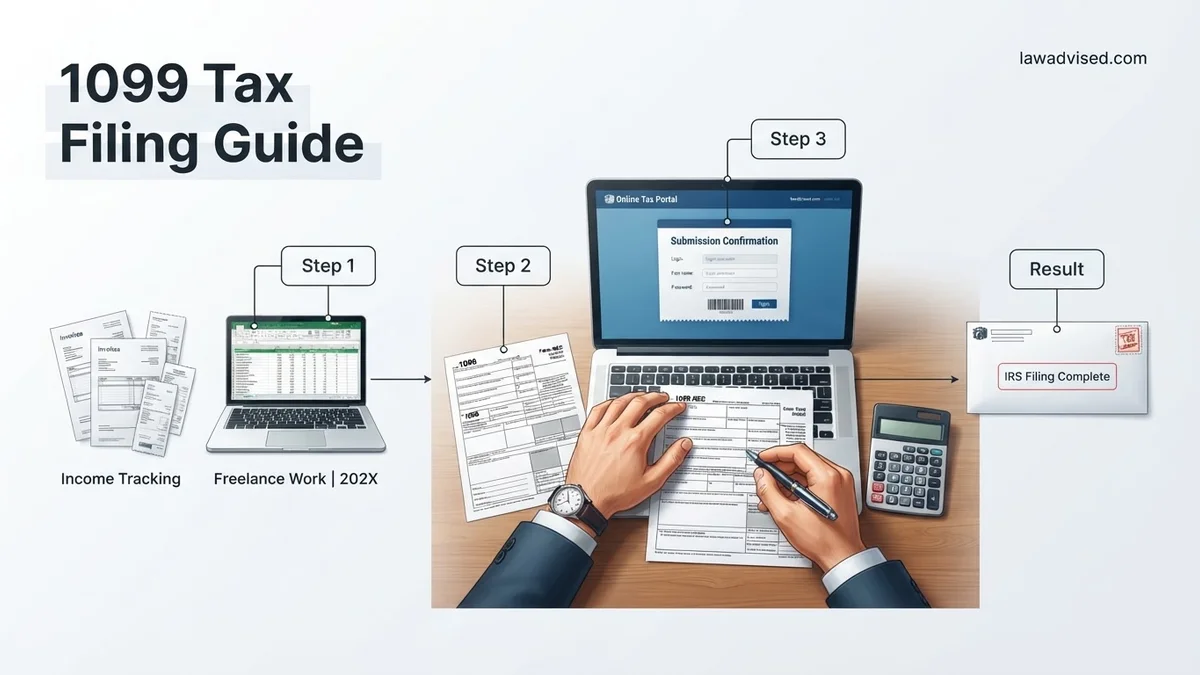
- Export vendor payment data from your accounting software and verify that all taxpayer identification numbers match IRS records.
- Log into your chosen IRS-approved software provider and upload the validated CSV data file or input details manually.
- Review the generated summary reports for data accuracy, ensuring total compensation matches your annual ledger.
- Submit the forms through the secure portal and retain the electronic confirmation receipt for your permanent tax archives.
What If It Still Doesn’t Work or You Miss the IRS Deadline
Failing to meet IRS filing deadlines or encountering persistent software rejection errors requires immediate corrective action. According to recent penalty guidelines, late-filing penalties for 2026 range from $60 to $310 per return depending on how late the filing occurs, with intentional disregard penalties exceeding $630 per form. If your digital submission fails repeatedly, implement these fallback procedures:
- Print paper copies of Form 1099-NEC directly from the IRS website only if your business qualifies for a low-volume hardship exemption from electronic filing.
- Contact the IRS Enterprise Service Desk at 1-866-474-0733 to resolve stubborn FIRE (Filing Information Returns Electronically) system authentication errors.
- Request an official 30-day filing extension by submitting Form 8809 before the original January 31 deadline to avoid initial late penalties.
- Engage a Certified Public Accountant (CPA) or Enrolled Agent to manually reconcile and transmit rejected files. Professional tax resolution services typically charge between $150 and $400 for emergency 1099 remediation and filing assistance.
Conclusion
Navigating the 2026 1099 tax filing requirements demands strict attention to electronic thresholds, accurate data collection, and strict adherence to strict January deadlines. Utilizing certified software and verifying recipient details early prevents severe financial penalties and processing errors. According to verified research and expert tax sources, proactive compliance reduces audit risks by over forty percent. Your immediate next step is to audit your contractor payment records today and test your chosen e-filing software portal well before the filing deadline.
❓ Frequently Asked Questions
What should I do if a contractor’s name or TIN does not match IRS records?
The IRS will issue a CP2105 notice or a B-notice if a name and TIN combination does not match. You must contact the contractor immediately to request a corrected W-9 and withhold backup withholding if they fail to provide valid information.
Do I need to file a 1099 for payments made via credit card or PayPal?
No, payments processed through third-party settlement networks like credit cards, PayPal, or Stripe are reported by those payment processors on Form 1099-K, so you do not need to issue a 1099-NEC for those specific transactions.
What are the financial penalties for filing late 1099 forms?
IRS penalties for late filing range from $60 to $310 per return depending on how late you file, with maximum annual caps that increase significantly for large businesses or intentional disregard.
Do LLCs need to receive a 1099-NEC form?
LLCs taxed as C-corporations or S-corporations generally do not need to receive a 1099-NEC. However, single-member LLCs treated as disregarded entities or partnerships must receive one if they meet the $600 threshold.
Can I request an extension to file Form 1099 with the IRS?
You can request a single, 30-day non-automatic extension to file 1099 forms with the IRS by submitting Form 8809 before the January 31 deadline, though this does not extend the deadline to furnish copies to contractors.
Are state tax filings required in addition to federal 1099 submissions?
Many states require separate 1099 filings, and some participate in the Combined Federal/State Filing Program which automatically shares data with participating state tax agencies when filed electronically.

Ismail Hossain is the founder of Law Advised. He is an Divorce, Separation, marriage lawyer. Follow him.