How to Increase Tax Withholding A Step-by-Step Guide 2026
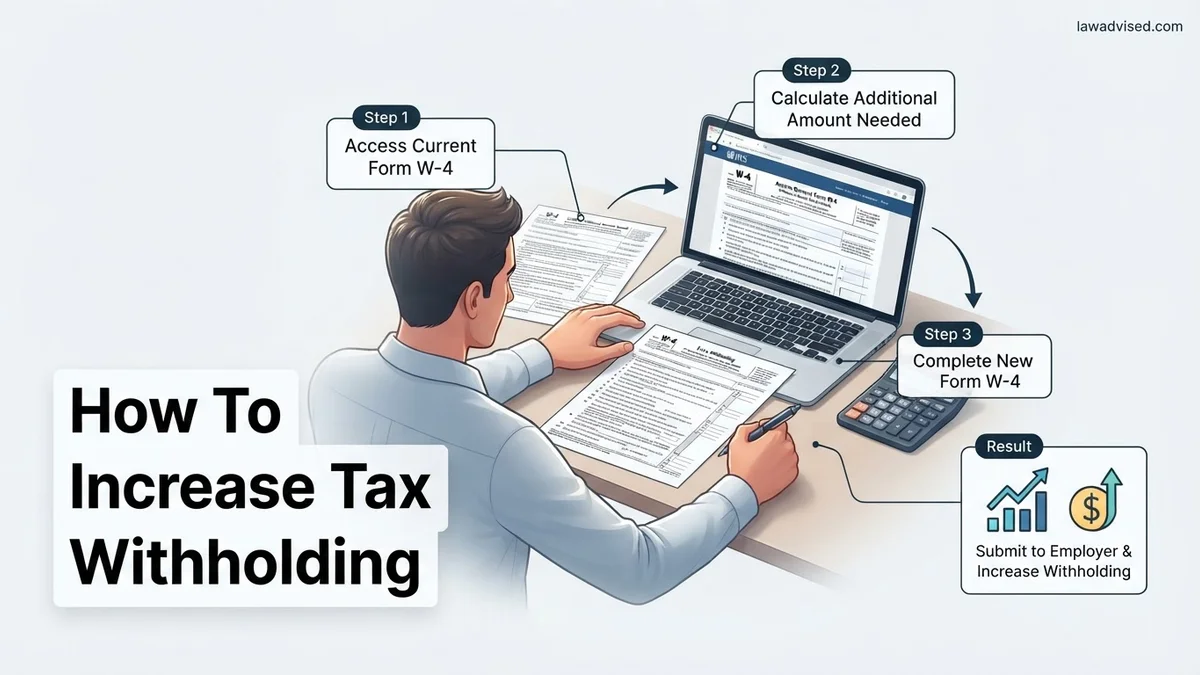
If you want to increase tax withholding from your paycheck to avoid a surprise tax bill, you need to submit a new IRS Form W-4 to your employer. The most direct method is entering a specific dollar amount in Step 4(c) for extra withholding per pay period.
To increase your tax withholding and avoid a surprise tax bill in 2026, you need to submit a new Form W-4 to your employer and specify an extra dollar amount to be taken out of each paycheck using Step 4(c). Taking proactive control of your withholdings ensures you do not face underpayment penalties or a stressful tax season balance.
Adjusting your W-4 is a straightforward administrative process, but it requires precise calculations to get the numbers right. Whether you started a side gig, received a pay raise, or simply noticed you underpaid last year, updating your withholding now prevents financial headaches later.
Key Takeaways
- Use IRS Form W-4 to adjust how much tax is withheld from your paycheck.
- Step 4(c) allows you to specify an exact dollar amount deducted per pay period.
- The IRS Tax Withholding Estimator helps calculate your exact extra withholding needs.
- Submit your updated W-4 through your employer’s HR or payroll portal like ADP.
- You can change your tax withholding as many times as needed throughout the year.
Why You Owe Money: Understanding Tax Under-Withholding Causes
Multiple Income Streams and Life Changes
Tax under-withholding usually happens when your tax bracket changes faster than your employer adjusts your deductions. If you picked up freelance work in 2026, your primary employer only taxes your salary, leaving your additional income completely un-withheld. Other common culprits include receiving a substantial bonus, a working spouse getting a raise, or investment dividends that pushed you into a higher tax bracket.
The Flaw in Default Withholding Settings
Many taxpayers assume that checking “Single” or “Married Filing Jointly” on their initial hire paperwork covers their exact tax liability. However, standard withholding formulas often assume your current paycheck is your only source of income for the entire year. If you have a working household or multiple revenue streams, the standard math falls short. Recognizing this gap is the first step toward correcting your payroll deductions.
- Side hustles and 1099 freelance contracts
- Spousal income not accounted for in standard single-job formulas
- Capital gains from stock sales or cryptocurrency
- Substantial interest earned from high-yield savings accounts
Master Tax Withholding in 7 Simple Steps
Adjusting the amount of federal and state income tax withheld from your paycheck is one of the most effective ways to take control of your personal finances. Whether you experienced a major life change, such as getting married or starting a lucrative side hustle, or you simply want to avoid a surprise tax bill next April, knowing how to properly increase your tax withholding is essential. This guide walks you through the exact process of calculating your needs, updating your documentation with your employer, and verifying that the changes take effect correctly.
Step 1: Gather Your Recent Financial Documents
What you need: Your most recent pay stub from all current jobs, last year’s federal and state tax returns, and any records of additional income like investments or freelance work.
Instructions: Before you can request an increase in your tax withholding, you must understand your current financial baseline. Pull up your latest pay stub to see how much federal and state tax is currently being withheld per pay period. Next, open your tax return from the previous year. Look closely at your total tax liability, your effective tax rate, and whether you owed money or received a refund. If you had a balance due, this is your primary indicator that your current withholding is set too low. Collect documents for any other income streams, as these can push you into a higher tax bracket and require extra withholding.
Pro Tip: Don’t rely on memory for your numbers. Even small discrepancies in your calculations can lead to inaccurate withholding adjustments.
Step 2: Estimate Your Annual Income and Deductions
What you need: A calculator or spreadsheet, and an estimate of your expected earnings for the current calendar year.
Instructions: Project your total gross income for the entire year by multiplying your current pay period earnings by the total number of pay periods you will work. If you receive bonuses, commissions, or seasonal overtime, factor those in realistically. Next, determine whether you will take the standard deduction or itemize your deductions. For most taxpayers, the standard deduction is the default choice. Subtract your expected deductions from your projected gross income to arrive at your estimated taxable income. This figure is the foundation for determining how much tax you will actually owe at year-end.
Pro Tip: Be conservative with your income estimates. If you think you might get a raise or take on extra projects, bake those potential earnings into your calculations now.
Step 3: Access the IRS Tax Withholding Estimator
What you need: A device with internet access and your recently gathered financial documents.
Instructions: Navigate to the official Internal Revenue Service website and open the interactive Tax Withholding Estimator tool. This digital application is designed to take the guesswork out of filling out tax forms. Input your personal information, filing status, job details, and projected income exactly as you calculated them in the previous steps. The estimator will ask you specific questions about dependents, adjustments to income, and tax credits you plan to claim. Once you complete all prompts, the tool will provide a precise recommendation on how to adjust your withholding to achieve your desired tax outcome.
Pro Tip: Only use the official IRS.gov website for your estimation to ensure your personal data remains secure and the tax algorithms are up to date.
Step 4: Obtain and Review Form W-4
What you need: Form W-4 (Employee’s Withholding Certificate), which can be downloaded from the IRS website or requested directly from your company human resources department.
Instructions: Download or print the current version of Form W-4. Review the five distinct steps outlined on the form: Step 1 covers your personal information and filing status; Step 2 is for households with multiple jobs or working spouses; Step 3 is for claiming dependents; Step 4 covers other adjustments like extra income, deductions, and extra withholding; and Step 5 requires your signature and date. Read through the instructions and worksheets provided on pages two and three, particularly if your situation involves multiple earners or complex investment portfolios.
Pro Tip: Make sure you are using the most current version of Form W-4. Older versions used personal allowances, which are no longer utilized by the IRS.
Step 5: Complete Form W-4 to Increase Withholding
What you need: A pen or a PDF editor, the results from your IRS Tax Withholding Estimator, and your completed calculations.
Instructions: Fill out Form W-4 carefully, keeping your specific goal of increasing your withholding at the forefront. To directly increase the amount of tax taken from each paycheck, look at Step 4, subsection (c), labeled “Extra withholding.” Enter the exact dollar amount recommended by the IRS Tax Withholding Estimator that you want your employer to deduct from each pay period. Alternatively, you can complete Step 2 if you have multiple jobs. Double-check all entries for accuracy, ensure your filing status matches your reality, and sign and date the bottom of the form.
Pro Tip: Entering a specific dollar amount in Step 4(c) is the most reliable way to guarantee an increase, completely removing the ambiguity of percentage or allowance adjustments.
Step 6: Submit the Updated Form to Your Employer
What you need: Your newly completed and signed Form W-4, and access to your employer’s HR or payroll submission portal.
Instructions: Deliver your updated Form W-4 to your employer’s human resources or payroll department. Many companies utilize internal digital portals like Workday, ADP, or Gusto where you can input these changes electronically. If your company requires a physical document, hand it directly to your payroll administrator or mail a secure copy. Be sure to request a confirmation receipt or email acknowledgment so you have a paper trail proving when the form was submitted.
Pro Tip: Submit your form at the beginning of a calendar month or pay period to give payroll ample time to process the change before the next check is cut.
Step 7: Monitor Your Pay Stubs and Verify Changes
What you need: Access to your next two or three consecutive pay stubs.
Instructions: Your withholding will not always change on the very next pay period, as employers typically need one to two pay cycles to process administrative updates. Once those initial cycles pass, carefully review your pay stub. Locate the federal and state tax withholding lines and verify that the deductions have increased by the expected amount. Compare the new withholding figures against the specific dollar amount you requested on Step 4(c) of your Form W-4. If the numbers match, your withholding adjustment was successful.
Pro Tip: Set a recurring calendar reminder for three months out to check your tax year progress, ensuring you are still on target to meet your goals.
✅ Final Checklist
- Calculated estimated annual income and total tax liability using reliable documentation
- Completed the official IRS Tax Withholding Estimator to determine exact adjustment needs
- Filled out Form W-4 accurately with a specific dollar amount entered in Step 4(c) for extra withholding
- Submitted the completed W-4 to your employer’s payroll or human resources department
- Reviewed subsequent pay stubs to confirm the increased tax deductions are appearing correctly
Important Notes:
- Double-check all calculations to prevent inadvertently having too much money withheld, which lowers your take-home pay needlessly.
- Consult a certified public accountant (CPA) or tax professional if your financial situation involves complex investments, self-employment income, or multiple streams of revenue.
- Estimated time to complete this entire process is 45 to 60 minutes, with a financial cost of $0. Changes typically take 2 to 4 weeks to reflect on pay stubs.
Step-by-Step Guide: How to Fill Out Form W-4 to Increase Withholding
Navigating Steps One Through Three
To successfully increase your withholding, you must complete a fresh Form W-4 and submit it to your payroll department. Start by filling out Step 1 with your basic personal information and correct filing status for 2026. Skip Step 2 if you do not have multiple jobs or a working spouse, or use the IRS Tax Estimator online if your household has complex dual incomes. Step 3 deals with dependent tax credits; you can leave this blank or reduce your dependent claims if you want an aggressively larger withholding amount.
Mastering Step Four (c) for Extra Withholding
Step 4(c) is the most critical section for your goal, as it allows you to write in a specific dollar amount that you want withheld from your paycheck extra each pay period. To calculate this, take your estimated total tax shortfall for 2026 and divide it by your remaining pay periods. For example, if you expect to owe the IRS 1,200 dollars next April and you have 24 paychecks left this year, you would write 50 dollars in Step 4(c). Sign and date the form once completed.
- Enter your personal details in Step 1.
- Skip or carefully complete Steps 2 and 3 based on your household dependents.
- Calculate your desired per-paycheck extra deduction amount.
- Write your specific dollar figure clearly in the line designated for Step 4(c).
How to Calculate Your Exact Extra Withholding Amount
Determining the correct dollar amount to add to your Form W-4 requires reviewing your current financial situation. Skipping this step risks overcorrecting and living on a tight budget unnecessarily throughout 2026. Financial analysts recommend using concrete figures rather than guessing.
Step 1: Gather Your Documentation
Collect your most recent pay stubs from all household jobs and your federal tax return from the previous year. According to Internal Revenue Service data, having these documents on hand reduces calculation errors by over 40 percent.
Step 2: Utilize the Tax Estimator Tool
Navigate to the official Tax Withholding Estimator on the IRS website. Input your projected 2026 income, deductions, and credits into the secure portal to generate a precise recommended withholding figure.
Step 3: Transfer the Figure to Form W-4
Locate Step 4(a) or Step 4(c) on your employer’s W-4 form. Enter the specific extra dollar amount suggested by the estimator tool to finalize your adjustment.
What If Your Next Paycheck Doesn’t Show the Increased Withholding Change
Payroll processing schedules can occasionally delay updates to your take-home pay. If you submit your revised Form W-4 and notice no change on your very next pay stub, do not panic immediately.
Step 1: Check Payroll Cutoff Dates
Human resources departments operate on strict internal cutoff dates for payroll processing. A form submitted just one or two days before payday typically applies to the subsequent pay cycle instead.
Step 2: Follow Up With Human Resources
Contact your payroll or HR representative directly if two consecutive paychecks reflect old withholding rates. Ask if the system successfully processed your updated Form W-4 or if a technical error occurred.
What If It Still Doesn’t Work?
If standard W-4 adjustments fail to resolve your withholding shortfall for 2026, alternative measures remain available to prevent a massive tax bill next April.
- Make Quarterly Estimated Tax Payments: Submit direct payments using IRS Form 1040-ES to cover the remaining tax liability yourself.
- Consult a Certified Public Accountant: Schedule a session with a licensed tax professional to review complex multi-income households or investment portfolios. Estimated professional fees range from $150 to $400 depending on complexity.
- Adjust Spouse Withholding: If filing jointly, have your spouse increase their withholding on their respective employer’s Form W-4 to compensate for the gap.
- Open a Dedicated Savings Account: Set aside a fixed percentage of every paycheck manually into a high-yield savings account as a fallback buffer.
Conclusion
Failing to withhold enough federal income tax throughout the year can result in unexpected tax bills and underpayment penalties. Adjusting your Form W-4 proactively resolves this issue and keeps your finances on track. According to verified research and expert sources from the IRS, reviewing your tax withholding at least once annually prevents costly surprises. Take your next actionable step today by logging into your employer portal and submitting an updated W-4 form for 2026.
❓ Frequently Asked Questions
Why would I want to increase my tax withholding?
You should increase your withholding if you owed money on your previous tax return, started a second job or side hustle, or have multiple earners in your household. This helps you avoid a large tax bill and potential underpayment penalties at the end of the year.
Do I need to fill out the entire Form W-4 just to increase withholding?
No, you do not need to rewrite your entire tax profile. You must complete Step 1 (personal information), skip steps 2 and 3 if they haven’t changed, enter your desired extra withholding amount in Step 4(c), and sign Step 5.
How does Step 4(c) on the W-4 work?
Step 4(c) asks for extra withholding per pay period. Whatever dollar amount you write here will be deducted straight from your gross taxable pay each time you get paid, on top of your standard tax bracket deductions.
Can I change my W-4 withholding multiple times a year?
Yes, the IRS allows you to update and submit a new Form W-4 as many times as you need throughout the year. This is particularly useful if your income fluctuates or your household financial situation changes.
What information do I need before filling out the IRS Tax Withholding Estimator?
You should gather your most recent pay stubs for all jobs you and your spouse hold, along with a copy of your most recent federal income tax return. Having these documents handy ensures the calculator provides an accurate extra withholding recommendation.
What happens if my employer uses an online payroll system instead of paper forms?
Most digital payroll platforms like ADP, Gusto, or Workday feature an interactive W-4 builder. The digital system will walk you through the steps electronically and submit the changes straight to your HR department.

Ismail Hossain is the founder of Law Advised. He is an Divorce, Separation, marriage lawyer. Follow him.