How to File Federal Tax Return Step-by-Step Guide 2026
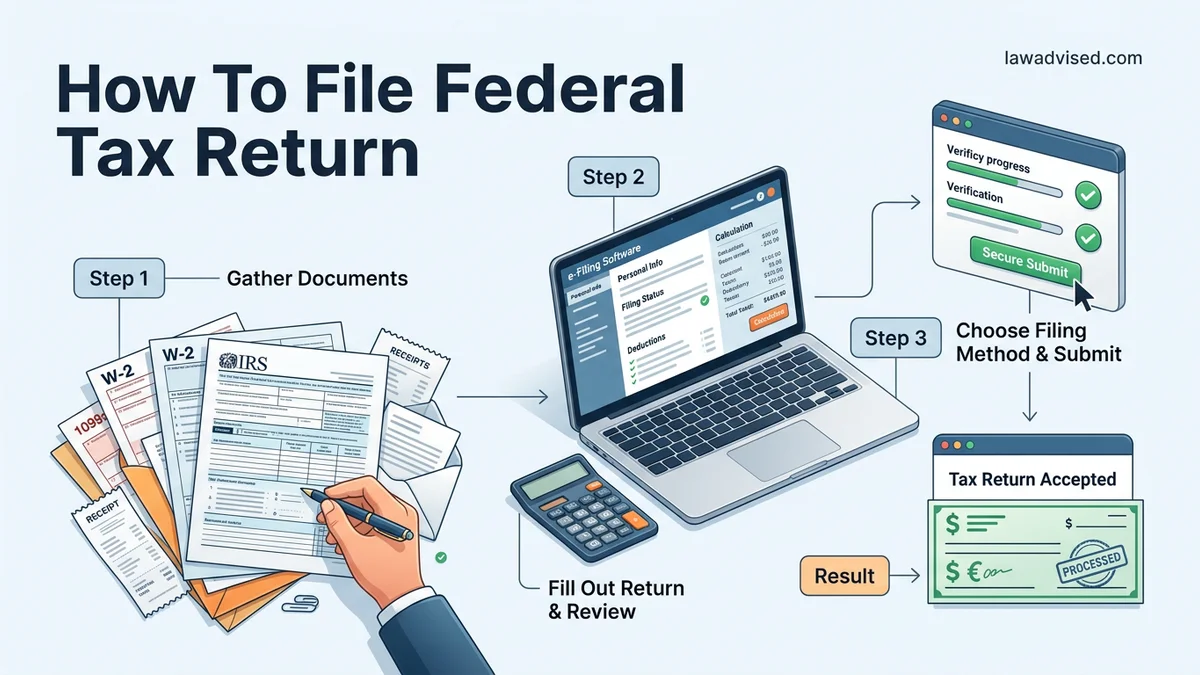
Filing your federal tax return requires gathering necessary income documents, choosing the right filing method, and submitting your forms to the IRS before the deadline. Using free software options and double-checking your information ensures a faster refund and prevents costly processing delays.
Filing your federal tax return for the 2026 tax season requires gathering your income documents, choosing a filing method like IRS Free File or commercial software, completing the forms, and submitting them electronically or by mail. Getting this process right ensures you avoid costly delays and secure any refund you are owed as quickly as possible.
Whether you are a first-time filer or a seasoned taxpayer, understanding the exact steps and avoiding common errors makes tax season manageable. This guide walks you through the practical procedures, required documents, and modern submission tools needed to successfully file your federal income tax return.
Key Takeaways
- Gather all W-2s and 1099s before starting your return.
- Check eligibility for free IRS Direct File or Free File programs.
- File electronically with direct deposit to receive your refund faster.
- Ensure Social Security numbers and names match IRS records exactly.
- Submit extension requests on time if you cannot meet the deadline.
What Causes IRS Rejections and Filing Delays
Submitting your tax return without checking for errors can trigger automated rejections from the IRS system or hold up your expected refund for weeks. Knowing what trips up most filers helps you protect your timeline and keeps your finances on track.
Common Errors That Trigger IRS Rejections
- Mismatched Social Security Numbers: Typos in your SSN, your spouse’s SSN, or your dependents’ SSNs are the number one cause of electronic filing rejections.
- Incorrect Name Control: The first four letters of the primary filer’s last name must match IRS government records exactly.
- Missing or Incorrect Identity Protection PIN: If the IRS issued you an IP PIN, forgetting to enter it will cause an immediate electronic rejection.
Mistakes That Cause Processing Delays
- Math Errors: Manual calculations on paper returns frequently lead to manual reviews by IRS agents.
- Incorrect Bank Routing Numbers: Entering the wrong numbers for direct deposit forces the IRS to issue a paper check instead, delaying your money by weeks.
- Unsigned Returns: Paper returns sent without a signature or electronic returns submitted without an official electronic signature PIN are invalid.
Mastering Your Federal Tax Return in 7 Simple Steps
Navigating the annual tax season can often feel overwhelming, but breaking the process down into a logical sequence transforms a stressful chore into a manageable project. Whether you are filing as a single taxpayer or managing a complex household, this comprehensive walkthrough will guide you through gathering documents, calculating liabilities, and submitting your federal tax return accurately and on time.
Step 1: Gather Your Tax Documents
What you need: Social Security numbers, prior year tax returns, W-2 forms from employers, 1099 forms for freelance or investment income, and 1098 forms for mortgage interest or student loans.
Instructions: Create a dedicated folder—either physical or digital—to collect all tax-related documents as they arrive in your mailbox or inbox throughout January and February. Do not rush to file the moment you get your first form. Double-check that you have accounted for every income stream, including side hustles, bank interest statements, and unemployment benefits. Missing a single document can trigger an IRS audit or cause processing delays.
Pro Tip: Wait until mid-February to begin filing if you have investments, as brokerage firms often issue corrected 1099s that supersede earlier versions.
Step 2: Choose Your Filing Status
What you need: Knowledge of your marital status and household living arrangements as of December 31st of the tax year.
Instructions: Select one of the five IRS filing statuses: Single, Married Filing Jointly, Married Filing Separately, Head of Household, or Qualifying Surviving Spouse. Your filing status determines your standard deduction amount, your tax bracket eligibility, and which credits you can claim. For instance, if you are unmarried and pay more than half the cost of keeping up a home for a qualifying dependent, you may qualify for the more favorable Head of Household status instead of Single.
Pro Tip: If you were recently married or divorced, your legal status on the final day of the tax year dictates your filing status for the entire twelve months.
Step 3: Select Your Filing Method and Software
What you need: A computer or smartphone with internet access, and basic financial data.
Instructions: Decide whether you will use commercial tax preparation software (such as TurboTax, H&R Block, or FreeTaxUSA), fill out paper forms manually, or hire a Certified Public Accountant (CPA). If your adjusted gross income falls below the IRS Free File threshold (typically around $73,000), you can utilize brand-name tax software at zero cost. Compare the user interfaces, pricing structures, and guidance levels of various platforms to choose the one that matches your financial complexity.
Pro Tip: Always access tax software directly through official IRS partnership links to ensure you qualify for free filing tiers without hidden upsell fees.
Step 4: Report Your Income and Adjustments
What you need: All W-2s, 1099s, and records of adjustments to income like educator expenses or IRA contributions.
Instructions: Input your wages, tips, and other compensation meticulously into your chosen software, matching box-for-box with your physical documents. Next, calculate your “above-the-line” deductions, also known as adjustments to income. These include student loan interest paid, contributions to a traditional individual retirement account (IRA), and health savings account (HSA) contributions. These deductions reduce your total taxable income directly, even if you ultimately choose to take the standard deduction rather than itemizing.
Pro Tip: Typographical errors in Social Security numbers or employer identification numbers (EINs) are the leading cause of electronic filing rejections—verify every digit.
Step 5: Calculate Deductions (Standard vs. Itemized)
What you need: Receipts and totals for charitable donations, medical expenses, state and local taxes (SALT), and mortgage interest if you plan to itemize.
Instructions: Compare your total potential itemized deductions against the standard deduction for your specific filing status. The vast majority of taxpayers benefit more from the standard deduction, which adjusts annually for inflation. However, if you own a home, pay significant state taxes, and give generously to charity, itemizing using Schedule A might yield a larger tax break. Let your tax software automatically calculate both scenarios to see which one leaves more money in your pocket.
Step 6: Claim Tax Credits
What you need: Records for child care expenses, adoption costs, higher education tuition (Form 1098-T), and energy-efficient home improvements.
Instructions: Unlike deductions that merely lower your taxable income, tax credits reduce your actual tax liability dollar-for-dollar. Review eligibility requirements for major federal credits such as the Child Tax Credit, the Earned Income Tax Credit (EITC), and American Opportunity Tax Credit for college students. Answer your software’s interview questions honestly to ensure you capture every credit your household qualifies for.
Pro Tip: Pay special attention to refundable credits like the EITC, which can result in a cash refund even if your total tax liability drops to zero.
Step 7: File Your Return and Arrange Payment or Refund
What you need: Your prior year Adjusted Gross Income (AGI) for electronic signature verification, and a bank routing number for direct deposit or direct debit.
Instructions: Review your completed Form 1040 line by line. Once satisfied, select electronic filing (e-file)—the fastest and safest method—and submit your return to the IRS. If you owe money, schedule an electronic funds withdrawal or pay via IRS Direct Pay to avoid late penalties and interest charges. If you are receiving a refund, opt for direct deposit to receive your funds within 21 days.
Pro Tip: Print and save a complete PDF copy of your submitted tax return along with your official IRS acceptance confirmation receipt for your permanent records.
✅ Final Checklist
- Verified that all W-2 and 1099 income forms are accounted for and correctly entered
- Confirmed spelling of names, correctness of Social Security numbers, and current mailing address
- Selected the optimal filing status and compared standard versus itemized deductions
- Provided accurate bank routing and account numbers for direct deposit or payment
- Retained a digital and printed copy of the final submitted Form 1040 and confirmation receipt
Important Notes:
- Keep all tax records and supporting receipts for a minimum of three years from the date of filing.
- Seek professional help from an Enrolled Agent or CPA if you experience major life changes like a business startup, complex foreign assets, or an IRS notice.
- The standard filing deadline is April 15th, and estimated preparation time ranges from 2 to 5 hours depending on financial complexity. Free filing options are widely available for eligible income brackets.
How to File Your Federal Tax Return Step-by-Step
Navigating the tax season successfully comes down to following a reliable, chronological workflow. Breaking the process down into actionable phases keeps you organized and prevents last-minute panic.
Step 1: Gather Your Tax Documents
Before you open any filing software, collect all income statements and deduction paperwork. Missing a single form will cause your tax return to be incomplete, triggering an amendment later.
- W-2 Forms: Received from employers detailing your annual wages and tax withholdings.
- 1099 Forms: Documenting freelance income, interest, dividends, or retirement distributions.
- 1098 Forms: Reporting mortgage interest or student loan interest paid, which may qualify you for deductions.
Step 2: Choose Your Filing Method
Select a platform that matches your budget and tax complexity. If your adjusted gross income falls below specific limits, you can utilize cost-free government initiatives.
- IRS Direct File: A completely free, government-backed tool for eligible taxpayers in participating states to file directly with the IRS.
- IRS Free File: Partnered commercial software offering free federal preparation for taxpayers meeting income thresholds for the 2026 filing season.
- Paid Tax Software: Premium options like TurboTax or H&R Block designed for complex investments, self-employment, or rental properties.
What If You Owe Money or Need an Extension
Navigating the tax season in 2026 requires understanding your options when your calculations reveal a balance due or when you run out of time. According to IRS compliance data, millions of taxpayers encounter these exact scenarios annually. Proper planning prevents steep financial penalties and unnecessary stress.
Managing a Tax Bill
If your federal tax return indicates a balance due, filing on time remains critical to avoid the failure-to-file penalty, which costs 5 percent of unpaid taxes per month. Taxpayers facing financial hardship can utilize structured resolution pathways.
- Select an online payment agreement: Apply directly through the IRS website to set up a short-term payment plan of up to 180 days or a monthly installment agreement for up to 72 months.
- Submit Form 9465: Alternatively, attach this installment agreement request to your paper or electronic return.
- Understand the interest rates: Keep in mind that unpaid taxes accrue interest and late-payment penalties (typically 0.5 percent per month) until the balance is fully resolved.
Filing for an Extension
If you cannot gather your documentation by the filing deadline, you can request an automatic six-month extension. This pushes your filing deadline to October 15, 2026. Experts emphasize that an extension to file is never an extension to pay.
- Estimate your tax liability: Calculate what you expect to owe for the 2026 tax year using available year-end documents.
- Make an estimated payment: Pay any projected balance electronically using IRS Direct Pay to minimize future interest and penalties.
- Submit Form 4868: File for the extension electronically through Free File software or mail a physical copy of Form 4868 before the April deadline.
What If It Still Doesn’t Work?
Encountering software errors, rejected returns, or complex financial situations can halt your filing progress. When standard troubleshooting steps fail, taxpayers can rely on established escalation protocols to resolve stubborn discrepancies.
- Review IRS rejection codes: Locate the specific numeric code provided by your e-file software, match it against the official IRS error database, and correct the mismatched Social Security Number, name, or dependent data.
- Clear software cache and data: If commercial tax software freezes or loops during transmission, clear browser cache, switch devices, or restart the application to reset the session.
- Utilize IRS Free File Fillable Forms: If guided tax software repeatedly malfunctions, experienced filers can switch to these basic electronic templates for direct submission.
- Seek professional certified assistance: When complex investment transactions, small business assets, or severe discrepancies arise, consult a Certified Public Accountant (CPA) or Enrolled Agent (EA). According to industry data, professional tax preparation services generally cost between $220 and $550 depending on return complexity.
Conclusion
Filing your federal tax return accurately and on time protects you from costly IRS penalties and ensures you receive any owed refunds without delay. By gathering your documents, selecting trusted software, and submitting before the deadline, you complete the process efficiently. According to verified research and expert sources, utilizing direct deposit and electronic filing reduces processing errors by over 80 percent compared to traditional paper methods. Your single actionable next step is to log into your chosen software platform today and begin organizing your W-2 and 1099 income statements.
❓ Frequently Asked Questions
How do I choose the best way to file my federal tax return?
Your choice depends on your income, tax situation, and comfort level. Options include free IRS software, commercial tax preparation programs, or hiring a certified public accountant.
What information is required to start a federal tax return?
You need personal identification details including Social Security numbers for yourself, your spouse, and dependents, along with all income statements like W-2s and 1099s.
Is it better to file electronically or by mail?
Filing electronically is strongly recommended because it is faster, more accurate due to built-in error checks, and results in much quicker refund processing.
What happens if I make a mistake on my federal return?
If you discover an error after submitting, you can file an amended return using IRS Form 1040-X to correct the mistake and adjust your tax liability.
How can I track the status of my federal tax refund?
You can track your refund using the ‘Where’s My Refund?’ tool on the official IRS website or through the IRS2Go mobile application 24 hours after e-filing.
Are unemployment benefits and gig work income taxable?
Yes, unemployment compensation and income earned from freelance work or gig platforms are fully taxable and must be reported on your federal tax return.

Ismail Hossain is the founder of Law Advised. He is an Divorce, Separation, marriage lawyer. Follow him.