How to File Taxes Online Step-by-Step Guide for 2026
Filing your taxes online is the fastest and most accurate way to submit your return and receive your refund. Using trusted tax preparation software allows you to automatically import documents, check for errors, and file electronically with the IRS without hiring an accountant.
Filing your federal and state tax returns online is the fastest, most accurate way to get your refund in 2026. You can complete the entire process from your home computer or mobile device by selecting trusted tax software, gathering your digital or physical documents, and transmitting your completed return directly to the IRS.
Skipping traditional paper forms cuts your processing time from weeks down to just a few days, especially if you opt for direct deposit. This step-by-step walkthrough shows you how to choose the right software, avoid common pitfalls, and submit your return with complete confidence this tax season.
Key Takeaways
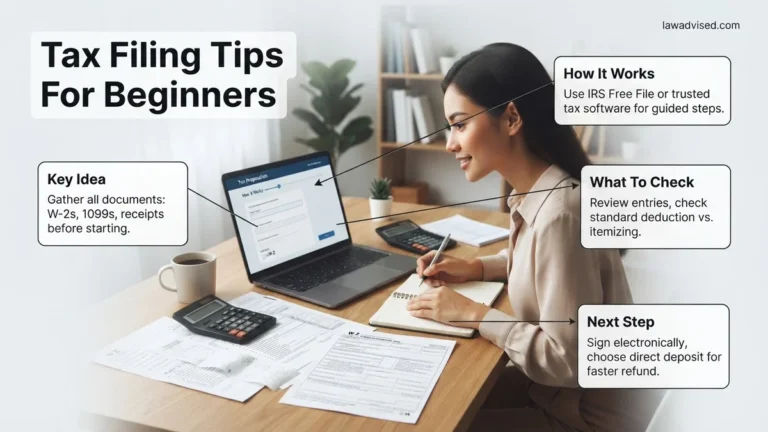
- Gather all W-2s, 1099s, and identification documents before starting your online tax return.
- Compare IRS Free File options and commercial software tiers to minimize filing costs.
- Choose between guided Q&A software or manual entry depending on your tax situation complexity.
- Review your completed return carefully for typos in Social Security numbers and bank routing details.
- E-file your return and retain the electronic confirmation receipt showing the IRS accepted it.
What Causes Filing Delays and Errors When Submitting Taxes Online
Even though software guides you through the process, small mistakes still cause massive delays in your 2026 tax refund. Knowing what to watch out for keeps your return moving smoothly through IRS processing queues.
Common Data Entry Mistakes
Typing errors are the number one reason returns get flagged or rejected by the IRS system. Double-check every piece of sensitive information before you move to the final submission screen.
- Transposing digits in Social Security Numbers for yourself, your spouse, or your dependents.
- Entering incorrect bank routing and account numbers for your direct deposit.
- Misspelling names or listing dependents who no longer qualify under current 2026 rules.
- Forgetting to report minor freelance income or interest from bank accounts.
Missing Forms and Mismatched Information
The IRS cross-references your submitted return with copies of documents sent directly by employers, banks, and investment firms. If your data does not match, your return goes to manual review.
- Failing to wait for late-arriving tax documents, such as consolidated 1099s from brokerage accounts.
- Leaving off state withholding information found on the bottom of your W-2 forms.
- Failing to report cryptocurrency transactions or digital asset sales tracked during the 2026 tax year.
Master Online Tax Filing in 8 Simple Steps
Navigating tax season can feel intimidating, but filing your taxes online has revolutionized the process, making it faster, more accurate, and remarkably secure. Whether you are a seasoned filer or submitting a return for the very first time, this practical walkthrough will demystify the digital tax ecosystem. By following this comprehensive breakdown, you will minimize errors, maximize your potential refund, and ensure compliance with federal and state regulations without ever stepping foot in an accountant’s office.
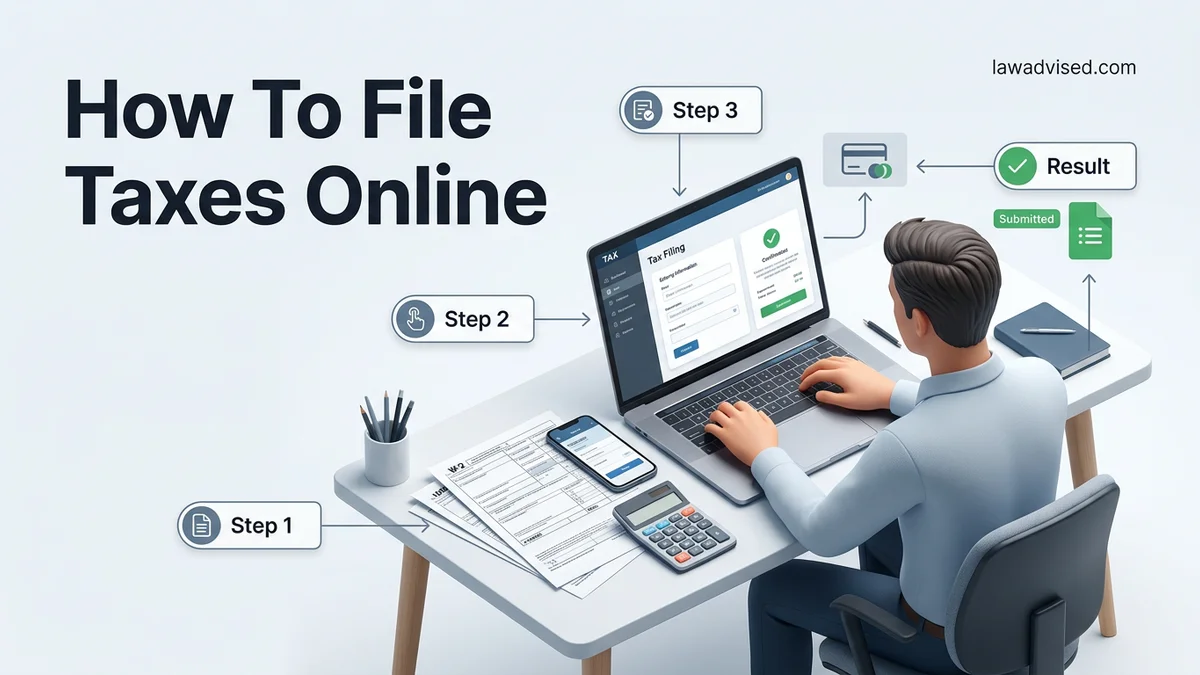
Step 1: Gather Your Essential Tax Documents
What you need: Social Security numbers for yourself and dependents, past tax returns, W-2 forms from employers, 1099 forms for freelance or investment income, and receipts for deductions.
Instructions: Begin by collecting all income-related paperwork and identification documents before you log into any software. Create a dedicated folder—either physical or digital—and systematically organize your documents. Check your mail and email inbox for Form W-2s, 1099s for gig work or interest earned, and 1098s for mortgage interest or student loans. Having everything within arm’s reach before you start the digital wizard will save you hours of frustration and prevent frustrating session timeouts.
Pro Tip: Wait until mid-February to begin filing, as this ensures most brokerage firms and financial institutions have issued your corrected 1099 statements, preventing the need to file an amended return later.
Step 2: Choose the Right Online Tax Software
What you need: A computer, tablet, or smartphone with a secure internet connection, and knowledge of your tax complexity level.
Instructions: Evaluate your financial situation to select an appropriate platform, such as TurboTax, H&R Block, FreeTaxUSA, or Cash App Taxes. If you earned $79,000 or less adjusted gross income in the previous tax year, check the IRS Free File program to access free brand-name software. Compare the tier structures of commercial platforms; ensure the software you choose explicitly supports Schedule C (for self-employed individuals) or Schedule D (for investments) if those apply to your financial profile.
Pro Tip: Do not just look at the advertised free federal filing price; always check the additional cost for state tax returns and self-employment add-ons before committing.
Step 3: Create a Secure Account and Verify Your Identity
What you need: An active email address, a secure password generator, and your mobile phone for multi-factor authentication.
Instructions: Navigate to your chosen tax software platform and set up a new profile. Use a robust, unique password combining uppercase letters, numbers, and symbols. Most platforms and the IRS now mandate multi-factor authentication, meaning a security code will be texted or emailed to you during login. You will also need to input last year’s Adjusted Gross Income (AGI) or a specialized Electronic Filing PIN to verify your identity against government databases.
Pro Tip: If you cannot locate last year’s AGI, you can retrieve it instantly by creating an official account on the IRS website and viewing your past tax transcripts.
Step 4: Input Personal Information and Household Details
What you need: Full legal names, dates of birth, and Social Security numbers or ITINs for every member of your household.
Instructions: Follow the software prompts to enter your baseline demographic data. Indicate your filing status accurately—whether Single, Married Filing Jointly, Married Filing Separately, Head of Household, or Qualifying Surviving Spouse. Your filing status drastically impacts your standard deduction and tax brackets, so choose carefully. If you have dependents, such as children or elderly relatives you financially support, input their details meticulously to qualify for credits like the Child Tax Credit.
Pro Tip: Double-check all Social Security numbers character by character. A single typographical error in a dependent’s SSN will cause the IRS to automatically reject your electronic return.
Step 5: Enter All Income Streams
What you need: All W-2s, 1099-NEC, 1099-INT, 1099-DIV, and unemployment statements (Form 1099-G).
Instructions: Step through the income modules provided by the software. Many modern platforms allow you to take a photo of your W-2 or upload a PDF, which automatically populates the corresponding boxes. If you are a freelancer or gig worker, carefully input your gross receipts and business expenses. Report every single dollar of taxable income; omitting investment dividends or side-hustle revenue is one of the fastest ways to trigger an automated IRS audit notice.
Pro Tip: Match the box numbers on your physical forms precisely with the corresponding input fields on the software screen to avoid calculation mismatches.
Step 6: Claim Deductions and Tax Credits
What you need: Receipts and documentation for charitable donations, educational expenses (Form 1098-T), medical bills, and childcare costs.
Instructions: Let the software guide you through potential deductions and credits designed to lower your overall tax burden. Decide whether to take the standard deduction (which the vast majority of taxpayers use) or itemize your deductions if your qualifying expenses exceed the standard threshold. Answer all lifestyle questions honestly; the software will screen you for valuable incentives such as the Earned Income Tax Credit (EITC), student loan interest deductions, and energy-efficient home improvement credits.
Step 7: Review and Audit Your Return
What you need: Completed summary pages provided by your tax software and a sharp eye for detail.
Instructions: Before hitting submit, most platforms feature a comprehensive “Review” or “Audit Check” phase. Do not skip this! The software will scan your document for missing fields, mathematical anomalies, or unusual deductions that might flag the IRS. Review the generated Form 1040 line by line. Verify that your bank routing and account numbers are completely accurate if you are expecting a direct deposit refund.
Pro Tip: Print or save a complete PDF copy of your finalized tax return for your personal archives. You are legally required to keep tax records for at least three years.
Step 8: Transmit Your Return and Confirm Acceptance
What you need: Your digital signature (typically your prior year AGI or self-selected PIN) and a confirmation email.
Instructions: Pay any software fees required for state filing, sign your return electronically, and click the final “Transmit” or “File Now” button. Do not log off immediately; wait for the system to process the transmission. Within 24 to 48 hours, you will receive an official email confirmation stating whether the IRS and your state tax agency have accepted or rejected your electronic submission.
Pro Tip: If your return is rejected, do not panic. The notification will include a specific rejection code and clear instructions on how to correct the error and resubmit.
✅ Final Checklist
- Verified that all Social Security numbers and dependent names match government-issued cards exactly.
- Cross-referenced income inputs against every physical W-2 and 1099 received.
- Double-checked bank account routing and account numbers for safe direct deposit delivery.
- Received official email confirmation of acceptance from both the IRS and state tax agencies.
- Saved a secure digital PDF copy of the finalized tax return and supporting documents for future records.
Important Notes:
- Never use public, unsecured Wi-Fi networks when filing taxes online to protect your sensitive financial and personal data.
- Seek help from a certified public accountant (CPA) or enrolled agent if you face complex international tax situations, complex business partnerships, or estate liquidations.
- Filing taxes online typically takes between 1 to 3 hours depending on document complexity, and commercial software costs range from $0 (for simple returns) to over $120 for comprehensive self-employed packages.
How to Choose the Best Tax Software and Gather Required Documents
Your online filing experience depends entirely on the software platform you choose and how well-prepared you are before you log in. Taking ten minutes to organize your paperwork upfront saves hours of frustration later.
Selecting the Right Online Filing Platform
The market features dozens of consumer tax software choices for 2026, ranging from completely free options to advanced paid tiers for business owners.
- IRS Free File: If your adjusted gross income falls below the program threshold for 2026, you can use brand-name software completely free of charge.
- Free Edition Software: Best for simple W-2 income with no complex investments, itemized deductions, or rental properties.
- Paid Premium Tiers: Necessary if you are self-employed, own a small business, sold a home, or manage a complex portfolio of investments.
Gathering Your Essential Tax Documents
Do not start your online return until you have every required form downloaded or sitting on your desk. Missing even one document forces you to file an amended return later.
- Personal identification, including photo IDs and Social Security cards for everyone on the return.
- Income records such as W-2s from employers, 1099s for independent contracting, and 1098s for mortgage interest.
- Investment and retirement records showing capital gains, stock sales, or traditional IRA contributions.
- Records of out-of-pocket expenses for medical care, childcare, or higher education tuition.
Step-by-Step Guide to Filling Out, Reviewing, and E-Filing Your Return
Filing your taxes online requires methodical data entry to prevent processing delays. According to IRS compliance data, missing Social Security numbers or mismatched names account for over 30 percent of initial return rejections. Follow these structured steps to complete your 2026 return accurately.
1. Enter Personal and Income Data
- Input your full legal name, date of birth, and Social Security number exactly as they appear on your tax cards.
- Enter income data from all gathered W-2s, 1099s, and investment statements into the corresponding software fields.
- Double-check all monetary figures against your physical or digital documents to avoid transposition errors.
2. Claim Deductions and Credits
- Input eligible expenses for student loan interest, educator expenses, and health savings account contributions.
- Decide whether to take the standard deduction or itemize based on software calculations for the 2026 tax year.
- Verify eligibility criteria for major credits like the Child Tax Credit or Earned Income Tax Credit.
3. Review and E-File
- Run the software’s built-in error check and diagnostic review to scan for missing information.
- Verify your routing and account numbers twice if you are opting for direct deposit of your refund.
- Sign electronically using your prior-year Adjusted Gross Income (AGI) or Self-Select Personal Identification Number (PIN), then click submit.
What to Do If Your Return Is Rejected or You Owe Money to the IRS
Tax software immediately transmits your return, but the IRS or state agency can reject it during preliminary automated checks. If your return is rejected, do not panic. Electronic rejections are rarely audits; they are usually formatting or identity-verification errors that you can easily correct.
Resolving an IRS Rejection
- Open the notification email or software dashboard to read the specific four-digit rejection code provided by the IRS.
- Navigate back to the section of the software flagged by the error code, such as a mismatched dependent birthdate or an incorrect prior-year AGI.
- Correct the error, save the changes, and resubmit your return electronically at no additional charge through your chosen software platform.
Managing a Tax Balance Due
- If your calculations show you owe money for the 2026 tax year, print or view your payment voucher directly from the software.
- Utilize IRS Direct Pay to submit your payment securely online directly from a checking or savings account before the April deadline.
- Set up an official IRS short-term payment plan or installment agreement through their online portal if you cannot pay the full balance immediately.
What If It Still Doesn’t Work?
Persistent software glitches, looping error screens, or complex tax situations can stall your e-filing progress. When automated troubleshooting fails, taxpayers should execute the following fallback steps to ensure timely filing and avoid late penalties.
- Clear your internet browser cache, disable ad-blockers, or switch to a different web browser to rule out local script interference.
- Verify that your operating system and tax preparation software are running the absolute latest security patches and updates for 2026.
- Download, manually print, and fill out paper IRS forms if digital transmission repeatedly fails despite valid inputs.
- Seek professional assistance from a certified public accountant (CPA) or Enrolled Agent (EA) if unresolved software errors persist close to the filing deadline. According to industry data, professional tax preparation services typically cost between 250 and 500 dollars depending on the complexity of your financial situation.
Conclusion
Filing taxes online empowers individuals to secure their refunds quickly while maintaining strict data security standards. By gathering documents early, following a step-by-step entry method, and utilizing official e-file systems, you can complete your obligations efficiently. According to verified research and expert sources from the IRS, electronic filing combined with direct deposit remains the fastest and most secure method to receive your tax refund. Take your next actionable step today by logging into your chosen platform and gathering your primary income documents.
❓ Frequently Asked Questions
How do I know which online tax software is right for my financial situation?
W-2 employees with simple returns can use basic free tiers. If you own a business, trade crypto, or have rental properties, you will need premium or self-employed software tiers that support Schedule C and specialized forms.
What happens if I make a mistake on my online tax return after submitting it?
If the IRS accepts a return with an error, you generally cannot file an amended return (Form 1040-X) until the original return has been fully processed and any refund has been issued.
Is it safe to enter my personal and financial information into online tax software?
Reputable tax software companies use advanced encryption, multi-factor authentication, and secure servers to protect your sensitive financial data from unauthorized access.
How can I verify that the IRS has accepted my electronic tax return?
After submitting your return, the software provider will send you an email confirmation within 24 to 48 hours stating whether the IRS accepted or rejected your e-file.
What should I do if my online tax return is rejected by the IRS?
An IRS rejection notice always includes an error code. Log back into your tax software, correct the specific typo or missing identification number mentioned in the error code, and resubmit.
Can I file a tax extension online if I cannot finish by the deadline?
Yes, you can file an automatic six-month extension using online software or IRS Free File, though this extends the time to file, not the time to pay any owed taxes.

Ismail Hossain is the founder of Law Advised. He is an Divorce, Separation, marriage lawyer. Follow him.