
Serve Manager Software For Process Servers: Streamline Your Workflow Today
Are you tired of juggling endless paperwork and missed deadlines as a process server? Managing your cases, tracking documents, and staying organized can quickly become overwhelming.
That’s where Serve Manager software comes in—it’s designed to make your job easier, faster, and more efficient. Imagine having all your important information at your fingertips, with tools that help you stay on top of every task. Keep reading to discover how Serve Manager can transform the way you work and help you serve your clients better than ever before.
Benefits Of Serve Manager Software
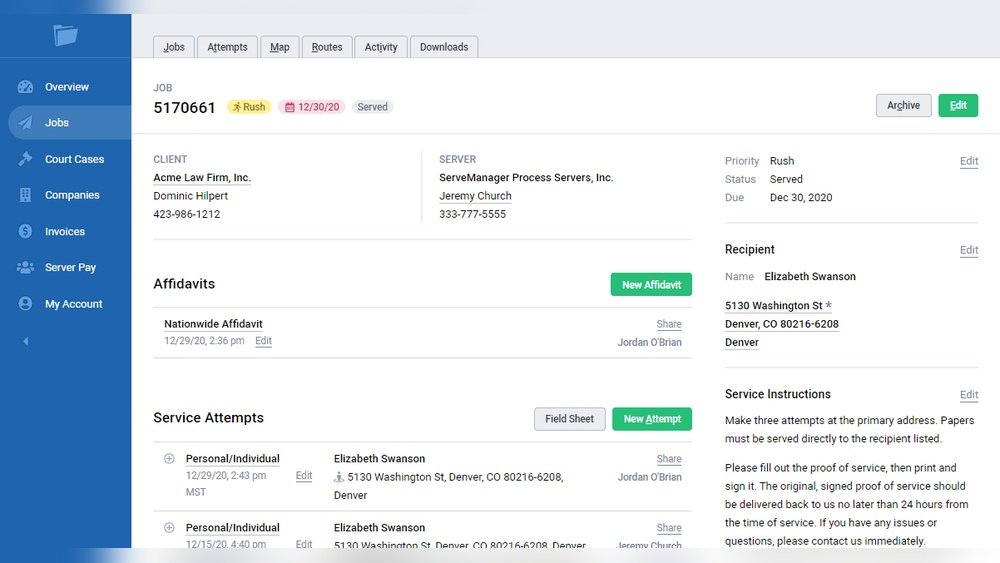
Serve Manager software offers many benefits for process servers. It helps manage tasks, clients, and documents in one place. This software simplifies daily work and saves time. It also improves accuracy and communication. These advantages help process servers work smarter and faster.
Boosting Efficiency
Serve Manager software organizes all jobs clearly. It tracks deadlines and appointments automatically. Process servers spend less time on paperwork. The software creates reports quickly. This lets servers focus on completing tasks, not managing files.
Reducing Errors
Manual work can cause mistakes in documents and schedules. Serve Manager reduces these errors by using templates and reminders. It checks for missing information before submitting forms. This helps avoid delays and legal issues. Accurate records build trust with clients.
Enhancing Communication
Serve Manager keeps all communication in one place. Process servers can message clients and update case status easily. It sends notifications about appointments and changes. Clear communication reduces confusion and missed deadlines. Everyone stays informed and connected.
Credit: www.servemanager.com
Key Features To Look For
Choosing the right Serve Manager software means finding features that boost your daily work. These features help process servers stay organized, save time, and track tasks easily. Each tool in the software should make serving documents smoother and more efficient.
Case Management Tools
Case management tools keep all your case details in one place. You can store client information, documents, and notes securely. These tools help you track progress and deadlines without confusion. Organizing cases well reduces errors and missed tasks.
Automated Scheduling
Automated scheduling lets you plan your service attempts fast. The software sends reminders and updates for appointments. It helps avoid double bookings and missed deadlines. Scheduling automation saves time and keeps your day on track.
Real-time Tracking
Real-time tracking shows your servers’ locations and task status instantly. You can see if a service was completed or if it needs follow-up. This feature improves communication and speeds up problem solving. It keeps clients informed with accurate updates.
Setting Up Serve Manager Software
Setting up Serve Manager software is simple and fast. This software helps process servers manage their tasks with ease. Proper setup ensures smooth daily operations and better case tracking.
Installation Steps
First, download the Serve Manager software from the official site. Open the installer and follow the instructions on screen. Choose the folder where you want to save the program. Wait for the installation to finish. Finally, launch the software and sign in with your account details.
Customizing Workflows
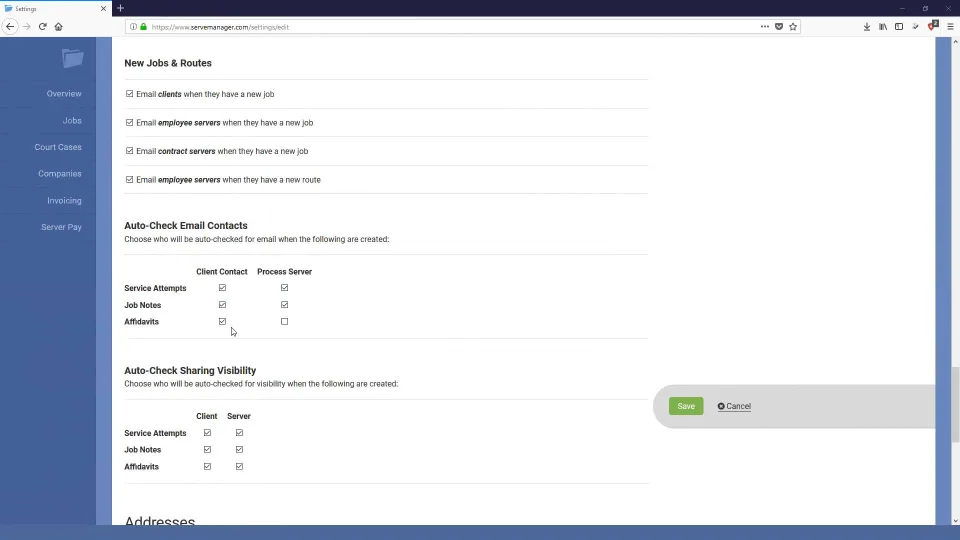
Serve Manager lets you tailor workflows to fit your needs. Go to the settings menu and select workflow options. Add or remove steps to match your process. Set deadlines and reminders for each task. This helps keep your work organized and on track.
Integrating With Existing Systems
Connect Serve Manager with your current tools for better efficiency. The software supports email, calendar, and document apps. Use the integration settings to link these systems. This saves time and reduces duplicate data entry. It keeps all your information in one place.
Credit: www.processserversoftware.com
Tips For Maximizing Productivity
Serve Manager software helps process servers handle many tasks quickly. Productivity is key to getting more done in less time. Small changes in how you use the software can make a big difference.
This section shares easy tips to improve your daily work. Focus on tools and habits that save time and reduce errors. These steps help you serve clients faster and stay organized.
Using Mobile Apps
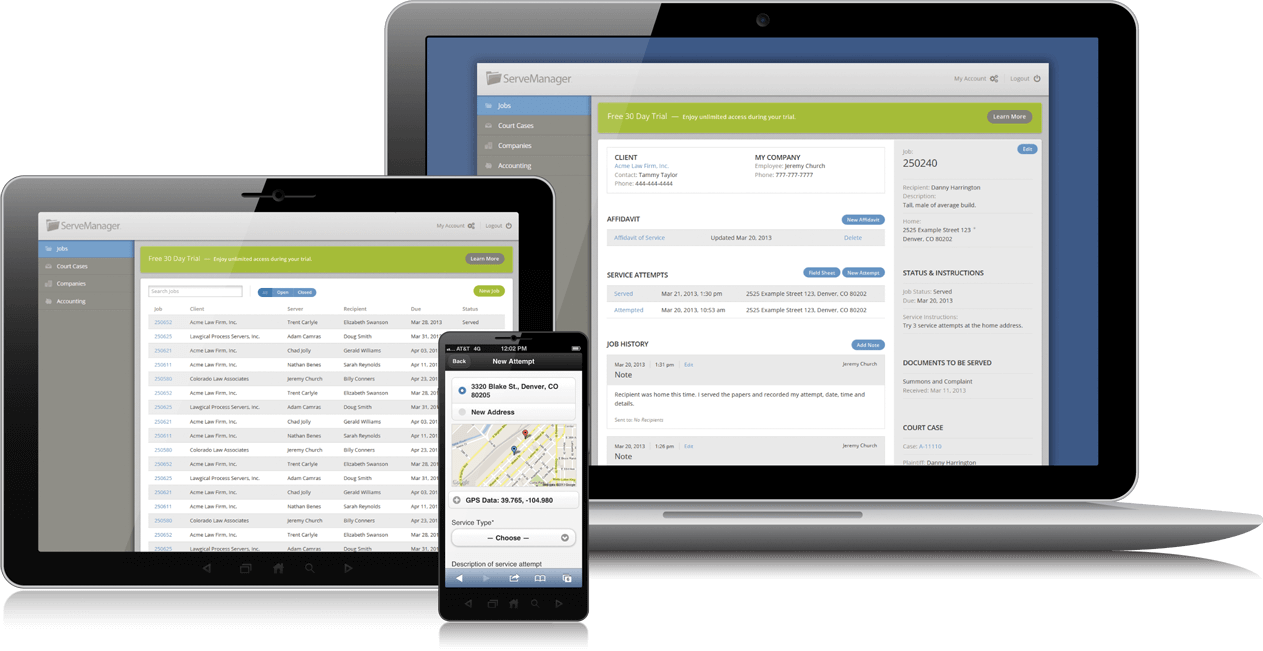
Mobile apps let process servers work outside the office. Use the app to check cases, get directions, and update status. It saves time by avoiding trips back to the office.
Apps send instant alerts for new jobs. You can upload photos or notes right after serving. This keeps information fresh and accurate.
Leveraging Reporting Tools
Reporting tools in Serve Manager show how tasks are progressing. They help spot delays or missed deadlines early. Use reports to plan routes and assign jobs smartly.
Reports also help track your team’s performance. You see who needs support or extra training. This keeps the whole team productive and focused.
Training Your Team
Train your team to use all Serve Manager features well. Regular training reduces mistakes and improves speed. Teach shortcuts and best practices for daily tasks.
Encourage team members to share tips they find useful. A well-trained team works smoothly and meets deadlines easily. Training keeps everyone confident and ready for work.
Common Challenges And Solutions
Serve manager software helps process servers organize their work. It saves time and reduces errors. Despite its benefits, some challenges can arise. Understanding these issues helps users handle them better. Below are common problems and easy solutions.
Data Security Concerns
Process servers handle sensitive client information. Protecting this data is very important. Some software may not have strong security features. This can lead to data breaches or loss.
Choose software that uses encryption for data storage. Regularly update passwords and limit access to trusted users. Back up data often to avoid permanent loss.
Technical Support Issues
Users sometimes face trouble with software functions. Quick help is needed to avoid work delays. Some providers offer slow or limited support.
Pick a software with reliable customer service. Look for options like live chat or phone support. Check user reviews about their support experience.
Adapting To Software Updates
Software updates bring new features and fixes. They can also cause confusion or disrupt workflows. Users may need time to learn changes.
Keep up with update notes and training materials. Test updates on a small scale before full use. Ask support for guidance if problems appear.
Credit: www.servemanager.com
Frequently Asked Questions
What Is Serve Manager Software For Process Servers?
Serve Manager software helps process servers manage and track legal document deliveries. It organizes routes, schedules, and client information in one place. This makes the job easier and saves time.
How Does Serve Manager Improve Process Serving Efficiency?
It automates task assignments and updates case status in real-time. This reduces errors and speeds up communication. Process servers can focus more on serving documents, less on paperwork.
Can Serve Manager Software Track Service Attempts And Results?
Yes, it records each attempt with time, location, and notes. This creates a clear service history for clients and courts. It helps prove compliance and improves accountability.
Is Serve Manager Software Easy To Use For Beginners?
The software has a simple, user-friendly interface designed for all skill levels. It offers tutorials and customer support to help new users. Process servers can start quickly without tech experience.
Conclusion
Serve Manager software helps process servers work faster and smarter. It keeps all case details organized in one place. Users can track progress and deadlines easily. The software reduces mistakes and saves time daily. It fits well with many business sizes and needs.
Choosing the right tools makes service of process smoother. This software supports clear communication between servers and clients. It helps improve efficiency without extra effort. A simple system can make a big difference in your work.

Ismail Hossain is the founder of Law Advised. He is an Divorce, Separation, marriage lawyer. Follow him.