Tax Refund Status Explained 2026 A Guide to IRS Stages
Navigating IRS tracking tools can be confusing when your payment stalls. This guide explains what every tax refund status means and provides a clear breakdown of timelines, common errors, and next steps.
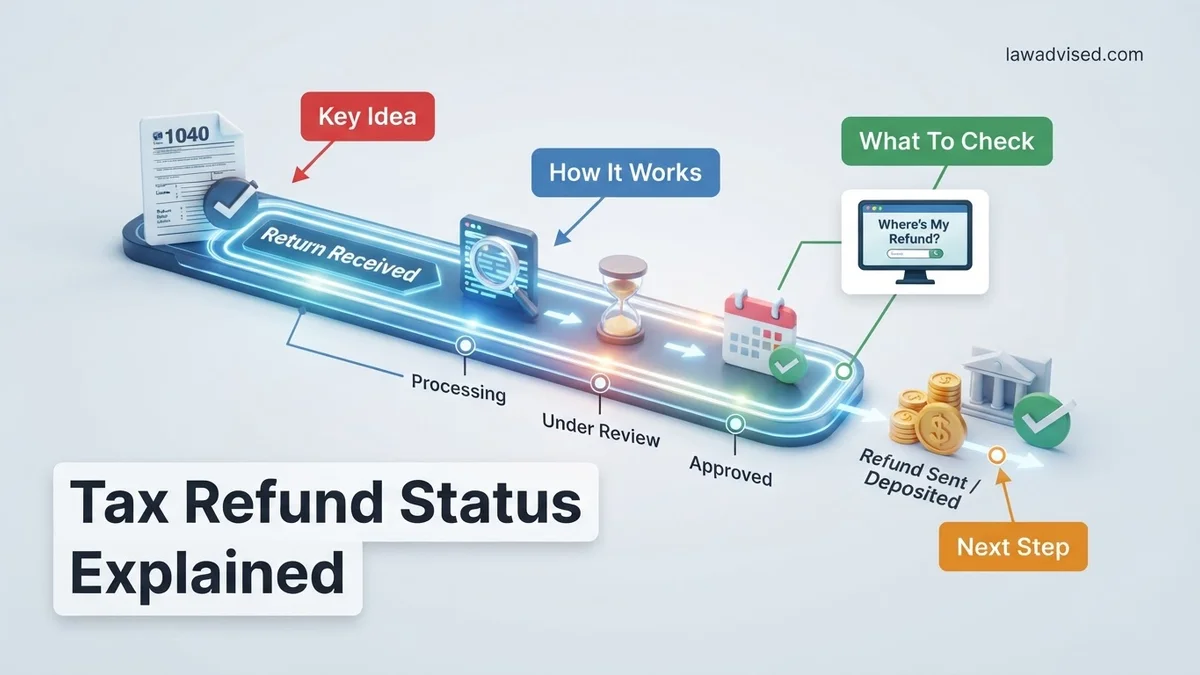
Checking your 2026 tax refund status often feels like looking into a black hole. The Internal Revenue Service moves your return through three distinct stages: Return Received, Refund Approved, and Refund Sent. Each phase carries specific procedural meanings and timelines that determine when cash actually hits your bank account.
Knowing what these milestones mean helps you separate normal processing windows from actual trouble spots. When you log into the IRS Where’s My Refund tool in 2026, you will encounter precise status indicators that dictate your next steps. Let’s break down what is happening behind the scenes.
Key Takeaways
- The IRS refund tracker moves through three main stages:Received, Approved, and Sent.
- Most e-filed refunds are issued within 21 days of acceptance.
- A ‘Still Being Processed’ message often indicates identity verification or manual review.
- Errors on your return will trigger automatic holds that extend processing times.
- Always use the official IRS Where’s My Refund tool to check your real-time status.
What Causes IRS Refund Delays and Status Freezes
The Dreaded “Still Being Processed” Message
If your 2026 tax tracker suddenly switches to a generic “still being processed” message instead of giving you a definitive approval date, do not panic. This usually means your return hit a manual review queue.
- Math Errors: Automated systems caught a discrepancy between your W-2 data and what you typed.
- Missing Forms: Schedules related to specific credits like the Earned Income Tax Credit were left blank or incomplete.
- Identity Verification: The IRS security systems flagged your return for potential fraud protection checks.
Common IRS Error Codes and Audit Flags
Beyond simple processing delays, you might spot specific alphanumeric codes on your official IRS account transcript. Reference codes like 152 generally just mean you are experiencing a standard seasonal delay. However, codes ending in 570 or 420 mean the IRS has placed a temporary freeze on your account because they need to verify your income or pull your file for a closer audit review.
How to Read and Track Your Tax Refund Status Step by Step
Stage 1: Return Received
This initial status means the IRS has successfully ingested your electronic or paper tax document into their master processing database. For electronic filings in 2026, this usually happens within 24 to 48 hours of submission. If you filed by paper, expect this stage to take up to four weeks just to register. At this point, the system is running preliminary automated checks for basic mathematical accuracy and identity confirmation.
Stage 2: Refund Approved
Once your return clears the initial automated filters, the status shifts to Refund Approved. This is the green light you have been waiting for. The IRS has calculated your exact overpayment amount and scheduled your payout. You will typically see a specific release date assigned to your file within this portal. For direct deposit users, funds generally arrive within five days of hitting this milestone.
Stage 3: Refund Sent
The final phase means the U.S. Treasury has officially transmitted the funds to your designated financial institution or mailed a physical paper check. Keep in mind that your bank might take an additional one to three business days to post that incoming ACH transfer to your available balance. If your status shows Refund Sent but nothing appears after five business days, you will need to initiate a formal trace with the IRS.
How to Fix Common Tax Refund Status Errors
Encountering an error message on the IRS portal can be stressful, but most codes have straightforward resolutions. The IRS utilizes specific system codes to indicate why a return requires additional review. Addressing these alerts promptly prevents extended processing delays.
Decoding IRS Error Codes and Action Steps
- Locate your reference code: Identify the specific error number or tax topic displayed beneath your refund tracker.
- Verify personal details: Ensure your Social Security Number, filing status, and exact refund amount match your submitted documents.
- Review for math discrepancies: Check your Form 1040 for calculation errors that often trigger automated system holds.
- Wait for official correspondence: If the system requests identity verification, wait for the official IRS letter containing your unique control number.
According to federal tax administration data, simple mathematical corrections add an average of two to three weeks to the standard processing timeline. Resolving identity confirmation alerts online typically accelerates release dates by ten days compared to mail-in responses.
What If Your Tax Refund Status Still Does Not Update?
When the tracker remains blank past the standard 21-day window, proactive intervention is required. Delays often stem from backlogged manual processing departments rather than missing data.
- Check IRS transcripts: Access your online account to view your Account Transcript for hidden processing codes or missing document flags.
- Contact the IRS helpline: Call the customer service line directly, utilizing specialized directory bypass techniques to reach a live representative.
- Engage the Taxpayer Advocate Service: Request assistance from this independent organization if you are experiencing severe financial hardship due to the delay.
- Seek professional assistance: Consult a Certified Public Accountant or Enrolled Agent to review your filed return for systemic errors. Professional representation fees typically range from $150 to $400 depending on complexity.
Conclusion
Navigating the complex stages of IRS processing requires patience and attention to detail. Most status delays resolve independently once automated security checks conclude, though proactive error correction accelerates the timeline significantly. According to verified research and expert financial sources, utilizing the official online tracking tool remains the safest and most reliable method to monitor your funds. As an actionable next step, log into your secure IRS portal today to verify your current transcript codes and ensure no action is pending.
❓ Frequently Asked Questions
Why hasn’t my tax refund status changed after 21 days?
If 21 days have passed since acceptance and your status has not changed, your return may be flagged for manual review, security screening, or contain errors that require correction. You should check your IRS online account for any specific notices or required action items.
What is the difference between Return Received and Refund Approved?
Return Received simply means the IRS has your paperwork in their queue. Refund Approved means your return has cleared processing, your refund amount is finalized, and a specific deposit or mail date has been assigned.
Can I call the IRS to speed up my tax refund status?
Calling the IRS generally will not speed up the processing of your tax return. Customer service representatives typically cannot provide a faster timeline unless it has been more than 21 days for e-file or six weeks for paper returns, or if the system indicates you need to call.
What should I do if my refund status says mailed instead of direct deposit?
If the IRS shows your refund was mailed as a check, it usually means your direct deposit information was invalid, rejected by your bank, or you filed a paper return. You must wait for the physical check to arrive in the mail, which can take several weeks.
Does the IRS tool show exact deposit dates for everyone?
Not always. While the tool provides an official deposit date once you reach the Approved stage, some accounts may experience delays depending on bank processing times, weekends, and federal holidays.
What do tax topic codes mean on the refund status page?
Tax topic codes (such as Topic 152) provide general information regarding why your refund might be delayed or how processing works. They are standardized informational messages rather than direct warnings about an error.

Ismail Hossain is the founder of Law Advised. He is an Divorce, Separation, marriage lawyer. Follow him.