How to Reduce Tax Withholding Step-by-Step Guide for 2026
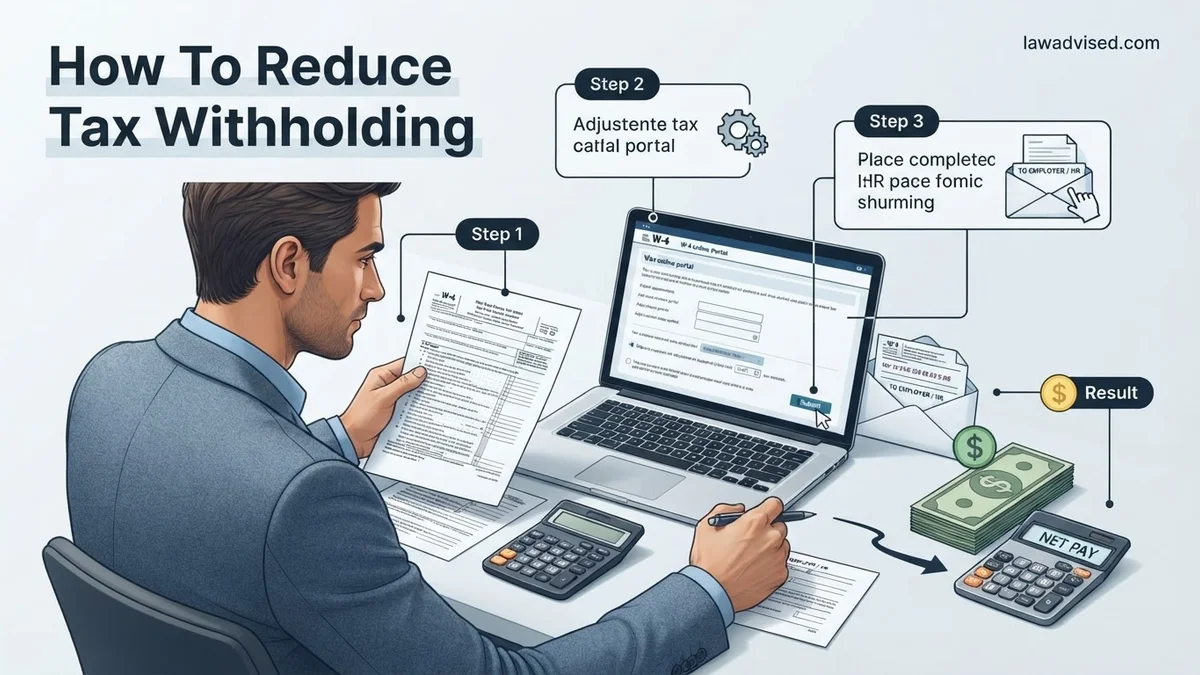
If you are receiving a massive tax refund, too much money is being withheld from your paycheck throughout the year. You can easily keep more of your hard-earned cash right now by submitting a revised IRS Form W-4 to your employer’s HR or payroll department. This step-by-step guide explains how to accurately adjust your federal withholding without accidentally owing a huge tax bill next April.
To reduce your federal income tax withholding and increase your take-home pay right now, you need to submit a revised IRS Form W-4 to your employer’s payroll department. Adjusting how much tax comes out of each paycheck puts your hard-earned money back in your bank account immediately, rather than waiting for a large refund next year.
Managing your W-4 properly is the direct mechanism to control your cash flow. If you consistently receive a massive tax refund every spring, you are essentially giving the government an interest-free loan throughout 2026. This step-by-step guide shows you how to accurately update your withholding using the official IRS tool and your W-4 form.
Key Takeaways
- Submit a new IRS Form W-4 to your employer’s payroll department to decrease your tax withholding.
- Use the official IRS Tax Withholding Estimator to calculate your exact adjustment numbers safely.
- Claim eligible dependents in Step 3 of the W-4 to instantly lower the amount of tax taken out.
- Account for itemized or standard deductions in Step 4b to further reduce taxable income per paycheck.
- Monitor your paystubs after the change to ensure your new withholding matches your financial goals.
Why Your Paycheck Has Too Much Tax Withholding
Common Triggers for Over-Withholding
Many employees have too much tax taken out of their paychecks without realizing it. The IRS tax tables often default to conservative withholding estimates, assuming you have no other deductions or tax credits. If your life circumstances changed recently, your current W-4 settings are likely outdated for the 2026 tax year.
- Your previous employer used an old W-4 format from before 2020.
- You received a significant pay increase, which pushed your automated withholding bracket higher.
- You experienced major life events like getting married or having a child, but never updated your paperwork.
The True Cost of a Large Refund
A big tax refund feels like a bonus, but it actually represents money you earned months ago. By reducing your withholding, you flatten out your monthly cash flow. You can use that extra cash throughout 2026 to pay down high-interest debt, invest in retirement accounts, or build an emergency fund.
- Your money sits in a government account earning zero interest.
- You miss out on compounding growth opportunities.
- Your everyday budget gets unnecessarily squeezed by smaller net paychecks.
Master Your Tax Withholding in 6 Simple Steps
Adjusting your tax withholding is one of the most effective ways to take control of your personal cash flow. When you have too much tax withheld from your paycheck, you are essentially giving the government an interest-free loan throughout the year. This guide covers how to accurately calculate your financial needs, utilize the proper government forms, and successfully submit your changes to human resources to maximize your take-home pay immediately.
Step 1: Retrieve Your Most Recent Paystub
What you need: Your latest physical or electronic paystub and a calculator or spreadsheet software.
Instructions: Locate your most recent earnings statement to examine your year-to-date (YTD) federal income tax withheld, state tax withheld, and gross pay. Understanding your current withholding baseline is critical before attempting any adjustments. Look specifically at the federal income tax line item to see how much money is currently leaving each paycheck. This figure allows you to track whether you are currently on pace for a massive refund, which indicates that your withholding is set higher than necessary.
Pro Tip: Do not rely on memory for your current withholding amounts; always use an actual paystub from the current calendar year to ensure your calculations are based on up-to-date data.
Step 2: Gather Your Previous Year Tax Return
What you need: A copy of your federal tax return (Form 1040) from the previous tax year.
Instructions: Pull out your last filed tax return to review your total tax liability, adjusted gross income, and standard or itemized deductions. Your past tax return serves as the closest blueprint for your upcoming tax obligations, assuming your financial situation remains relatively stable. Compare your total tax liability from last year with the total federal tax you expect to have withheld this year if you make no changes. This comparison highlights the gap between what you actually owe the government and what you are currently paying.
Pro Tip: If you experienced major life changes since last year—such as getting married, having a child, or buying a home—keep those changes in mind, as your old return will only serve as a baseline.
Step 3: Access the IRS Tax Withholding Estimator
What you need: An internet-connected device, your paystubs, and your previous tax return.
Instructions: Navigate to the official IRS website and open the Tax Withholding Estimator tool. Input all requested financial data, including your projected annual income, current federal withholding YTD, spouse’s income if filing jointly, and any deductions or credits you plan to claim, such as the Child Tax Credit. The estimator processes this information against current tax brackets and outputs a precise recommendation for how to fill out a new withholding form. This digital tool eliminates guesswork and protects you from accidentally under-withholding.
Pro Tip: Complete this process during a time when you have at least twenty uninterrupted minutes, as accuracy is entirely dependent on the precision of the numbers you enter.
Step 4: Obtain and Complete IRS Form W-4
What you need: The results from the IRS Estimator tool and a blank IRS Form W-4 (Employee’s Withholding Certificate).
Instructions: Download a fresh copy of Form W-4 from the IRS website or request one from your employer’s human resources or payroll department. Transfer the specific recommendations generated by the IRS Estimator directly onto the form. Pay close attention to Step 2 if you hold multiple jobs or file jointly, and Step 3 if you are claiming dependents. If you want to reduce your withholding to increase take-home pay, you will typically adjust your deductions, claim dependents accurately, or specify an additional lower withholding amount in the designated sections.
Pro Tip: Double-check all math and ensure you sign and date the bottom of the form; unsigned W-4 documents will be rejected by payroll administrators.
Step 5: Submit the Form to Your Payroll Department
What you need: Your completed and signed Form W-4, along with your company’s HR portal login or physical office location.
Instructions: Deliver your updated Form W-4 to your employer’s human resources or payroll processing department. Many modern companies utilize employee self-service portals like Workday or ADP, allowing you to input these changes digitally without needing a paper form. If submitting digitally, save a PDF confirmation of your submission for your personal financial records. Ask your payroll contact roughly how many pay cycles it will take for the adjustment to officially take effect on your upcoming paychecks.
Pro Tip: Submit your form at least two weeks before the end of a pay period to ensure it gets processed in time for the next scheduled distribution.
Step 6: Monitor Your Subsequent Paystubs
What you need: Access to your next two or three paystubs following the submission.
Instructions: Review your upcoming paystubs carefully to verify that the federal income tax withholding deduction has successfully decreased according to your expectations. Calculate your new net take-home pay and ensure that the math aligns with the adjustments you made on your W-4 form. If the withholding amount has not changed after two full pay cycles, immediately follow up with your payroll department to confirm they received and processed your document correctly.
Pro Tip: Revisit the IRS Estimator mid-year, especially around July or August, to ensure your withholding remains accurate and you are not accidentally trending toward owing a penalty at tax time.
✅ Final Checklist
- Verified current year-to-date withholding on your latest paystub
- Consulted the official IRS Tax Withholding Estimator online
- Accurately filled out and signed a new IRS Form W-4
- Successfully submitted the updated W-4 to your employer’s payroll department
- Checked your next paystub to confirm the withholding reduction took effect
Important Notes:
- Be careful not to reduce your withholding too much, as under-withholding can result in unexpected tax bills and IRS penalties at the end of the year.
- Seek professional help from a certified public accountant (CPA) if you have complex investment income, self-employment revenue, or complicated multi-state tax situations.
- Estimated time to complete: 30 to 45 minutes. Cost: Free (using official IRS tools).
How to Fix Tax Withholding Using the IRS Estimator Tool
Gathering Your Documents Before You Start
Before you touch your W-4, you need accurate data to plug into the official calculator. Guessing your numbers will result in under-withholding, which can trigger a surprise tax bill. Take ten minutes to collect your most recent financial documents.
- Your most recent pay stubs for all jobs held by you and your spouse.
- Your most recently filed tax return from the prior year.
- Estimates of other income sources like freelance work, dividends, or side hustles.
Using the Official IRS Tax Withholding Estimator
Go to the IRS website and open the Tax Withholding Estimator tool for 2026. This interactive calculator takes your specific financial profile and translates it into the exact line items you need for your new W-4 form. Follow the on-screen prompts carefully to ensure maximum accuracy.
- Enter your current salary, federal tax withheld to date, and pay frequency.
- Input expected deductions such as student loan interest or charitable contributions.
- At the end, the tool generates specific, exact numbers for Steps 3 and 4 of your W-4.
Step-by-Step Instructions to Fill Out IRS Form W-4
Completing the updated IRS Form W-4 requires careful attention to detail to ensure your 2026 tax withholding aligns with your actual liability. According to Internal Revenue Service guidelines, you should have your most recent pay stubs and tax return on hand before beginning the process.
- Complete Step 1: Enter your personal information, including your name, address, Social Security number, and filing status (Single, Married filing jointly, or Head of household).
- Complete Step 2: Use this section only if you hold multiple jobs simultaneously or if you are filing jointly and your spouse also works. The IRS recommends using the online Tax Withholding Estimator tool to ensure accurate calculations across multiple incomes.
- Complete Step 3: Claim dependents by multiplying the number of qualifying children under age 17 by $2,000, and other dependents by $500, then entering the total dollar amount in this field.
- Complete Step 4: Account for other adjustments, such as other income not from jobs (Step 4a), expected deductions beyond the standard deduction (Step 4b), and any extra tax you want withheld per pay period (Step 4c).
- Complete Step 5: Sign and date the form, then submit the completed document directly to your employer’s payroll or human resources department.
What If It Still Doesn’t Work?
If you submitted your updated Form W-4 and notice no change in your net pay after two complete pay cycles, financial professionals advise taking immediate corrective action. Payroll departments sometimes experience processing delays or administrative backlogs.
- Confirm receipt of your form with your human resources or payroll department in writing to ensure it was entered into their processing system correctly.
- Log into your employer’s self-service employee portal to verify that your withholding elections match what you submitted on the physical or digital W-4.
- Make manual quarterly estimated tax payments directly to the IRS using IRS Direct Pay if your employer cannot update your withholding in a timely manner.
- Consult a certified public accountant (CPA) or Enrolled Agent if complex multi-stream income issues persist. Professional tax advisory services typically cost between $150 and $450 depending on the complexity of your financial situation.
Conclusion
Managing your tax withholding prevents giving the federal government an interest-free loan throughout the year while protecting you from unexpected tax bills and penalties. By updating your Form W-4 to accurately reflect your 2026 deductions, credits, and filing status, you can optimize your monthly cash flow. According to verified research and expert sources from the American Institute of CPAs (AICPA), proactive tax planning remains the most effective method for maintaining financial control. Your immediate next step is to log into your employer portal today and review your current year-to-date withholding status against your projected annual income.
❓ Frequently Asked Questions
What happens if I reduce my tax withholding too much?
If you reduce your withholding too much, you may not have enough tax taken out over the course of the year, resulting in a surprise tax bill or potential underpayment penalties when you file your return.
Which steps on the new Form W-4 reduce my withholding?
Steps 3 and 4 are where you make adjustments to reduce withholding. Step 3 allows you to claim credits for dependents, while Step 4 lets you account for other income, deductions, and extra adjustments.
Do I need my previous tax return to fill out a new W-4?
Having a copy of your most recent federal tax return and your latest paystub is highly recommended, as they provide the exact income and deduction figures needed for accurate calculations.
How do itemized deductions help reduce my paycheck withholding?
If your itemized deductions exceed the standard deduction, claiming them in Step 4b of your W-4 reduces the taxable income your employer uses to calculate your paycheck withholding.
Are there any limits on how many times I can change my W-4?
There is no federal limit on how many times you can submit a new W-4 to your employer, though individual company policies may occasionally set practical administrative limits.
Should I consult a tax professional before changing my W-4?
If you have complex financial situations such as multiple jobs, self-employment income, or variable investments, consulting a tax professional can help you avoid accidental under-withholding.

Ismail Hossain is the founder of Law Advised. He is an Divorce, Separation, marriage lawyer. Follow him.