How to Check Tax Return Status Step-by-Step Guide for 2026
Wondering how to check tax return status and when your refund will arrive? You can securely track your federal refund online using the official IRS ‘Where’s My Refund?’ tool or the IRS2Go mobile app within 24 hours of e-filing.
The fastest way to check your 2026 tax return status and find out when your refund will arrive is by using the official IRS Where’s My Refund? tool online or the IRS2Go mobile app. You do not need to call the IRS or guess when your money will hit your bank account, because these digital tools provide real-time tracking directly from the processing servers.
Waiting for a tax refund can test your patience, especially when you have bills to pay or financial goals to meet for 2026. Knowing exactly how to track your return eliminates the stress of uncertainty and helps you spot potential processing problems early. Here is the straightforward guide on what information you need, how to navigate the official tools, and what to do if your status stalls.
Key Takeaways
- Use the official IRS ‘Where’s My Refund?’ tool for the most accurate tracking updates.
- Wait 24 hours after e-filing or 4 weeks after mailing a paper return before checking.
- Have your exact Social Security number, filing status, and precise refund amount ready.
- Status updates occur once per day, typically overnight, so checking multiple times is unnecessary.
- Contact the IRS directly only if the online tool specifically instructs you to do so.
What Causes Delays When You Check Tax Return Status
Common Processing Hang-Ups in 2026
When you look up your 2026 tax return status and notice it has not changed, a few typical bottlenecks are usually to blame. The IRS automated systems flag returns that contain mathematical errors, mismatched Social Security numbers, or missing documentation. If you claimed specific credits like the Earned Income Tax Credit (EITC) or the Additional Child Tax Credit (ACTC), federal law requires the IRS to hold those refunds until mid-February, causing your status tracker to show a pending message for several weeks.
- Simple math errors on your 1040 form that require manual review by an IRS agent
- Mismatched income reporting between your W-2 or 1099 forms and what you typed into your tax software
- Filing a paper return instead of electronic filing, which drastically increases processing times
- Suspicious activity that triggers identity verification safeguards
How the IRS Processing Timeline Works
Understanding the standard IRS timeline keeps your expectations realistic during the 2026 tax season. For electronic filers who choose direct deposit, the IRS typically issues refunds within 21 days of acceptance. However, peak filing periods in late March and April can slow down system updates. The Where’s My Refund tool updates its database just once per day, usually overnight, so checking your status multiple times a day will not yield new information.
- E-filed returns with direct deposit: Usually processed within 21 calendar days
- Paper returns submitted by mail: Can take 4 to 8 weeks or longer to register in the system
- Amended returns (Form 1040-X): Take up to 16 weeks to fully process through the system
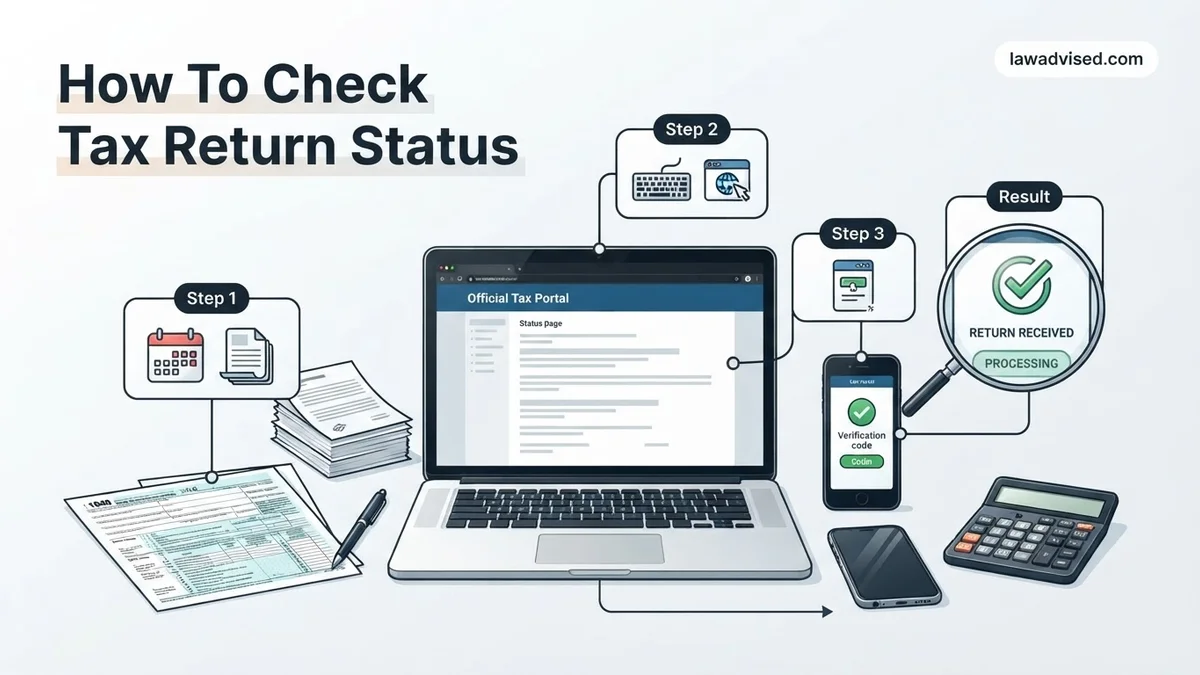
Master Tax Return Tracking in 7 Simple Steps
Waiting for your tax refund can feel like a test of patience, but staying informed about your return status doesn’t have to be a guessing game. Whether you are eagerly anticipating a financial boost or simply want to ensure your documents were successfully processed by the IRS, knowing how to track your progress is an essential skill. This comprehensive walkthrough provides a clear roadmap to navigate the official government systems, gather your necessary details, and interpret the status messages correctly so you are never left in the dark.
Step 1: Gather Your Tax Filing Documents
What you need: A copy of your recently filed federal income tax return (Form 1040), a pen, and a secure device connected to the internet.
Instructions: Before you attempt to log into any online portal, locate your exact filed tax return. You will need specific, precise data from this document to pass identity verification checks. Specifically, look at the top left or right corner to find your exact filing status (Single, Married Filing Jointly, Head of Household, etc.), and find the exact whole-dollar amount of your expected refund or balance due as calculated on line 35a or similar lines of your Form 1040. Having the physical or digital paperwork sitting directly in front of you prevents frustrating lockout errors caused by transposed digits.
Pro Tip: Never guess your refund amount or rely on estimates; use the exact decimal-free integer printed on your finalized, accepted tax return document.
Step 2: Navigate to the Official IRS Where’s My Refund Tool
What you need: A web browser, a stable internet connection, and the official IRS website URL.
Instructions: Open your preferred web browser and navigate strictly to the official Internal Revenue Service website at IRS.gov. Avoid clicking on sponsored search engine ads, as spoofed phishing sites frequently mimic the IRS interface to steal personal data. Once on the homepage, locate the prominent feature button labeled “Where’s My Refund?”. This tool is updated once daily, usually overnight, so checking it multiple times a day will not yield new information. Click the button to launch the secure portal tracker.
Pro Tip: Bookmark the official IRS page to protect yourself against malicious lookalike domains that harvest Social Security numbers.
Step 3: Input Your Personal Identification Data
What you need: Your Social Security Number (SSN) or Individual Taxpayer Identification Number (ITIN).
Instructions: On the tracker landing page, you will be prompted to enter three critical pieces of identifying information. First, input your primary Social Security Number or ITIN. Next, select your exact filing status from the drop-down menu, making sure it matches your tax form precisely. Finally, enter the exact whole-dollar amount of the refund you are expecting. Double-check every single number you type into these fields. Once verified, click the submit button to transmit your query through the secure government gateway.
Pro Tip: If you filed a joint return, always enter the Social Security number of the primary taxpayer listed first on the tax form, otherwise the system will flag a mismatch.
Step 4: Understand the Status Tracker Stages
What you need: Basic understanding of IRS processing phases and a digital or physical notebook.
Instructions: Once your identity is verified, the system will display one of three primary status milestones: Return Received, Refund Approved, or Refund Sent. “Return Received” means the IRS has your documents and is reviewing them. “Refund Approved” indicates your return has passed validation, and a specific payout date will be assigned. “Refund Sent” means the money has been dispatched to your bank via direct deposit or mailed as a physical check via the postal service. Read the message carefully to see which phase applies to your unique filing situation.
Pro Tip: Do not panic if your status says “Return Received” for several weeks; standard electronic processing takes up to 21 days during peak filing season.
Step 5: Access Your Online IRS Account for Detailed Transcripts
What you need: An ID.me account, a smartphone for multi-factor authentication, and a valid photo ID.
Instructions: If the basic tracker does not provide enough detail, sign in to your individual IRS online account using ID.me. If you do not have an account, you will need to register by uploading a government-issued photo ID and taking a live selfie for biometric verification. Once logged in, navigate to the “Tax Records” section and request a “Wage and Income Transcript” or “Tax Account Transcript”. These documents provide deep insight into processing codes, adjustments, and whether any holds have been placed on your account.
Pro Tip: Setting up an ID.me profile takes about 15 to 20 minutes, so complete this step well in advance of tax season to avoid processing bottlenecks.
Step 6: Monitor for IRS Letters and Notices
What you need: A designated physical mail folder and a keen eye for official government envelopes.
Instructions: Sometimes the online tracker will display a message directing you to call a specific phone number or reference a specific notice number, such as CP05 or Letter 12C. This means the IRS requires additional verification, documentation, or clarification regarding your income or deductions. Keep a close watch on your physical mailbox for official correspondence from the Department of the Treasury. If you receive a letter, read the instructions meticulously and respond within the requested timeframe—usually 30 days—to prevent long processing delays.
Pro Tip: The IRS never initiates contact through text messages, social media, or unsolicited phone calls asking for immediate payment or personal details.
Step 7: Check State Tax Return Status Separately
What you need: Your state tax filing documents and your state department of revenue website link.
Instructions: Remember that filing a federal return does not automatically track your state return. Most U.S. states with an income tax operate entirely independent tracking portals. Visit your specific state’s Department of Revenue or state tax agency website. Look for their dedicated individual income tax refund tracker. Much like the federal process, you will need to input your SSN, filing status, and expected state refund amount to view your local processing status and expected direct deposit timeline.
Pro Tip: State tax processing times vary wildly compared to federal timelines, often running independently faster or slower depending on local system upgrades.
✅ Final Checklist
- Verified that your web browser is connected to the official secure IRS.gov domain.
- Confirmed that your SSN, filing status, and exact refund amount match your Form 1040 precisely.
- Waited at least 21 days for e-filed returns or 6 weeks for paper returns before worrying about delays.
- Checked both federal IRS portals and your local state department of revenue tracking tools.
- Created a secure ID.me account to inspect detailed account transcripts if simple tracking yields generic messages.
Important Notes:
- Never share your full Social Security number or login credentials over unsecured networks, phone calls, or unverified email addresses.
- Seek professional help from a Certified Public Accountant (CPA) or Enrolled Agent if your refund is delayed beyond 12 weeks or if you receive an unresolved audit notice.
- Estimated time: 10-15 minutes to check status; Cost: 100% free when using official government websites.
How to Use the Official IRS Where’s My Refund Tool Step by Step
Gathering Your Required Information First
Before you open the tracking tool, you need three specific pieces of data directly from your filed 2026 tax return. Having these numbers ready ensures you can log in without getting locked out due to repeated incorrect entries. The system is extremely strict about exact matches to protect your personal financial data.
- Your Social Security Number (SSN) or Individual Taxpayer Identification Number (ITIN)
- Your exact filing status (Single, Married Filing Jointly, Head of Household, etc.)
- The exact whole-dollar refund amount shown on your 2026 tax return
Navigating the Online Tool and IRS2Go App
Go to the official IRS website and click on the Where’s My Refund tool, or open the IRS2Go mobile app on your smartphone. Click the check your refund button and enter your secure credentials. The system will display one of three primary tracking stages to show you exactly where your money stands.
- Return Received: The IRS has successfully accepted your electronic return and is beginning initial checks.
- Refund Approved: Your return has passed processing, and the IRS has scheduled your specific payment date.
- Refund Sent: The money has been transferred to your bank via direct deposit or mailed as a physical check.
How to Troubleshoot Common IRS Tracking Errors and Missing Data
When checking your refund through the official IRS portal in 2026, you might encounter unexpected error messages or blank data screens. The most frequent system notices include “Tax Topic 152”, “Information Does Not Match”, or a completely blank status bar. Understanding these specific codes prevents unnecessary panic and guides your next digital steps.
Decoding Common IRS Status Messages
System error codes usually point to a precise data mismatch or a routine processing hold. Follow these steps to resolve verification failures and data blockages:
- Double-check your exact Social Security Number or Individual Taxpayer Identification Number digits.
- Verify that your filing status on the return matches your official IRS profile precisely.
- Enter the exact whole-dollar refund amount shown on line 35a of your Form 1040 without cents.
- Clear your internet browser cache or switch to an alternate device if the tracker page fails to load entirely.
Addressing Security Verification Blocks
If the system locks you out after multiple failed lookup attempts, the IRS security protocol temporarily suspends access for 24 hours. Wait out the full cooling period before trying again with verified documentation. Keep your physical paper copy of the filed return next to you to ensure absolute data entry accuracy.
What If It Still Doesn’t Work?
If digital tracking tools continue failing after multiple attempts or your refund remains stalled past standard 2026 processing windows, escalation is required. Take these structured fallback steps to resolve persistent filing delays:
- Access your online IRS account dashboard to review official transcripts for unposted notices or verification flags.
- Call the specialized IRS individual taxpayer assistance line directly at 1-800-829-1040 during operating hours.
- Contact the Taxpayer Advocate Service if your delayed refund creates an immediate severe financial hardship.
- Consult a certified public accountant or enrolled agent to review your tax documents for hidden mathematical errors.
- Engage a tax professional for formal intervention, with typical consulting fees ranging from $150 to $400 depending on complexity.
Conclusion
Navigating refund tracking requires patience, precise data entry, and an understanding of standard processing timelines. By utilizing official IRS digital tools and knowing how to troubleshoot common system errors, you can successfully monitor your financial return this season. According to verified research and expert financial sources, proactive monitoring reduces taxpayer anxiety and accelerates issue resolution. Your actionable next step is to log into the official Where’s My Refund portal today with your exact refund amount ready.
❓ Frequently Asked Questions
Why is my refund taking longer than the standard 21 days?
Delays can happen if your return requires manual review, contains mathematical errors, was flagged for identity verification, or includes claims for the Earned Income Tax Credit (EITC) or Additional Child Tax Credit (ACTC). By law, the IRS holds refunds containing these credits until mid-February.
What do the different status stages mean on Where’s My Refund?
There are three main stages: Return Received (the IRS has your paperwork), Refund Approved (your return is processed and a payment date is scheduled), and Refund Sent (the money has been sent to your bank or mailed as a check).
Can I check my tax return status by phone?
Yes, you can call the IRS automated refund hotline at 1-800-829-1954. However, phone representatives generally cannot provide additional information until the standard 21-day processing window has passed.
What should I do if the system says my information does not match?
Double-check your copy of the tax return to ensure you entered the exact Social Security number, correct filing status (such as Single or Head of Household), and the precise whole-dollar refund amount without cents.
How do I check my status if I filed a paper tax return?
Paper returns take significantly longer to process and typically do not show up in the online tracking system until at least 4 weeks after you have mailed them to the IRS.
Is it safe to use third-party apps to check my tax refund?
You should avoid third-party apps that promise to track your refund, as they may compromise your sensitive personal data. Always use official government portals like IRS.gov or the official IRS2Go mobile app.

Ismail Hossain is the founder of Law Advised. He is an Divorce, Separation, marriage lawyer. Follow him.