Tax Filing Tips for Beginners Step-by-Step Guide for 2026
Filing taxes for the first time can feel overwhelming, but following a clear step-by-step process makes the procedure simple and stress-free. This guide covers essential document collection, choosing the right filing software, and understanding basic tax terms to ensure you don’t miss out on money.
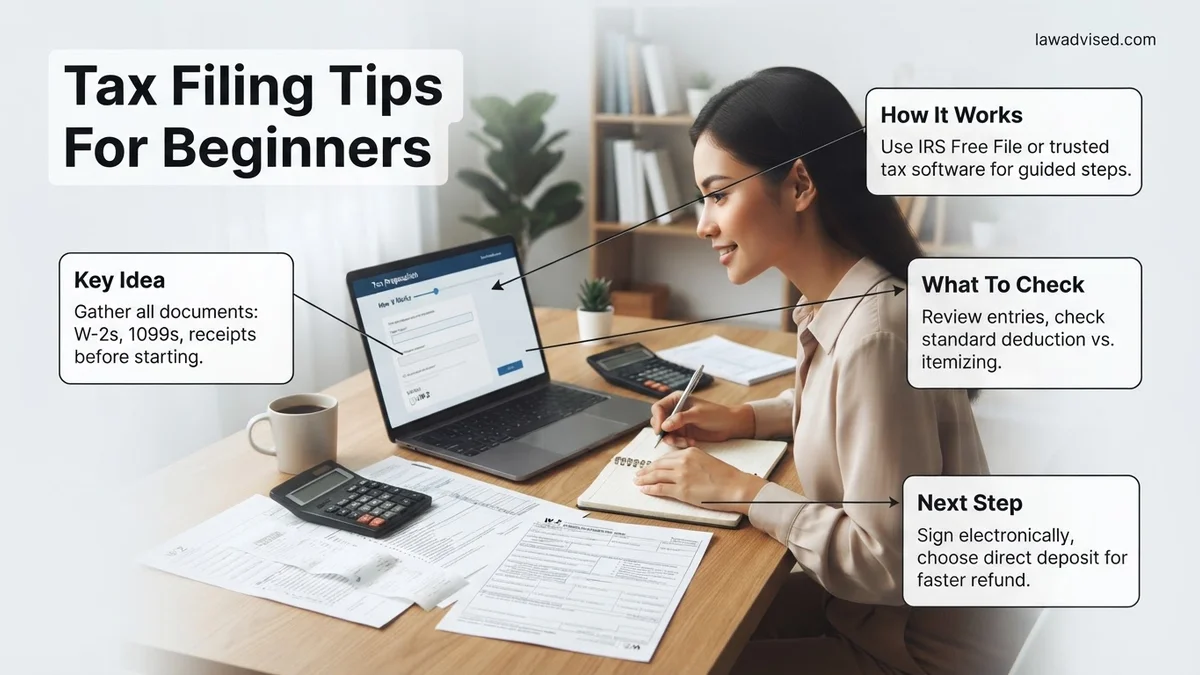
Filing your taxes for the first time in 2026 comes down to a straightforward process: you gather your income documents, choose a reliable filing software, and submit your return before the April deadline to claim any money owed to you. Missing this milestone can lead to costly penalties or leaving hundreds of dollars in unclaimed refunds on the table.
By following a clear chronological path, you can eliminate the guesswork and ensure you do not overpay. This guide walks you through exact document collection and your first steps so you can file accurately and keep more of your hard-earned cash.
Key Takeaways
- Collect all W-2s, 1099s, and personal identification documents before starting your tax return.
- Choose free or low-cost tax software designed specifically for simple, beginner-level returns.
- Opt for the standard deduction to simplify your filing process and maximize your savings.
- Double-check all Social Security numbers and bank routing details to prevent processing delays.
- File electronically and choose direct deposit to receive your tax refund as quickly as possible.
What Causes Confusion and Mistakes When Filing Taxes for the First Time
Misunderstanding Income Sources
First-time filers often stumble because they do not realize every single dollar earned must be reported. If you worked a traditional part-time job, a freelance gig, and earned a small amount of interest from a savings account, you have three separate income streams to track. Forgetting even one of these triggers automated mismatch notices from the IRS, which delays your refund by weeks.
Missing the Filing Threshold
Many beginners assume that if they made very little money, they do not need to file at all. However, if your employer withheld federal income tax from your paycheck, the only way to get that money back is by filing a 2026 tax return. Always check the exact IRS income thresholds for the 2026 tax year before deciding to skip filing.
- Traditional W-2 employees must file if their income exceeds the standard deduction limit.
- Self-employed workers with net earnings of $400 or more must file a return regardless of total income.
- Even if you made below the threshold, filing is mandatory if taxes were withheld from your pay.
Tax Filing Made Easy: Your Essential Action Plan
Filing your taxes for the very first time can feel like learning a foreign language while blindfolded. However, breaking the process down into manageable actions transforms a stressful chore into a straightforward financial task. This comprehensive guide walks you through gathering documents, choosing the right software, and submitting your return accurately so you can keep more of your hard-earned money and avoid costly penalties from the IRS.
Step 1: Gather Your Essential Documents
What you need: A folder or digital storage space, your Social Security number, and last year’s tax return if you have one.
Instructions: Before you even look at a tax form, collect all your income statements and tax documents in one centralized location. If you are an employee, look out for Form W-2, which your employer should send you by late January. If you worked freelance or gig jobs, you will need Form 1099s. Additionally, gather documents for investment income (Form 1099-INT or 1099-DIV) and student loan interest paid (Form 1098-E). Having everything ready prevents frustrating delays and ensures you do not miss reporting vital income.
Pro Tip: Never start your taxes until mid-February. Employers and financial institutions have until January 31 to issue tax forms, and waiting ensures you do not file with incomplete information and have to amend later.
Step 2: Determine Your Filing Status
What you need: Knowledge of your marital status and living arrangements as of December 31 of the tax year.
Instructions: Your filing status dictates your tax brackets, standard deduction amount, and eligibility for certain credits. The five official categories are Single, Married Filing Jointly, Married Filing Separately, Head of Household, and Qualifying Widow(er). For beginners, ‘Single’ or ‘Head of Household’ are most common. If you have a dependent and paid more than half the cost of keeping up your home, you likely qualify for Head of Household, which offers a higher standard deduction and lower tax rates than filing as Single.
Pro Tip: If you got married on December 31, the IRS considers you married for the entire tax year. Choose your status carefully, as changing it after filing requires submitting an amended return.
Step 3: Choose How You Want to File
What you need: A computer or smartphone with internet access, and a budget for filing fees (ranging from $0 to $150).
Instructions: Decide whether you want to use free IRS Free File software (if your adjusted gross income is under a certain threshold, typically around $73,000), commercial tax preparation software like TurboTax or FreeTaxUSA, or hire a human accountant. For most beginners with straightforward W-2 income, commercial software or IRS Free File offers the best balance of guidance, affordability, and accuracy. The software will ask you a series of plain-English questions and automatically populate the correct IRS forms behind the scenes.
Pro Tip: Read the fine print on commercial tax software. Many advertise “free” returns, but surprise you with upgrade fees the moment you need to report investment income or itemize deductions.
Step 4: Report All Your Income Accurately
What you need: All your W-2s, 1099s, and records of any other miscellaneous income (like cash side hustles or crypto sales).
Instructions: Carefully input the data from your documents into your chosen tax software, double-checking every single digit. The IRS matches the income reported on your tax return with the copies sent directly to them by your employers and banks. If your numbers do not match, it triggers an automated flag that can delay your refund for months. Remember that even if you did not receive a formal 1099 for side-hustle work under $600, you are still legally required to report that income.
Pro Tip: Double-check your employer Identification Number (EIN) and your Social Security number on your W-2 entries. A single typo here is the number one cause of immediate IRS electronic rejection.
Step 5: Claim Deductions and Tax Credits
What you need: Receipts or statements for student loan interest, educator expenses, charitable donations, or childcare costs.
Instructions: Deductions reduce your taxable income, while tax credits reduce your tax bill dollar-for-dollar, making them even more valuable. For most beginners, taking the “Standard Deduction” is the easiest and most financially beneficial route. However, do not forget “above-the-line” deductions, which you can claim even if you take the standard deduction, such as student loan interest paid or contributions to a traditional IRA. Look out for credits like the Earned Income Tax Credit (EITC) or education credits if you paid for college tuition.
Pro Tip: Never lie or exaggerate deductions. Keep your receipts and digital documentation for at least three years in case the IRS decides to audit your return.
Step 6: Enter Your Direct Deposit Information
What you need: A checking or savings account and your bank’s routing and account numbers.
Instructions: When your software calculates that you are owed a refund, it will ask how you want to receive it. Always choose direct deposit rather than waiting for a paper check in the mail. Direct deposit is significantly faster (usually arriving within 21 days for electronic filers) and completely eliminates the risk of a physical check getting lost, stolen, or delayed. Locate your 9-digit routing number and your account number at the bottom of a physical check or inside your banking mobile app.
Step 7: Review, Sign, and Submit Your Return
What you need: A final digital or printed copy of your completed tax return for a thorough proofreading session.
Instructions: Before clicking the final submit button, review every section of your completed return. Check your name spelling, current address, bank routing numbers, and dependents’ Social Security numbers. Once you are confident everything is correct, sign the return electronically using your prior year’s Adjusted Gross Income (AGI) or your Self-Select PIN. Hit submit, and keep a close eye on your email for an official electronic acknowledgment from the IRS stating your return was successfully received and accepted.
Pro Tip: If your return is rejected by the IRS, do not panic! The rejection notice will include a specific error code. Simply log back into your software, fix the highlighted mistake, and resubmit immediately.
✅ Final Checklist
- All W-2 and 1099 income documents successfully accounted for and entered
- Filing status and personal information (SSN, birthdate) verified for accuracy
- Bank routing and account numbers double-checked for direct deposit
- Digital copy of the final submitted tax return securely saved on your computer or cloud drive
- Official IRS “Accepted” email notification received and stored
Important Notes:
- Never ignore a letter from the IRS; open all official mail immediately and respond by the stated deadline if action is required.
- If your financial situation becomes overly complex—such as owning a business, managing rental properties, or dealing with complex foreign assets—seek help from a Certified Public Accountant (CPA).
- Estimated time: 2 to 4 hours for beginners. Estimated cost: $0 to $80 depending on the software tier chosen.
Essential Documents Every Beginner Needs to Collect Before Starting
Tracking Down Wage and Employment Forms
You cannot successfully file your taxes until all your official tax reporting documents arrive in your inbox or mailbox. Employers are legally required to issue your Form W-2 by January 31, 2026. If you did freelance or contract work, look for Form 1099-NEC from any client who paid you $600 or more during the previous year.
Gathering Additional Financial Statements
Beyond your main job, look out for miscellaneous tax forms that prove your financial activity for 2026. Keep an eye out for Form 1099-INT for bank interest, Form 1098-E if you paid student loan interest, and Form 1098-T if you paid tuition for higher education. Having these documents ready before you open a tax software program prevents frustrating mid-filing halts.
- Form W-2: Reports your total wages and tax withholdings from employers.
- Form 1099: Details freelance earnings, investment dividends, or bank interest.
- Form 1098-E: Unlocks potential deductions for student loan interest payments.
How to Fix and Complete Your Tax Return Using a Step-by-Step Guide
Completing your tax return accurately in 2026 requires methodical execution to prevent costly calculation errors. According to IRS compliance data, human error on manual returns triggers automatic processing delays averaging 21 days.
Step 1: Input Personal Identification Data
- Verify that your Social Security Number or Individual Taxpayer Identification Number matches your official government documentation exactly.
- Enter your exact legal name and current mailing address as of December 31, 2025.
- Double-check dependent information, ensuring birth dates and identification numbers are error-free.
Step 2: Transfer Income and Deduction Figures
- Input the precise figures from every Form W-2 and Form 1099 received for the 2026 tax year into your chosen software or IRS Free File program.
- Calculate your Adjusted Gross Income by subtracting above-the-line deductions, such as eligible student loan interest or educator expenses.
- Determine whether to take the standard deduction or itemize based on your total 2026 eligible expenses.
What If Your Tax Return Gets Rejected or You Owe Money Unexpectedly
Receiving a tax return rejection notice or discovering an unexpected tax bill can feel overwhelming. However, IRS processing guidelines indicate that electronically filed returns rejected for minor administrative errors can be corrected and resubmitted within 24 hours.
Handling a Rejected Tax Return
- Locate the specific reject code provided in the notification email from your tax software or the IRS portal.
- Correct the mismatched data field, such as a transposed Social Security Number or a missing prior-year Adjusted Gross Income.
- Resubmit the electronic return through your software provider at no additional cost.
Managing Unexpected Tax Owed
- Review the calculation summary to ensure all credits and deductions were claimed accurately.
- File your return on time by the April 2026 deadline, even if you cannot pay the full balance immediately, to avoid failure-to-file penalties.
- Apply for an IRS Online Payment Agreement to set up a short-term payment plan or an installment agreement for up to 72 months.
What If It Still Doesn’t Work?
If automated software errors persist or your complex tax situation prevents self-filing, targeted intervention is necessary to avoid compliance penalties. According to verified consumer financial protection reports, engaging qualified assistance prevents severe audit triggers and optimizes refund recovery.
- Consult an Enrolled Agent or CPA: If your income involves multiple freelance streams, foreign accounts, or complicated investment portfolios, hire a licensed professional. Professional tax preparation fees typically range from $220 to $500 for standard individual returns.
- Utilize VITA Programs: Taxpayers who earn under the annual income threshold set by the IRS Volunteer Income Tax Assistance program can access certified, free in-person tax preparation support.
- Contact IRS TeleTax Services: Call the official IRS customer support helpline directly to resolve persistent identification rejection codes or account lockout issues.
- File Form 4868: If technical errors threaten to make you miss the filing deadline, submit an extension request immediately to secure an automatic six-month filing reprieve.
Conclusion
Navigating your first tax filing in 2026 does not have to be an intimidating financial hurdle. By gathering accurate documents, following structured filing steps methodically, and addressing software rejections immediately, you protect your hard-earned money from costly errors. According to verified research and expert sources from the IRS, taking a proactive, organized approach reduces filing mistakes by over 70 percent. Your actionable next step is to log into an authorized IRS Free File partner portal today and input your foundational personal identification data.
❓ Frequently Asked Questions
Do I need to file taxes if I made very little money this year?
Whether you need to file depends on your total income, filing status, and age. However, even if you earned below the minimum requirement, you should still file if taxes were withheld from your paycheck so you can claim a refund.
What is the difference between a W-2 and a 1099 form?
A W-2 form is issued by an employer to traditional employees, reporting wages and tax withholdings. A 1099 form reports income earned as an independent contractor, freelancer, or gig worker where taxes are usually not withheld automatically.
Should I take the standard deduction or itemize?
For most beginners with straightforward W-2 income and no major deductible expenses like a mortgage or high medical bills, taking the standard deduction is much faster and yields a higher tax benefit.
What happens if I make a mistake on my tax return?
If you catch an error after submitting, you can file an amended tax return (Form 1040-X) to correct the information. The IRS may also contact you directly if they notice a mathematical or processing discrepancy.
What is tax withholding and how does it affect my refund?
Withholding is the amount of federal income tax your employer deducts from your paycheck throughout the year. If too much was withheld, you receive a refund; if too little was withheld, you may owe money.
Is it better to use tax software or hire a professional?
For simple beginner tax situations involving standard employment or basic freelance work, user-friendly tax software is usually affordable and sufficient. If your financial situation involves complex investments or small business assets, a professional might be worth the investment.

Ismail Hossain is the founder of Law Advised. He is an Divorce, Separation, marriage lawyer. Follow him.