How to File Taxes for the First Time Step-by-Step Guide 2026
Learning how to file taxes for the first time can feel overwhelming without a clear roadmap. This step-by-step guide walks you through gathering documents, choosing the right filing software, and submitting your return accurately in 2026.
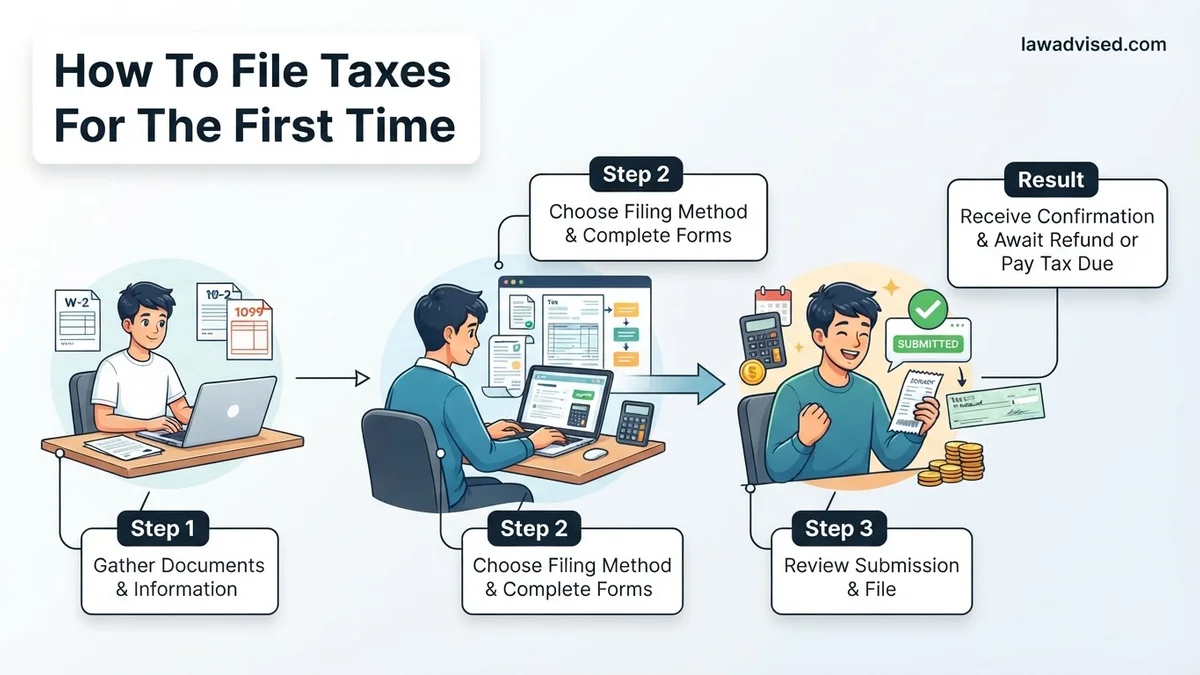
Filing your taxes for the very first time in 2026 comes down to a straightforward four-step process: gathering your income documents, choosing a filing software or method, filling out your federal and state returns, and submitting them electronically for a fast refund. If you earned income last year—whether from a traditional job, freelance gigs, or a mix of both—the IRS expects you to report it.
Tackling this process without a roadmap leads to missed deductions, math errors, and delayed refunds. This practical guide walks you through the exact paperwork you need and the exact steps to submit your 2026 tax return accurately on your first try.
Key Takeaways
- Gather all W-2s, 1099s, and your Social Security number before starting.
- Determine if you qualify as a dependent on someone else’s tax return.
- Use IRS Free File or commercial software to file your taxes at little to no cost.
- Choose direct deposit for your tax refund to receive funds much faster.
- Double-check your banking details and math to avoid costly processing delays.
What Causes Confusion When Filing Taxes for the First Time
Decoding Your Tax Documents
The sheer number of tax forms creates the biggest hurdle for first-time filers. You might receive a W-2 if you work a standard job, or a 1099 if you did freelance or gig work. Juggling multiple forms means transferring every number to the right box on your main tax return.
- Form W-2: Sent by employers detailing your total earnings and tax withholding for 2025.
- Form 1099-NEC: Sent by clients or platforms if you earned at least 600 dollars as an independent contractor.
- Form 1099-INT: Issued by your bank if you earned more than 10 dollars in interest.
Determining Filing Status and Standards
Choosing your correct filing status—such as Single or Head of Household—directly impacts your tax bracket and standard deduction. For the 2026 tax season, the basic standard deduction offers a flat-rate shield for a large portion of your income, meaning you only pay taxes on money earned above that threshold. Confusing your dependency status or trying to itemize deductions when the standard deduction is higher wastes valuable time and costs you money.
Filing Taxes Made Easy: Your Essential Action Plan
Filing taxes for the very first time can feel overwhelming, especially with all the jargon, forms, and deadlines floating around. However, breaking the process down into manageable, logical phases turns a stressful chore into a straightforward task. This comprehensive walkthrough is designed specifically for first-time filers, guiding you through gathering your documents, choosing the right software, and submitting your return accurately so you can keep more of your hard-earned money and avoid costly mistakes.
Step 1: Gather Your Essential Tax Documents
What you need: Your Social Security Number (SSN) or Individual Taxpayer Identification Number (ITIN), photo ID, and a folder or digital drive for organization.
Instructions: Before you even look at a tax form, you need to collect all income and financial statements mailed or emailed to you. If you worked a traditional job, look for Form W-2 from your employer. If you had freelance gigs, side hustles, or contract work, expect a Form 1099. Also, track down bank interest statements (Form 1099-INT) and student loan interest statements (Form 1098-E) if applicable. Create a dedicated physical folder or a secure digital folder on your computer to store these documents so you do not have to scramble later.
Pro Tip: Wait until mid-February to start gathering documents, as employers and financial institutions legally have until January 31st to issue forms, and rushing too early means you might miss a corrected form.
Step 2: Determine Your Filing Status
What you need: Knowledge of your marital status and living arrangements as of December 31st of the tax year.
Instructions: Your filing status dictates your tax bracket, standard deduction amount, and eligibility for certain credits. Most first-time filers will choose “Single.” However, if you are legally married, you can file “Married Filing Jointly” or “Married Filing Separately.” If you are unmarried, pay more than half the cost of keeping up a home, and have a qualifying dependent living with you, you may qualify as “Head of Household,” which offers a higher standard deduction and lower tax rates than filing as single.
Pro Tip: If you think you might qualify for Head of Household, read the IRS guidelines carefully, as meeting the criteria can save you hundreds or thousands of dollars in taxes.
Step 3: Decide Whether to Take the Standard Deduction or Itemize
What you need: A rough estimate of your total deductible expenses (such as medical bills, charitable donations, state and local taxes, and mortgage interest).
Instructions: The standard deduction is a flat-dollar reduction that lowers your taxable income and is used by the vast majority of taxpayers because it is simple. Itemizing means listing out every single deductible expense individually on Schedule A. For most first-time filers—especially students, young professionals, and renters—the standard deduction will be significantly higher than the sum of your itemized expenses, making it the clear and easy winner.
Pro Tip: Always choose whichever deduction method yields the higher amount. If your total itemized deductions are less than the standard deduction for your filing status, take the standard deduction to save time and maximize your savings.
Step 4: Select Your Tax Preparation Software
What you need: A computer or smartphone with internet access, and basic knowledge of your income level.
Instructions: Unless your tax situation is exceptionally complex, you do not need to pay a certified public accountant. Instead, use IRS Free File (if your adjusted gross income is below the annual threshold, typically around $79,000) or reputable commercial tax software like TurboTax, FreeTaxUSA, or H&R Block. Create an account, and the software will act as an interactive interview, asking you plain-English questions about your life, job, and education, and then automatically populating the correct government forms behind the scenes.
Pro Tip: Beware of hidden upsells in commercial tax software. Many companies try to charge extra for state returns or complex schedules, so read the pricing tier details carefully before starting.
Step 5: Enter Your Income and Personal Information
What you need: Your collected W-2s, 1099s, SSN, and your tax software or prep portal open.
Instructions: Carefully input your personal details, ensuring your name matches your Social Security card exactly. Next, input the numbers from your W-2 and other income forms into the corresponding boxes highlighted by your software. Double-check every single digit. A misplaced decimal point or a typo in an Employer Identification Number (EIN) can trigger an automated audit or delay the processing of your tax return by several weeks.
Pro Tip: Line up your physical or digital tax form right next to your screen and read the numbers aloud as you type them to dramatically reduce data-entry errors.
Step 6: Claim Tax Credits and Deductions
What you need: Receipts and documentation for education expenses (Form 1098-T), charitable donations, or childcare costs.
Instructions: This is where you actively lower your tax bill. Tax credits are especially valuable because they reduce your tax liability dollar-for-dollar. As a first-time filer, look out for the American Opportunity Tax Credit if you are in college, the Earned Income Tax Credit if you have modest earnings, and deductions for student loan interest payments. Your tax software will prompt you for these, but you must answer the lifestyle and education questions accurately to unlock them.
Step 7: Choose How to Receive Your Refund or Pay Owed Taxes
What you need: Your bank account routing number and checking account number if you want direct deposit.
Instructions: Once you complete all sections, the software will calculate whether you are getting a refund or if you owe money. If you are getting a refund, opt for direct deposit; it is secure and the absolute fastest way to get your money, usually within 21 days. If you owe money, you do not have to pay immediately on the day you file, but you must pay by the official tax deadline (usually April 15th) to avoid interest and failure-to-pay penalties.
Step 8: Review, Sign, and E-File Your Return
What you need: Your Adjusted Gross Income (AGI) from the previous year (if applicable) and an electronic signature.
Instructions: Review the summary of your tax return one final time. Look closely at your address, bank routing details, and total income. Once satisfied, use your software to electronically file (e-file) the return. E-filing is vastly superior to mailing paper forms because it provides instant electronic confirmation that the IRS has received your documents.
Pro Tip: Save a complete digital PDF copy of your submitted tax return and your acceptance receipt in a secure, password-protected folder for your permanent records.
✅ Final Checklist
- Verified that your name and Social Security Number match your official government documents.
- Confirmed that all income forms (W-2s, 1099s) have been entered without typographical errors.
- Selected the correct filing status and optimal deduction method.
- Provided accurate banking details for direct deposit of your refund.
- Saved a digital copy of your final filed tax return for your personal archives.
Important Notes:
- Never ignore a notice from the IRS; if there is a discrepancy, address it promptly by contacting the IRS official helpline.
- If your tax situation involves complex investments, foreign assets, or small business partnerships, consider hiring a CPA.
- Estimated time: 2 to 4 hours. Estimated cost: $0 to $60 depending on the software tier and whether you file state taxes.
Step-by-Step Guide on How to File Your Taxes Accurately
Step 1: Gather Your Documents and Personal Information
Before opening any software, pull together everything you need in one place. Missing a single form forces you to file an amended return later, which slows down your refund.
- Your Social Security number or Individual Taxpayer Identification Number (ITIN).
- All W-2s and 1099 forms from employers or clients.
- Form 1098-T if you paid for college tuition or student loans.
- Your 2025 tax return (if you filed one previously) to reference your Adjusted Gross Income (AGI).
Step 2: Choose Your Filing Method
First-time filers should generally avoid paper forms and complex manual calculations. Modern tax software automates the math and prevents common rookie mistakes.
- IRS Free File: Available if your adjusted gross income falls below the IRS threshold for the 2026 tax year.
- Commercial Tax Software: Programs like TurboTax, FreeTaxUSA, or H&B Block walk you through questions in plain English.
- Professional CPA: Best if your financial situation includes complex investments, foreign assets, or small business structures.
How to Fix Common First-Time Tax Filing Mistakes
Filing taxes for the first time often leads to preventable errors that delay refunds. According to IRS data, simple math errors and missing documentation are the leading reasons returns get flagged for manual review. Addressing these mistakes quickly keeps your 2026 tax filing on track.
Missing or Incorrect Identification Numbers
Entering the wrong Social Security Number (SSN) or Individual Taxpayer Identification Number (ITIN) will cause the IRS to instantly reject your electronic return. Double-check every digit against your actual physical Social Security card before submission. If you are claiming dependents, verify their SSNs match government records precisely.
Incorrect Filing Status Selection
Choosing the wrong filing status drastically impacts your standard deduction and tax bracket. First-time filers usually file as Single, but Head of Household may apply if you pay more than half the cost of maintaining a home for a qualifying dependent. Review IRS publication guidelines carefully to ensure accurate status selection for the 2026 tax season.
Math and Income Reporting Errors
Transposing numbers from your W-2 or 1099 forms creates discrepancies between your return and the documents submitted to the government by your employer. Use tax preparation software to automatically pull and calculate figures, reducing manual entry errors by up to 90 percent.
What If Your Return Gets Rejected or You Need to Amend
If the IRS rejects your electronic return, do not panic. Rejections are usually automated system flags rather than formal audits. Most electronic filing platforms allow you to correct the error and resubmit for free within days of the initial notification.
Steps to Correct and Resubmit Your Return
- Read the rejection notification carefully to identify the specific error code provided by the IRS.
- Log back into your chosen tax preparation software and navigate to the section flagged in the rejection code.
- Correct the inaccurate data, such as a mismatched name, missing birthdate, or incorrect prior-year Adjusted Gross Income (AGI).
- Resubmit the electronic return through the software platform at no additional charge.
- File a paper return by mail if the electronic rejection persists due to a duplicate SSN identity theft flag.
What If It Still Doesn’t Work?
If persistent software errors or complex financial situations prevent you from filing accurately for 2026, fallback options are available. Take these steps to ensure compliance:
- Gather all supplementary tax documents, including late-arriving forms or investment statements.
- Check if you qualify for free volunteer income tax assistance (VITA) programs offered through community centers and universities.
- Hire a certified public accountant (CPA) or Enrolled Agent (EA) if your first-time return involves freelance income, rental properties, or complex foreign assets. Professional tax preparation fees typically range from $200 to $500 for standard individual federal and state returns.
- Request an official IRS tax extension using Form 4868 if the April deadline approaches and your issues remain unresolved, granting you until October to file without failure-to-file penalties.
Conclusion
Filing taxes for the first time in 2026 requires careful organization, accurate data entry, and adherence to IRS guidelines to avoid costly processing delays. According to verified research and expert financial sources, utilizing digital tax software significantly reduces calculation errors and accelerates refund delivery times. Your next actionable step is to log into your chosen filing platform today and gather all required W-2 and 1099 income documents to begin your draft.
❓ Frequently Asked Questions
How do I know if I am considered a dependent for tax purposes?
Generally, if a parent or guardian provides more than half of your financial support and you are a student under a certain age, you may be claimed as a dependent. You must check the dependent box on your tax return even if you earned your own income.
What happens if I miss the April tax filing deadline?
If you owe taxes and miss the deadline without filing an extension, the IRS assesses a failure-to-file penalty and a failure-to-pay penalty. If you are getting a refund, there is typically no penalty for filing late, though you have a three-year limit to claim it.
Should I choose the standard deduction or itemize?
For most first-time filers with straightforward employment income, taking the standard deduction is much easier and provides a higher deduction amount than itemizing individual expenses.
How long does it take to receive a tax refund?
If you file electronically and choose direct deposit, the IRS typically issues refunds within 21 days. Paper returns filed by mail can take six weeks or longer to process.
What is an Adjusted Gross Income (AGI) and why do I need it?
Your AGI is your total gross income minus specific allowable deductions. You need your prior year AGI to verify your identity when filing your electronic tax return for the current year.
Do I have to report income from a side hustle or freelance gig?
Yes, all earned income must be reported to the IRS, even if you did not receive a 1099 form because you earned less than the reporting threshold from a specific client.

Ismail Hossain is the founder of Law Advised. He is an Divorce, Separation, marriage lawyer. Follow him.