How to Fix Rejected Tax Return Step-by-Step Guide 2026
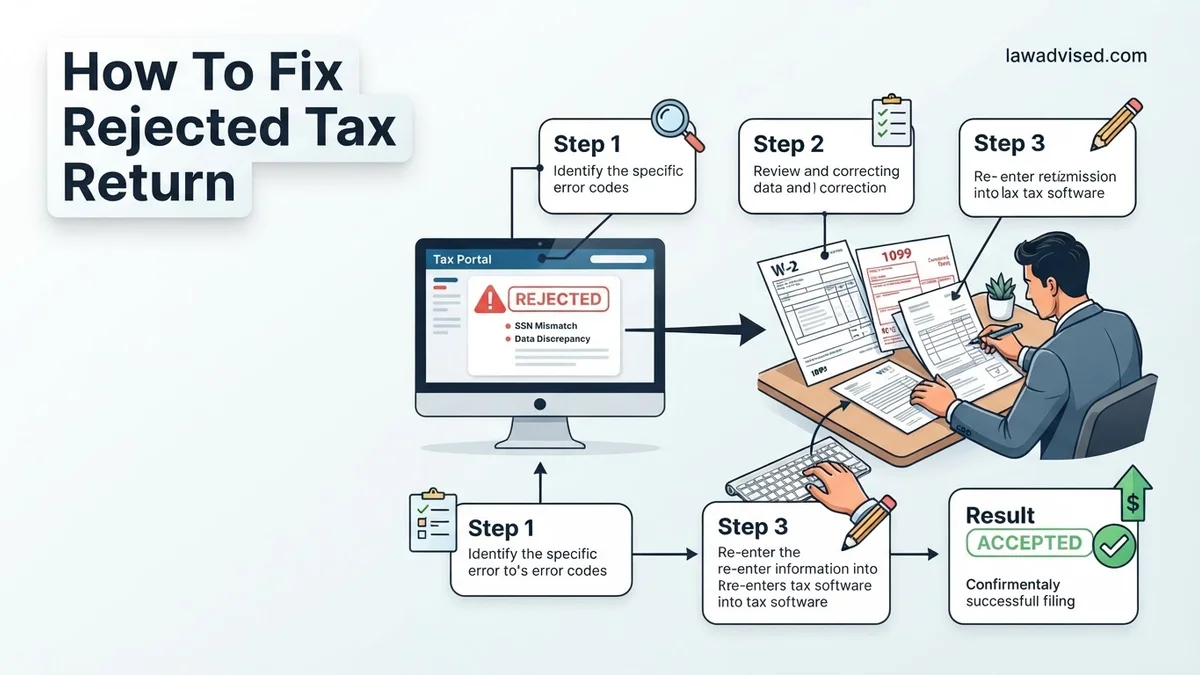
A rejected tax return means the IRS or state agency stopped your submission due to missing or incorrect data, which is different from a denied return. You can easily fix these errors by locating the specific rejection code, correcting the information in your tax software, and resubmitting your return. Follow this step-by-step process to correct your filing and get your return accepted.
Fixing a rejected tax return in 2026 comes down to finding the specific error code provided by the IRS, correcting that exact data point in your tax software, and resubmitting your file electronically. A rejected return simply means the system caught a formatting or identification mismatch before processing it, meaning you have not technically filed yet.
Addressing this quickly ensures you avoid late-filing penalties and secures your 2026 tax refund without unnecessary paper-filing delays. Most rejections take less than fifteen minutes to fix once you know where to look.
Key Takeaways
- A rejected return is not a denial; it simply means the IRS system found an error.
- Always log into your tax software to find the specific error code and description.
- Mismatched Social Security Numbers and birthdates are the most common causes of rejection.
- Correct the flagged data directly inside your tax preparation software before resubmitting.
- If electronic resubmission fails repeatedly, you must print, sign, and mail your tax return.
Understanding Why Tax Returns Get Rejected
Electronic tax filing systems rely on automated checks to match your submitted data against federal databases. When something does not align, the system immediately rejects the return. Knowing the common culprits helps you spot the mistake right away.
Most Frequent 2026 Rejection Triggers
- Mismatched SSNs or ITINs: A single typo in your Social Security Number or a dependent’s number will trigger an instant rejection.
- Incorrect Identity Protection PIN: If you or your spouse were issued a 6-digit IP PIN by the IRS for 2026 and forgot to enter it, the return bounces back.
- Duplicate Dependent Claims: Another person claiming the same dependent on a separate return causes a system conflict.
- Name Control Mismatches: The first four letters of your last name on the return must match Social Security Administration records exactly.
E-File Rejections Versus IRS Audits
Do not panic when you see the word rejected. An e-file rejection is an automated gatekeeper stopping your return before human review. It is vastly different from an IRS audit, which happens months after a return is accepted. You simply need to correct the data entry error and send it back through the digital pipeline.
Tax Return Rejection: What Causes It and How to Fix It
Discovering that the IRS or your state tax agency has rejected your tax return can trigger instant panic. However, a rejection simply means the return failed basic electronic validation checks and was never officially processed—it is not an audit or a penalty. This practical walkthrough provides a clear, actionable roadmap to diagnose the issue, correct the errors, and successfully resubmit your return without unnecessary stress or delay.
Step 1: Locate and Understand the Rejection Code
What you need: Your tax software login credentials, the email notification from your e-file provider, or your IRS/state online account access.
Instructions: Check the email or notification associated with your tax filing. When an electronic return is rejected, the agency issues a specific error code (e.g., IRS Reject Code IND-510 or F1040-905). Log into the tax software you used or access your IRS e-file status page to find this alphanumeric code. Read the accompanying text explanation carefully. This code acts as your exact diagnostic tool, pointing precisely to the line number or data field that caused the electronic rejection system to halt processing.
Pro Tip: Do not guess why your return was rejected. Always match your exact rejection code to the official IRS or software provider lookup database to understand the root cause.
Step 2: Investigate Identity and Personal Data Mismatch
What you need: Physical copies of your Social Security cards, driver’s licenses, and last year’s filed tax return.
Instructions: The most common reason for rejection is an incorrect Social Security Number (SSN), Individual Taxpayer Identification Number (ITIN), or misspelled name. Compare every letter of the primary taxpayer, spouse, and dependent names against the official Social Security Administration (SSA) card. Check that birthdates match legal records. Additionally, verify that your Identity Protection PIN (IP PIN), if issued by the IRS, was entered correctly in the designated field. Even a single transposed digit in an SSN will trigger an immediate system rejection.
Pro Tip: If you recently got married or legally changed your name, ensure you updated it with the SSA before filing, as the IRS cross-references names with SSA databases.
Step 3: Resolve Duplicate SSN or Dependent Claims
What you need: Prior tax records and custody agreements (if applicable).
Instructions: If your rejection code indicates that a dependent’s SSN or your own SSN has already been used on another tax return, you face a potential identity theft issue or a dependent filing conflict. Contact your ex-spouse or family members to confirm who is claiming a shared dependent. If you suspect tax-related identity theft—where an unauthorized person filed using your SSN—you must take immediate defensive action. If it is merely a data entry mistake by someone else or a prior attempt, you will likely need to paper-file your return.
Pro Tip: Never ignore a duplicate SSN rejection. If someone has fraudulently filed using your information, you must file IRS Form 14039 (Identity Theft Affidavit) immediately.
Step 4: Fix Adjusted Gross Income (AGI) or Prior Year PIN Errors
What you need: A copy of your Form 1040 from the previous tax year.
Instructions: When e-filing, the IRS requires you to verify your identity by entering either last year’s Adjusted Gross Income (AGI) or the Self-Select Prior Year PIN you used. If your return is rejected due to an AGI mismatch, look at line 11 of your previous year’s Form 1040. Enter that exact dollar amount. If you filed late last year or your prior return is still being processed by the IRS, enter “0” (zero) for your prior-year AGI. Do not guess or estimate this number, as the IRS electronic validation system requires an exact match with their database.
Pro Tip: If you cannot find last year’s AGI, create an account on the IRS website and view your “Tax Records” or Transcript online to retrieve the precise figure.
Step 5: Correct Mathematical and Form-Specific Discrepancies
What you need: Your W-2s, 1099s, receipts, and supporting tax schedules.
Instructions: Sometimes a rejection occurs because calculated fields do not match itemized amounts, or a required supporting form is missing. For example, if you claim business expenses or capital gains, the software may have omitted a mandatory schedule. Open your tax software return, navigate to the flagged section, and review the math. Re-enter your employer identification numbers (EIN) from W-2 box 5 and income figures to ensure no decimal points were misplaced. Make sure all required fields marked with a red asterisk in your software are fully completed.
Step 6: Update and Re-Transmit Your Electronic Return
What you need: Your corrected tax file ready for submission within your software platform.
Instructions: Once you have successfully updated the incorrect data fields, saved your changes, and cleared any software error alerts, you are ready to resubmit. Navigate back to the file section of your tax software. Choose the option to re-file or re-transmit your electronic return. Most commercial tax preparation software allows you to do this at no additional charge. After submitting, monitor your email or software dashboard over the next 24 to 48 hours for an acceptance notification from the IRS.
Pro Tip: Keep a digital or printed copy of both the rejected return summary and the newly corrected return for your personal financial records.
Step 7: Pivot to Paper Filing If Electronic Rejection Persists
What you need: A printer, blue or black ink pen, supporting tax documents, and a standard mailing envelope with appropriate postage.
Instructions: Occasionally, persistent software glitches or stubborn IRS database mismatches make electronic resubmission impossible. If your return is rejected multiple times for an unresolvable technical reason, you have the legal right to paper-file. Print out your complete Form 1040, along with all attached schedules and W-2s. Sign and date the return physically. Mail the packet to the appropriate IRS address designated for your state, which can be easily found on the official IRS website. Note that paper-filed returns take significantly longer to process—often 6 to 8 weeks or more.
✅ Final Checklist
- Verified that the exact rejection code has been identified and addressed
- Checked all Social Security Numbers, dates of birth, and legal spellings against official cards
- Confirmed prior-year AGI or Self-Select PIN matches last year’s filed return precisely
- Successfully re-transmitted the corrected return through your e-file provider
- Saved the electronic acceptance confirmation receipt for your records
Important Notes:
- A rejected tax return means it was never received by the IRS, meaning you are not officially filed; fix and resubmit quickly to avoid potential late-filing or late-payment penalties.
- Seek assistance from a Certified Public Accountant (CPA) or Enrolled Agent (EA) if you encounter complex multi-state filing conflicts or suspected identity theft.
- Fixing a rejected return typically takes between 30 to 60 minutes, and the cost range is $0 if using standard DIY software or standard software correction tools.
How to Find Your Specific Tax Rejection Code
Your tax software or the platform you used to file will provide a specific rejection code and a short explanation text. This code is your roadmap for fixing the return. Never try to guess the error; let the code guide your exact correction.
Checking Your Tax Software Dashboard
Log back into the account you used to file your 2026 taxes, such as TurboTax, H&R Block, or FreeTaxUSA. Navigate to the status center or notification inbox. The platform will clearly display a status of Rejected along with a rejection code that usually starts with a letter and a set of numbers, such as IND-507 or R0000-500-01.
Decoding Common IRS Error Codes
- IND Codes (Individual Data): Usually point to issues with names, dates of birth, or Social Security Numbers belonging to you, your spouse, or your dependents.
- FW2 Codes (W-2 Data): Indicate that the Employer Identification Number (EIN) or income figures reported do not match what the IRS has on file from your employer.
- PIN Codes: Mean your Self-Select PIN from last year or your current IP PIN was entered incorrectly.
Step-by-Step Guide on How to Fix and Resubmit Your Return
Fixing and resubmitting a rejected electronic tax return requires careful attention to detail. According to Internal Revenue Service procedures, you do not need to file an entirely new return from scratch. Instead, you correct the specific error on your existing software profile and transmit the update.
Step 1: Access Your Tax Software or IRS Account
- Log into the tax preparation software you used to file initially, such as TurboTax, H&R Block, or FreeTaxUSA.
- Navigate to the notifications or status center to locate the specific rejection code and error description.
- Open your saved tax return file for the 2026 tax year.
Step 2: Correct the Underlying Data Error
- Go directly to the section flagged by your rejection code, such as the personal information page for SSN mismatches or the income reporting section for 1099 discrepancies.
- Type in the correct information, cross-referencing your physical documents like W-2s or 1099-NEC forms to ensure absolute accuracy.
- Save the updated file before proceeding to the electronic transmission screen.
Step 3: Resubmit Electronically
<
- Select the option to fix and re-e-file your tax return within your software interface.
- Re-enter your prior-year Adjusted Gross Income (AGI) or Self-Select PIN if prompted for identity verification.
- Submit the return and monitor your email for the acknowledgement confirmation, which typically arrives within 24 to 48 hours.
What If It Still Doesn’t Work?
If your corrected electronic tax return faces a secondary rejection, repeated e-file attempts will usually yield the same error code. When software glitches or complex identity mismatches prevent electronic filing, targeted fallback measures become necessary to ensure compliance for the 2026 tax season.
- Switch to Paper Filing: Print out your corrected tax return, manually sign and date it, and mail it to the appropriate IRS service center for your state. Note that paper returns take significantly longer to process, often extending refund timelines to six to eight weeks.
- Verify Identity Theft Protections: If your return is rejected due to a duplicate SSN or an Identity Protection PIN (IP PIN) failure, retrieve your official six-digit IP PIN directly from your online IRS account before trying again.
- Consult a Certified Public Accountant (CPA): Persistent system rejections often stem from deeper data conflicts within your IRS transcripts. Engaging a licensed tax professional or Enrolled Agent typically costs between $200 and $500 depending on complexity.
- Contact IRS Customer Support: Speak directly with an IRS representative by calling the dedicated taxpayer assistance line to diagnose underlying database flags stopping your transmission.
Conclusion
A rejected tax return is simply a processing pause rather than a penalty, and resolving the underlying discrepancy quickly restores your path to receiving your refund. According to verified research and tax administration data from the IRS, addressing electronic filing errors promptly prevents delayed refunds and reduces the likelihood of subsequent tax notices. Your immediate next step is to log into your tax software, locate the specific rejection code, and submit your corrected return today.
❓ Frequently Asked Questions
What are the most common reasons the IRS rejects an electronic tax return?
The most frequent causes include mismatched Social Security Numbers or names, incorrect Identity Protection PINs, duplicate dependent claims, and math errors. Reviewing your personal information against your Social Security card usually resolves these identification issues.
How long do I have to fix a rejected tax return after the filing deadline?
The IRS typically provides a 5-day grace period from the original filing date to correct and successfully e-file a rejected return without facing late-filing penalties. If you miss this window, you should still submit your corrections immediately.
What should I do if someone else claimed my dependent on their tax return?
If your return is rejected because a dependent was already claimed, you cannot e-file. You must print your tax return, attach supporting documentation proving your eligibility, and mail it to the IRS.
How do I update an incorrect AGI or Self-Select PIN from last year?
If an incorrect Adjusted Gross Income causes your rejection, look at last year’s filed tax return line 11 (or equivalent) and enter that exact figure into your software. Alternatively, you can use $0 if you did not file last year.
Can I switch tax software providers if my return is rejected?
Yes, you can transfer your tax data to a different software provider, but you will need to manually re-enter your information and ensure the prior year’s figures match IRS records before attempting to e-file.
What happens if my state tax return is rejected but my federal return is accepted?
Federal and state tax returns are processed completely independently by different agencies. A federal acceptance does not impact a state rejection, so you must still log into your software to fix and resubmit your state tax forms.

Ismail Hossain is the founder of Law Advised. He is an Divorce, Separation, marriage lawyer. Follow him.