When Do Employers Send W2 Forms 2026 Expert Guide
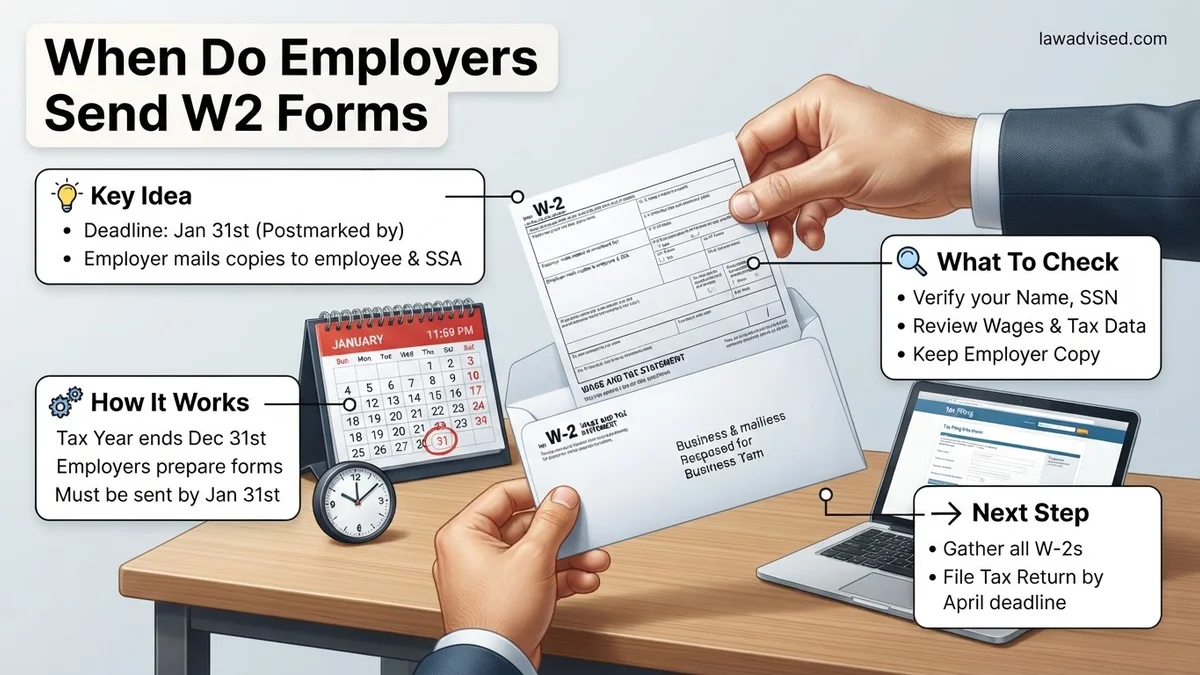
Employers are legally required to send out W-2 forms by January 31 of each year. If this deadline falls on a weekend, the requirement shifts to the next business day. Employees should allow a few extra days for postal delivery before taking action.
Employers are legally required to send out W-2 forms to employees no later than January 31, 2026. This strict deadline applies whether your employer chooses to mail a physical paper copy or deliver your Wage and Tax Statement through an electronic portal.
Knowing this exact date helps you plan your tax filing season effectively. Missing this form delays your refund and stalls your financial planning for the year. Let’s break down the rules governing this crucial tax deadline so you know exactly when to expect your documents.
Key Takeaways
- The official IRS deadline for employers to send W-2 forms is January 31.
- Mailed forms require extra delivery time before employees actually receive them.
- Electronic W-2s are often available earlier through online employer payroll portals.
- Contact your human resources department immediately if your form does not arrive.
- Contact the IRS for assistance if your employer fails to provide the W-2 by mid-February.
Understanding the Legal Deadline for When Employers Send W2 Forms
The Official IRS January 31 Rule
The IRS sets a hard deadline of January 31 for all employers to furnish Form W-2 to their workforce. For the 2026 tax season, covering the 2025 calendar year, this means your employer must postmark physical copies or grant electronic access on or before Saturday, January 31, 2026.
When a deadline falls on a weekend, IRS rules typically shift action items to the next business day. However, most payroll departments process and release W-2s well in advance of the final cutoff to avoid compliance penalties.
Postmark Versus Physical Delivery in Your Hands
There is a major difference between when your employer sends the form and when it actually arrives in your mailbox. The legal mandate only requires employers to send or postmark the document by January 31, not guarantee delivery by that date.
- Mailed documents: Standard postal delivery times mean you should allow an extra 5 to 7 business days for physical mail to arrive.
- Electronic delivery: If you opted into paperless delivery, the form is usually available instantly on January 31 or earlier.
- Weekend buffer: If January 31 lands on a weekend, mailed forms often go out the Friday before or the following Monday.
Why Delays Happen and Causes for Missing W-2 Tax Statements
Common Administrative Hurdles for Employers
Even though the January 31 deadline is clear, administrative hiccups occasionally cause employers to miss the mark. Complex corporate restructuring, software integration issues with payroll providers like ADP or Gusto, or sudden changes in human resources staff can slow down processing times.
Furthermore, companies must reconcile quarterly tax filings with annual totals. If a discrepancy arises during this final reconciliation phase, payroll teams temporarily halt W-2 generation to correct the errors before sending them out to employees.
Outdated Contact Information and Delivery Failures
Sometimes the employer sends the W-2 on time, but it never reaches you due to logistics. Moving without updating your address with your company’s HR department is the leading cause of missing paper tax forms.
- Bad mailing addresses: The company sends the form to your old apartment, and it gets returned to sender.
- Spam filters: Electronic W-2 notification emails land in your junk mail folder, making you think the document hasn’t been generated.
- Former employers: Companies are still required to mail your W-2 if you left the job during 2025, but they rely on the last address they had on file.
Step-by-Step Guide to Fixing and Recovering a Missing W-2 Form
When the January 31 deadline passes without your Form W-2 arriving in the mail or appearing in your digital employee portal, structured recovery steps are required. According to payroll administration experts, taking immediate action prevents unnecessary tax filing delays as the 2026 tax season progresses.
1. Verify Contact Information and Delivery Channels
First, confirm that your former or current employer possesses your correct residential address and active email credentials. Human resources departments frequently send digital notification links to legacy email accounts that employees no longer monitor regularly. Log into your company’s online payroll portal, such as ADP or Workday, to check if the electronic document is already generated and available for download.
2. Contact the Payroll or HR Department Directly
Reach out formally to your company’s human resources or payroll department to request a reissue. Document the date, time, and method of your communication for your personal records. Employers are legally obligated to provide a copy, and many can print or email a replacement document within 24 to 48 hours of your request.
3. Access Prior Year Data and Pay Stubs
Gather your final pay stub from December 2025. This document typically displays your year-to-date gross earnings, federal income tax withheld, and FICA contributions. Certified public accountants note that having these exact year-end figures allows you to estimate your tax liability accurately while you wait for the official form to arrive.
What If It Still Doesn’t Work?
If your employer fails to respond or refuses to provide your 2026 Form W-2, specific IRS escalation procedures must be initiated to protect your filing status. Experts recommend the following fallback protocol:
- Contact the IRS Directly: Call the IRS customer service hotline at 1-800-829-1040 after February 26, 2026. Provide the IRS representative with your employer’s complete business name, address, phone number, and estimated earnings.
- Trigger an IRS Inquiry: The agency will formally contact your employer on your behalf and send a standard reminder letter regarding their legal reporting obligations under federal law.
- File Using Form 4852: If the official form still does not arrive by early April, use IRS Form 4852 (Substitute for Form W-2, Wage and Tax Statement). Attach this substitute form to your 2026 tax return using your final December pay stub calculations.
- Seek Professional Tax Assistance: Consult a certified public accountant (CPA) or enrolled agent if substituting a W-2 complicates your filing. Professional tax preparation services typically range from $200 to $500 depending on the complexity of your income structure.
Conclusion
Missing tax documents create unnecessary stress, but systematic troubleshooting ensures your 2026 tax return remains accurate and compliant. Verifying your portal access, contacting payroll promptly, and utilizing IRS Form 4852 when necessary resolve most missing document scenarios effectively. According to verified research and expert tax administration sources, taking proactive steps by late February prevents costly filing extensions and potential audit flags. Actionable next step: Check your employee payroll portal today and contact your human resources department immediately if your W-2 is missing.
❓ Frequently Asked Questions
What is the absolute last day employers can legally send out W-2 forms?
The IRS mandates that employers must issue W-2 forms to employees no later than January 31 following the close of the tax year. This deadline applies to both physical mailings and electronic distribution methods.
Does the January 31 deadline mean I will receive my W-2 on that day?
No, January 31 is the deadline for the employer to send or postmark the document. If your form is sent via traditional mail, you should allow several additional business days for the postal service to deliver it to your address.
Can my employer send my W-2 exclusively online?
An employer can provide your W-2 electronically only if you have given explicit consent to receive it that way. Without your consent, they are legally required to mail a physical paper copy to your last known address.
What should I do if February arrives and I still do not have my W-2?
First, check your employee online portal to see if an electronic copy is available for download. If not, contact your employer’s payroll or HR department immediately to confirm your mailing address and request a duplicate copy.
What can I do if my employer refuses or fails to send my W-2?
If you have contacted your employer and still cannot get your W-2 by mid-February, you can contact the IRS for assistance. The IRS will contact the employer on your behalf and can help you file your taxes using a substitute form if necessary.
Can I file my federal income taxes without my W-2 form?
While you can file using a substitute form like Form 4852, the IRS strongly recommends waiting for your actual W-2. Filing without it can lead to processing delays and discrepancies when the IRS matches your tax return with employer records.

Ismail Hossain is the founder of Law Advised. He is an Divorce, Separation, marriage lawyer. Follow him.